
What is WADesk — A Feature Overview and Getting Started Guide for the Foreign Trade WhatsApp CRM
What is WADesk
WADesk is a WhatsApp Customer Management System built for foreign trade companies and cross-border teams. It lets you manage multiple WhatsApp accounts from a single Desktop Client, handle customer communication, run bulk outreach, and use AI-powered auto-replies — with efficient team collaboration and clear data management.
What WADesk Can Do for You
If your team uses WhatsApp for customer development or maintenance, you may have encountered these problems:
- Team members log into WhatsApp on their personal phones — messages are scattered and cannot be centrally managed
- You want to send outreach messages in bulk, but doing it manually one by one is slow and risky for accounts
- Customers speak foreign languages, forcing you to switch between translation tools constantly
- When employees leave, customer data is lost with no way to transfer it
- Managers cannot see team chat activity or monitor execution
WADesk solves these problems.
| Your Need | WADesk Feature |
|---|---|
| Manage multiple WhatsApp accounts on one computer | Multi-account Aggregation |
| Send bulk messages for customer outreach | Message Broadcast |
| Auto-reply to customer inquiries | AI Bot / Keyword Auto Reply |
| Real-time translation of foreign messages | Auto Translation |
| Manage customer info and follow-up status | Contact CRM |
| View employee chat history | Chat Monitoring |
| Protect customer data when employees leave | Data Backup / Asset Protection |
WADesk Access Points
WADesk consists of three components, each serving different user roles.
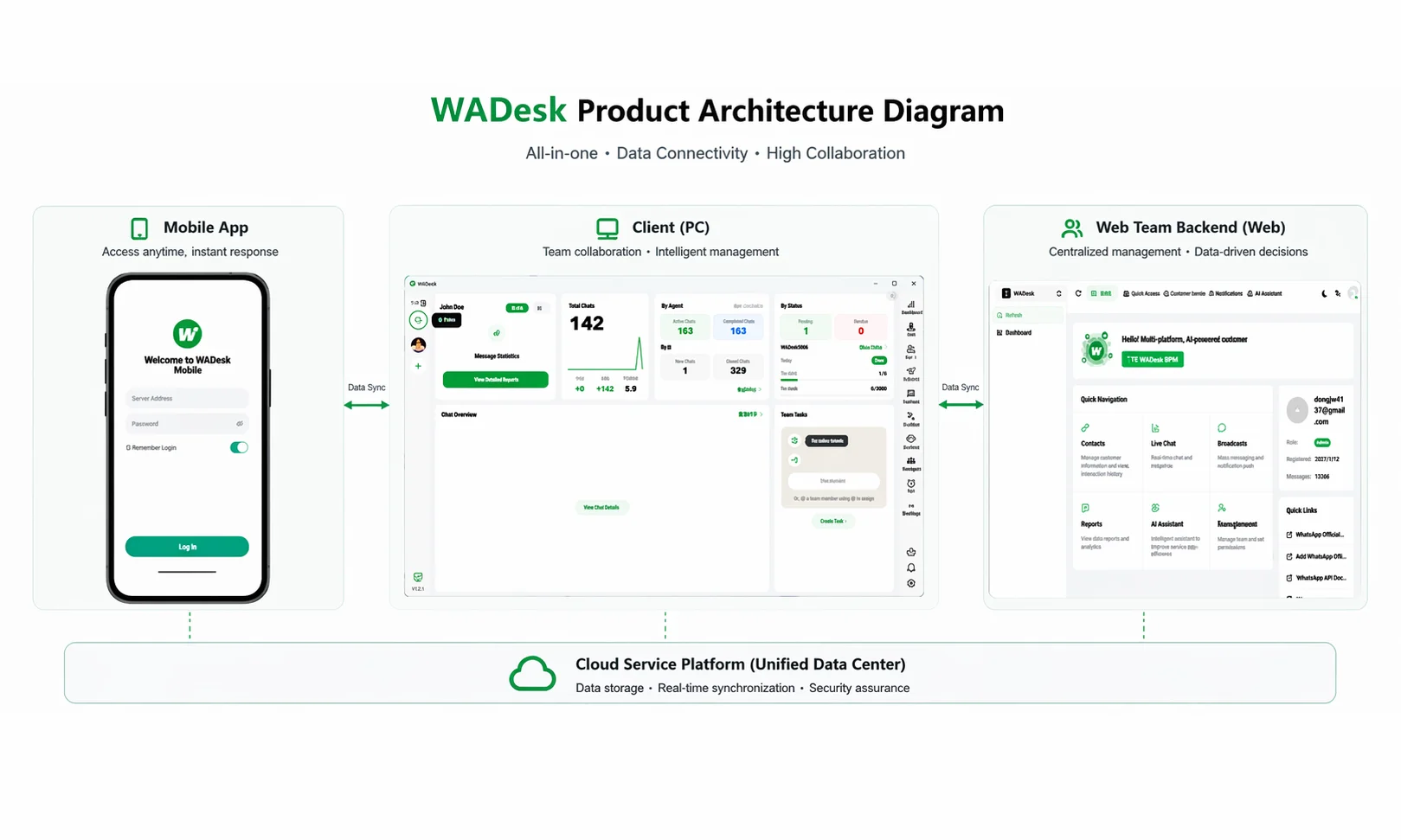
Desktop Client / Mobile App
Built for sales and operations staff, this is the main workspace for daily tasks:
- Log into multiple WhatsApp accounts simultaneously and manage all messages in one interface
- View new followers and manage contacts and leads
- Launch broadcast tasks to reach customers in bulk
- Use the Quick Reply library to improve communication efficiency
- Enable AI Auto Reply to let bots handle common questions 24/7
- Translate incoming foreign-language messages in real time
Home (Web)
Built for business managers, this is the central hub for team management and data monitoring:
- Invite team members and allocate account port slots
- Set up Organization and configure permissions by department and role
- View employee chat history and monitor team execution
- Analyze team data
- Configure AI Bots, team Quick Reply, and tag systems
WADesk Primarily Serves Three Types of Users
B2B Foreign Trade Companies: Manufacturing, procurement, and professional services industries that need to maintain long-term overseas customer relationships and use WhatsApp for inquiry follow-up, quoting, and after-sales support.
Cross-Border E-commerce: High-volume sellers who need automated customer service inquiry handling and use WhatsApp for repeat purchase marketing and promotional outreach.
Global Marketing Agencies: Teams managing large-scale customer acquisition and community operations that require multi-account matrix operations and granular data tracking.
Next Steps
After understanding what WADesk is, choose your next step based on your role:
- I am a general user → See "Getting Started for New Users" to complete account login and basic setup
- I am an admin → See "Getting Started for Admins" to complete team initialization