Deciding to delete a Telegram account is often a drastic step. Whether you are decluttering your digital footprint, facing privacy concerns, or dealing with an account that has become unmanageable due to spam, knowing the right way to exit is crucial.
However, for marketing teams and business users, the urge to delete often stems from a lack of control—too many groups, messy chats, or fear of bans. Before you pull the plug, let’s explore the correct methods to deactivate your account and discuss whether a better Telegram account management strategy could solve the underlying issues.
Why do users, especially in the B2B and export sectors, feel the need to wipe their Telegram presence? Usually, it comes down to three pain points:
- Security & Privacy Anxiety: Users worry about data leaks or IP tracking. Without proper proxy configuration, using Telegram for business can feel exposed.
- The "Messy Account" Syndrome: If you are manually managing marketing campaigns, your account likely became a dumping ground for thousands of groups and spam bots. It feels easier to delete the Telegram account and start over than to clean it up.
- Fear of Account Bans: When running Telegram bulk messaging campaigns manually, accounts get flagged easily. Users often delete "burned" accounts to cycle to new ones, which is an inefficient and exhausting loop.
If you are certain about leaving, Telegram offers two primary ways to remove your data.
Method 1: The Self-Destruct Timer (Passive)
This is the default security feature.
- Go to Settings > Privacy and Security.
- Scroll down to "Delete my account if away for".
- Select a time period (1 month, 3 months, 6 months, or 1 year).
- If you do not come online within that period, the account is deleted automatically.
Method 2: Instant Deletion (Active)
For immediate removal, you cannot use the app; you must use a browser.
- Visit the my.telegram.org deactivation page.
- Enter your phone number in the international format.
- Enter the confirmation code sent to your Telegram app (not SMS).
- Click "Delete Account".
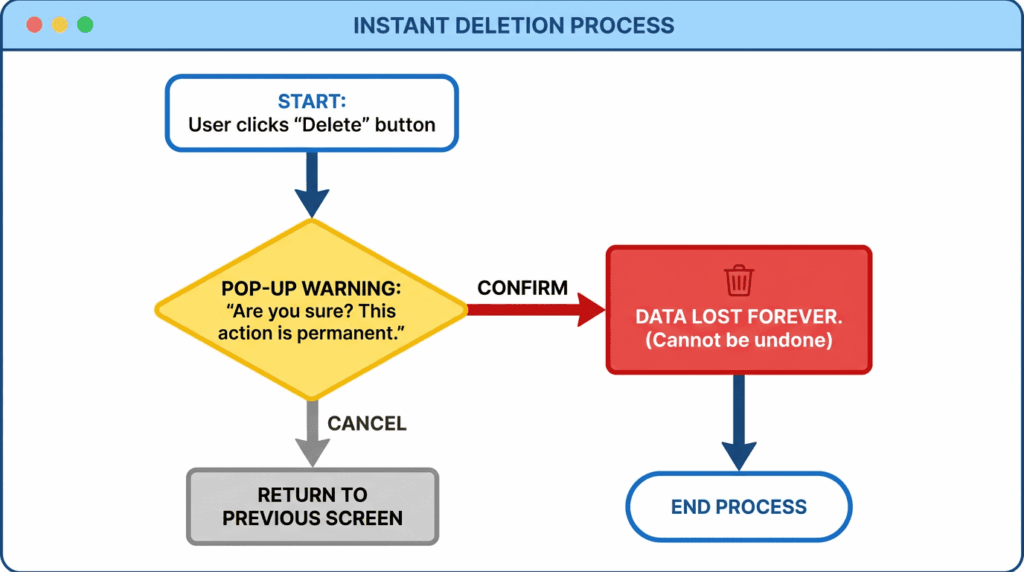
Warning: Once deleted, all your chats, groups, and contacts are gone forever. If you have valuable business data, ensure you have a backup.
If you are deleting your account because managing it is too difficult, or because you are juggling multiple business identities, there is a smarter way.
Tools like TGDesk transform how you handle Telegram, allowing you to keep your assets secure without needing to constantly "burn" and restart accounts.
1. Unified Multi-Account Management
Instead of logging in and out or deleting accounts to switch markets, TGDesk allows you to manage multiple accounts simultaneously. You can separate your "Support" account from your "Sales" account within one dashboard.
2. Enhanced Security with Proxy Configuration
Don't delete an account just to hide your IP. TGDesk supports individual proxy configuration for each account. This means your US market account uses a US IP, and your EU account uses an EU IP, drastically reducing the risk of bans and increasing privacy.
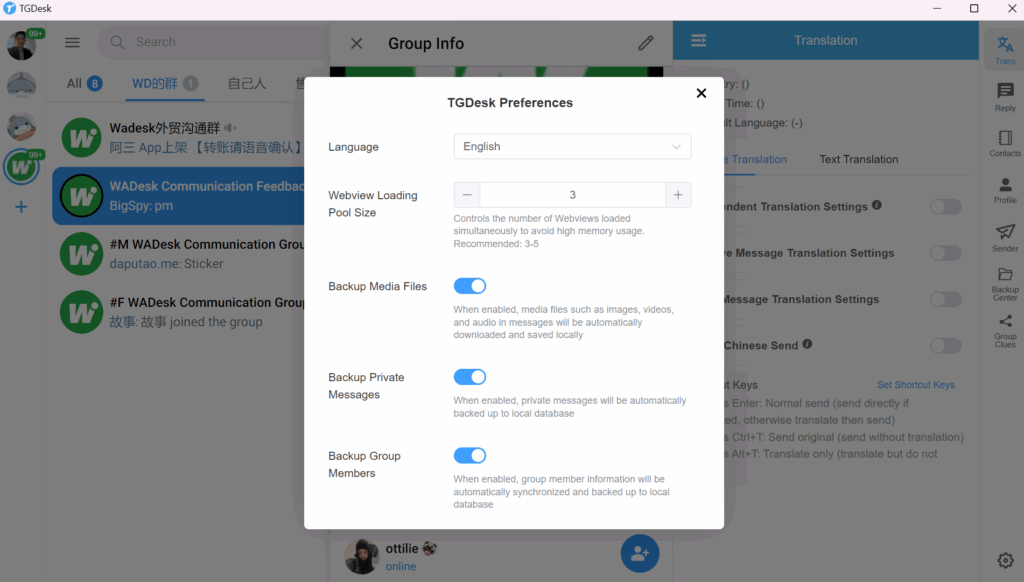
3. Local Data Backup
Before you even think about clicking "Delete," you need to secure your data. TGDesk offers local data backup, ensuring that your client lists and chat history are saved locally. This gives you full control and peace of mind, removing the anxiety that often drives users to wipe their data.
Scenario A: The Overwhelmed Export Team
The Situation: An export team uses one generic account for clients in Dubai, Russia, and Brazil. The chat list is a mess, and they are terrified of clicking a wrong link. They want to delete the Telegram account and make three new ones. The Better Solution: Instead of starting from zero, they use TGDesk to clone their workflow into three distinct accounts. They assign specific proxies to each region and use the Group Management feature to organize client chats. No data is lost, and efficiency triples.
Scenario B: The Aggressive Marketer
The Situation: A marketer manually sends 500 messages a day. The account gets restricted. He plans to delete it and buy a new SIM card. The Better Solution: He switches to TGDesk for Telegram bulk messaging. The tool automates the sending process with safe intervals, reducing the ban rate. He no longer needs to treat accounts as disposable "burner" items.
When deciding between manual chaos (leading to deletion) and professional management, consider these factors:
| Feature | Manual App Usage | TGDesk SaaS |
|---|---|---|
| Multi-Account | Limited (3 accounts), mixed IPs | Unlimited, isolated environments |
| Security | Standard encryption | Proxy per account + Local Backup |
| Longevity | High risk of bans (leading to deletion) | High stability via safe automation |
| Data Control | Cloud only | Local Data Backup (Ownership) |

If your goal is sustainable business growth, using a dedicated Telegram marketing tool is far superior to the cycle of creating and deleting accounts.
Deciding to delete a Telegram account should be a last resort for privacy, not a reaction to operational chaos. If your struggle is managing multiple identities, avoiding bans, or handling bulk messages, the solution isn't deletion—it's better orchestration.
TGDesk offers the balance you need:
- Security: Through individual proxies and local backups.
- Efficiency: By managing multiple accounts and groups in one place.
- Stability: Reducing the need to constantly restart your marketing efforts.
Ready to stop deleting and start managing?
👉 Visit TGDesk Official Website to experience the safest multi-account management system.
👉 Try TGDesk for Free and secure your business data today.