

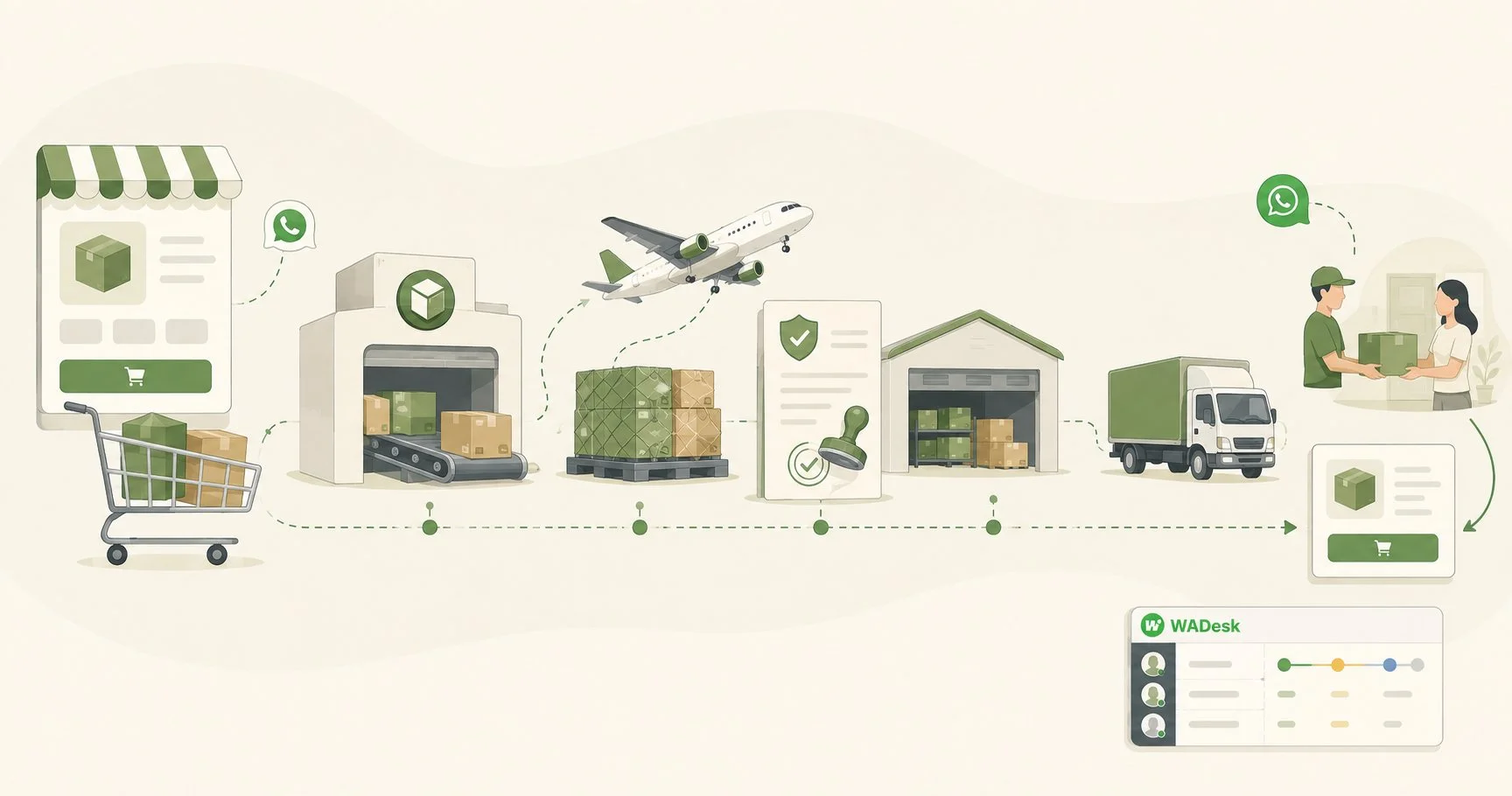
For many cross-border ecommerce teams, WhatsApp has become the main channel customers use to ask about products, confirm orders, check delivery status and contact the seller after purchase.
The problem is that most teams still handle these conversations manually. A customer adds a product to the cart but never completes checkout, and no one follows up. Orders ship and agents repeat "where is my package" all day. A first-time buyer finishes one order and never hears from the brand again.
WADesk is a WhatsApp CRM for ecommerce teams that need to manage multiple WhatsApp accounts, organize customers with tags, and schedule segmented outreach from one workspace. This article covers three practical scenarios: how to set up three follow-up messages for abandoned checkouts, how to reduce repetitive shipping questions, and how to schedule repeat-purchase reminders by customer segment. A setup checklist is included at the end.
1. Three Common Problems for Ecommerce Teams on WhatsApp
1. Abandoned checkouts with no follow-up. A customer adds products to the cart but never completes payment — often because of price, shipping cost, or payment friction. If you wait several days before following up, the customer’s purchase intent may have already declined. Roughly seven in ten carts are abandoned, according to Baymard's industry statistics.
2. Shipping questions that pile up. Once an order ships, the most common question is "where is my package." The more orders you have, the more agents copy-paste tracking answers — and the inquiries from people actually ready to buy get queued behind them.
3. One-time buyers who never return. After the first order, nothing reminds the customer to come back. Acquiring a new customer costs far more than getting an existing one to buy again.
2. How to Recover Abandoned Checkouts with a WhatsApp CRM
The idea is simple: you export the list from your order system, and a WhatsApp CRM sends three scheduled follow-ups to customers who abandoned checkout. The CRM does not read your store's orders directly — order data comes from your store backend (e.g. Shopify).
Step 1: Export the list from your order system. In your store backend (e.g. Shopify), filter customers who started checkout but did not complete it. If checkout collected the customer's phone number and they agreed to receive messages on WhatsApp, export those records.
Step 2: Import the list into WADesk and tag them. Import the list and apply a tag such as "abandoned-unpaid." The tag is what lets you message only these customers later, without bothering everyone else.
Step 3: Schedule three separate follow-ups. Use the scheduled bulk messaging feature to create three scheduled sending tasks based on when the list was exported. Note that your team sets these up in advance — the CRM does not read each customer's checkout abandonment time and trigger automatically:
| Follow-up | Timing | Message | Goal |
|---|---|---|---|
| First | About 1 hour after checkout abandonment | Friendly reminder with product details and a recovery link from your store backend | Reach the customer while purchase intent remains high |
| Second | About 24 hours later | Relevant product benefits, use cases or answers to common questions | Address remaining purchase concerns |
| Third | About 48 hours after the second message | An appropriate discount, if margins allow, plus a support option | Remove the final barrier to purchase |
Two things to watch. First, avoid messaging customers only a few minutes after they leave checkout, as this can feel intrusive; aim for the first follow-up within one to two hours after the customer leaves checkout. Second, set the discount based on your gross margin so that recovering the order does not eliminate the profit. When your list is large, split it by tag and timing and leave a sensible gap between batches, so you don't reach a large audience all at once — see the scheduled bulk messaging guide for setup. (WhatsApp's native broadcast lists cap at 256 contacts; that's a platform limit, see why WhatsApp broadcast is capped at 256 contacts — it has nothing to do with the WADesk bulk task itself.)
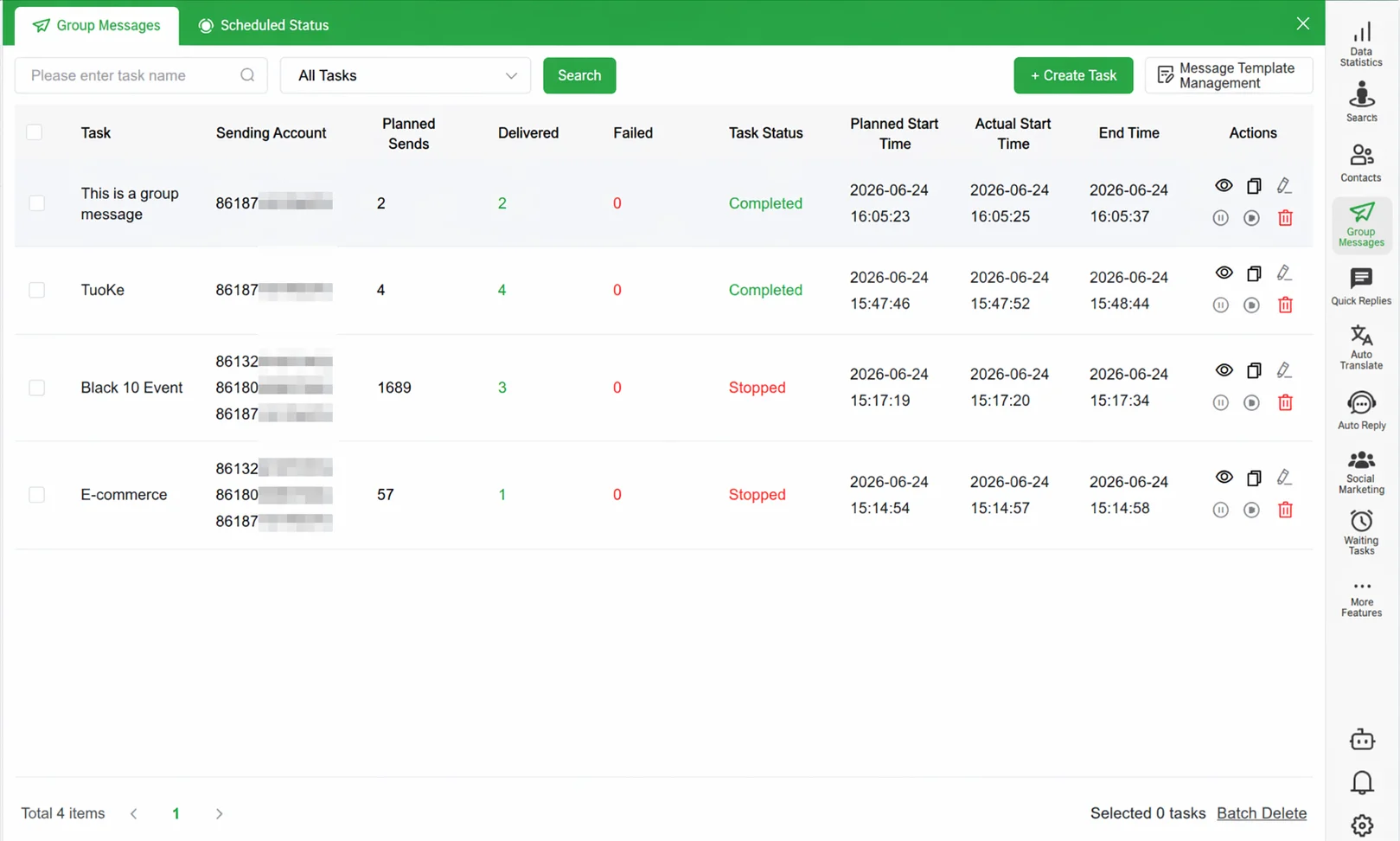
▲ The scheduled broadcast interface: import the abandoned-checkout list, then send three batches on a planned timeline.
3. How to Reduce Shipping Questions
You cannot eliminate shipping questions entirely, but you can take most of the repetition off your agents.
1. Turn frequent questions into quick replies. Write one-tap replies for "where is my order," "how long does delivery take," and "how do I return" (the quick reply library) — no more typing the same answer.
2. Set up keyword auto-reply. When a customer message contains words like "order," "shipping," or "where is my package," the system can reply automatically with a tracking link, instructions for checking the order, or an option to contact a support agent — even when nobody is online. Because the CRM does not read order or shipping data, the parcel's exact location still comes from your store or carrier.
3. Track problem orders with reminders. If a parcel has no updates, delivery fails, or a package appears to be lost, create a task reminder for that customer so a human follows up instead of waiting for the customer to ask again.
4. Separate routine shipping inquiries from sales conversations. Multiple WhatsApp accounts are managed in one client and team console (team inbox collaboration); agents handle the accounts and customers they are permitted to see, so leads ready to buy take priority and shipping questions are answered with quick replies.
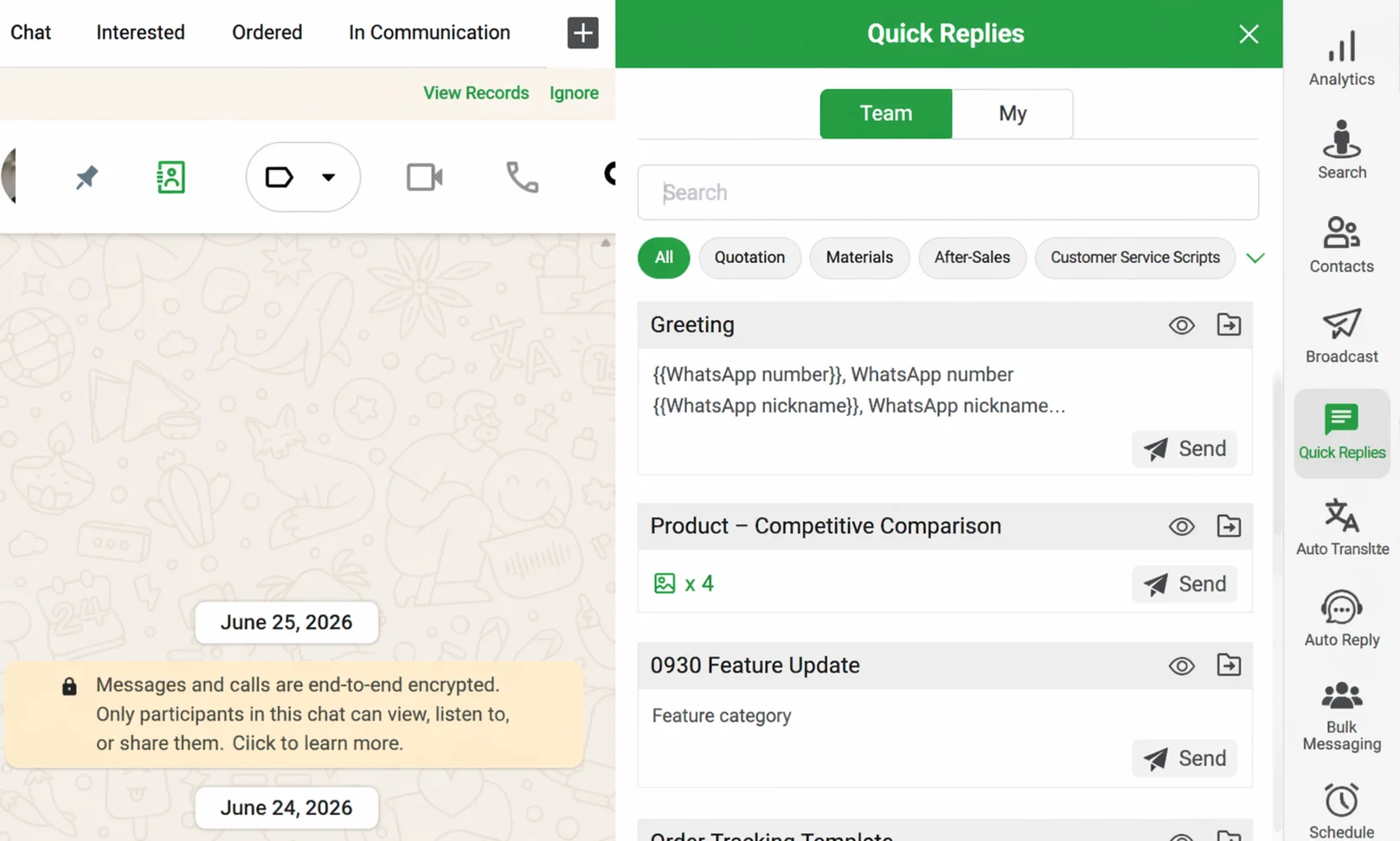
▲ During a chat, agents can send approved answers about shipping, pricing and frequently asked questions with one click.
4. How to Use a WhatsApp CRM to Drive Repeat Purchases
Repeat purchases depend on reaching the right customer with the right message at the right time, rather than sending the same promotion to everyone.
1. Tag customers by purchase time and category. Segmentation is what tells you who should receive a reminder. For example, tag a customer as "skincare, purchased 3 months ago" (see customer tier segmentation).
2. Send a replenishment reminder at the right time. Your ecommerce team can group customers according to the product's typical replenishment cycle — for example, compile a "purchased 30+ days ago" list every month — then send reminders via scheduled messages. For products with a clear usage cycle, match the reminder cadence to the average usage period; the reorder link comes from your store backend, and the WhatsApp CRM sends it to the list.
3. Send new-product and campaign messages by segment. When there is a new product or a promotion, message only the relevant segments with scheduled bulk messaging, not your whole contact list.
Start with no more than one or two repeat-purchase messages per month, then adjust the frequency based on replies, conversions, opt-outs and blocks.
5. What WADesk's WhatsApp CRM Can and Cannot Do
To avoid confusion, here is the boundary clearly. WADesk focuses on WhatsApp customer management and message delivery. It does not directly read order, payment or shipping data from Shopify. Order data comes from your store backend; you export the list and import it.
What WADesk can do:
- Manage multiple accounts in one client and team console; agents see the accounts they are permitted to handle.
- Team collaboration: accounts managed in one console with permissions and conversation assignment; when an employee leaves, an admin can disable the account and reassign customers (see offboarding redistribution).
- Customer tags and groups: tag by source, purchase status, or category for segmented outreach.
- Scheduled messages and broadcasts: send to a group on a planned timeline, with multiple templates.
- Auto-reply with keywords: trigger replies when a message contains set keywords.
- Quick replies: one-tap answers for frequent questions.
- Task reminders: set reminders for individual customer follow-ups.
- Import and export: import customer lists from your order system and export customer data when needed.
- AI translation: translate incoming customer messages into the agent's preferred language and translate replies back into the customer's language.
6. Two-Week WhatsApp CRM Setup Checklist
Days 1–2: Accounts and customer data. Connect your WhatsApp accounts per market; create team member accounts and assign permissions; export customer lists from your order system, import them, and apply tags (by source, purchase status, category).
Days 3–4: Cut shipping questions. Write quick replies for frequent shipping questions; set keyword auto-reply ("order / shipping / where is my package").
Days 5–6: Configure abandoned-checkout follow-ups. Create the three scheduled broadcasts (1 hour / 24 hours / 72 hours) from the table in section 2.
From day 7: Repeat-purchase reminders. Segment existing customers by product category and purchase date, and set replenishment reminders.
Week 2: Observe and adjust. Review replies and conversions per follow-up; run the first segmented broadcast to repeat buyers.
How to Measure Results
- Cart follow-up: share of messaged customers who reply or complete a purchase.
- Shipping workload: daily number of shipping questions per agent — this usually drops once quick replies and auto-reply are in place.
- Repeat purchase: share of existing customers who order again within a period.
Common Mistakes
- Treating broadcasts like email — everyone, every week. Customers will mute or block you, and future messages stop reaching them.
- Importing lists without tags. No tags, no segments — you end up sending everyone the same message.
- Following up too fast or too often. Messaging customers only minutes after they leave checkout, or contacting them several times a day, can feel pushy.
- Watching send volume, not replies. If nobody replies, the message or the timing is wrong.
Final Thoughts
An ecommerce WhatsApp CRM earns its keep on three jobs: recovering abandoned checkouts, cutting repetitive shipping questions, and turning first-time buyers into repeat customers. WADesk covers these with customer tags, scheduled messages, automated replies and team workflows — start with the two-week checklist above, then measure reply rates and adjust. The tool is the easy part; the habit of exporting lists, tagging customers and scheduling follow-ups is what compounds.
FAQ
Q1: Do I need code or technical setup?
No. WADesk is configured through a visual interface, so no coding is required. For teams with few accounts and simple flows, one operator can typically complete the base setup; actual time depends on account count, customer data, and sending rules.
Q2: Does it integrate with Shopify?
Not directly, and it does not read order status. Order data lives in your Shopify backend; export records for abandoned checkouts or customers who completed a purchase, then import them into WADesk. Customer data can also be exported.
Q3: How is customer data managed?
WADesk supports customer profile management, role-based permissions, customer data import and export, and chat history backup. When an employee leaves, an admin can disable the account and reassign customers to colleagues (see offboarding redistribution). Specific storage depends on the current product version and team configuration.
Q4: How do multiple accounts and teams work?
Multiple WhatsApp accounts are managed in one client and team console. Agents handle the accounts and customers they are permitted to see, and managers can review the team's overall conversations. This helps prevent conversations and customer records from being mixed across markets.
Compliance note: The features described in this article are current WADesk capabilities; abandoned-cart and repeat-purchase scenarios require you to export lists from your order system and import them. Industry figures are cited where a source exists; elsewhere they are qualitative descriptions based on common experience, and actual results vary by category, region, and team setup. WADesk follows WhatsApp platform usage guidelines and keeps sending cadence reasonable — no bulk account registration or non-compliant automation.