


This is one part of a complete team workflow — see the WhatsApp Operations Playbook for Export & Global Sales Teams.
A Familiar Scenario
A sales manager at a Shenzhen LED lighting exporter was frustrated:
- Top rep Jessica had been with the team 2 years. Her quote replies were never templated—she ran on instinct. But her monthly close rate was 3x that of new hire Tom
- Tom had been here 3 weeks and was still constantly asking Jessica "what do I say if the client asks for 5% off?" and "what's my next line when the client asks for a sample?"
- Jessica was getting busier and had no time to onboard the new hire
- Last week, Jessica handed in her resignation
The sales manager did the math: when Jessica leaves, the quote strategies, follow-up cadence, and negotiation tactics for her 200+ WhatsApp clients leave with her. Tom will need another 3 months of accumulation to catch up.
This isn't unusual. In WhatsApp-dependent trade teams, "the rep who knows the clients best quits" = "the highest-quality client asset evaporates." But teams can easily turn this around with a lightweight system—script library + quick replies.
Why Sales Scripts Are "Hidden Team Assets"
Many trade bosses ask: "Don't we have a sales playbook? Why do new hires still struggle?"
The problem is—real sales scripts never live in any document. They exist in three places:
- The top rep's head ("I always ask for the spec sheet first, then quote")
- The top rep's chat history with clients ("Last time this client said budget was tight, I tested them with an MOQ 1000 proposal")
- Casual conversations between sales and management ("Don't send profile pics of women to Middle Eastern clients—it offends them")
This expertise isn't recorded, isn't structured, and can't be searched by new hires. When the top rep leaves, this expertise leaves too.
The core value of script library + quick replies is to make this "hidden team asset" explicit, templated, and reusable.
The 3-Stage Script Framework: From Loose Lines to a Reusable System
Scripts aren't a scattered "collection of golden lines"—they're a system covering the customer lifecycle. I break the most common WhatsApp sales scenarios into three stages:
Stage 1: First Touch
The first 3 rounds of conversation with a new client (from inquiry, referral, ad click, etc.) determine whether this client is worth long-term follow-up.
| Stage | Script purpose | Quick Reply template example |
|---|---|---|
| Round 1: Client's first inquiry | Reply within 5 minutes to show responsiveness | "Hi Client Name, thanks for reaching out. I'm Rep Name from Company. We have Product in stock. Could you tell me about your use case? I'll recommend the best fit." |
| Round 2: Client shares use case | Show expertise, move into needs discovery | "Got it. For use case, we'd recommend spec which handles high-frequency scenario use well. Could you share typical order volumes? That'll help me give you a more accurate price range." |
| Round 3: Client shares budget | Lock in intent, set next step | "Your budget range is workable. I'd suggest we confirm the sample details via WhatsApp video or photos this week. What day works for you?" |
Why do these 3 rounds need standard scripts? Because 80% of new clients are lost if they don't get a reply in Round 1 within 5 minutes. Script templates free new hires from "what do I open with?"
Stage 2: Follow-up
The 1-7 day follow-up rhythm after a quote goes out is where close rates are won or lost. Without follow-up, 90% of quotes die in silence.
| Timing | Script goal | Quick Reply template |
|---|---|---|
| 24h after quote | Confirm receipt + add value | "Hi Client, did you get the quote I sent yesterday for model? I also put together a category selection guide with the 5 most popular pairings this year—would you like me to send it over?" |
| 3 days after quote | Resolve the silence | "Hi Client, wanted to check in on the quote from yesterday. If pricing or MOQ isn't right, we can adjust. If it's a quality concern, I can send factory video. Which one works for you to share?" |
| 7 days after quote | Last push / move to long-term nurture | "Hi Client, reaching out because model in stock is already 30% spoken for this week and I want to make sure your timeline isn't affected. If you're ready, let me know; if it's early, I'll note to follow up next month." |
The core of Stage 2 scripts is "don't make clients feel rushed, but make sure they know you're there." New hires' most common mistake is "I'm worried about annoying the client"—the reality is clients give up when ignored, not when followed up.
Stage 3: After-sales
A deal closed isn't an ending—it's the start of a second sale. 80% of repeat business comes from existing clients. After-sales scripts determine whether they come back.
| Timing | Script goal | Quick Reply template |
|---|---|---|
| 24h after shipping | Logistics update | "Hi Client, your order Order ID has shipped. ETA is arrival time. Tracking number is code, you can check anytime. If there are any issues on receipt, just message me directly and I'll handle it." |
| 3 days after receipt | Satisfaction check-in | "Hi Client, did the goods arrive? Any issues using them? We just added a few upgrades/accessories. If you need extras, I can include them next time." |
| 30 days after receipt | Repeat-purchase trigger | "Hi Client, it's been a month since your last delivery. How is product feedback going? We're running promotion/new release right now and I've reserved a special discount for you." |
The key to Stage 3 scripts is "selling IS service." Clients only start truly trusting you when they receive the goods—this script stage determines second-purchase conversion.
WADesk Script Library + Quick Reply in Practice
WADesk organizes "scripts" into two layers of management—Script Library (structured storage) and Quick Replies (one-click invocation during chat).
Layer 1: Script Library (Team Asset Repository)
The library is the "warehouse" of scripts—all templates are organized in groups, searchable, editable, and reorderable via drag-and-drop.
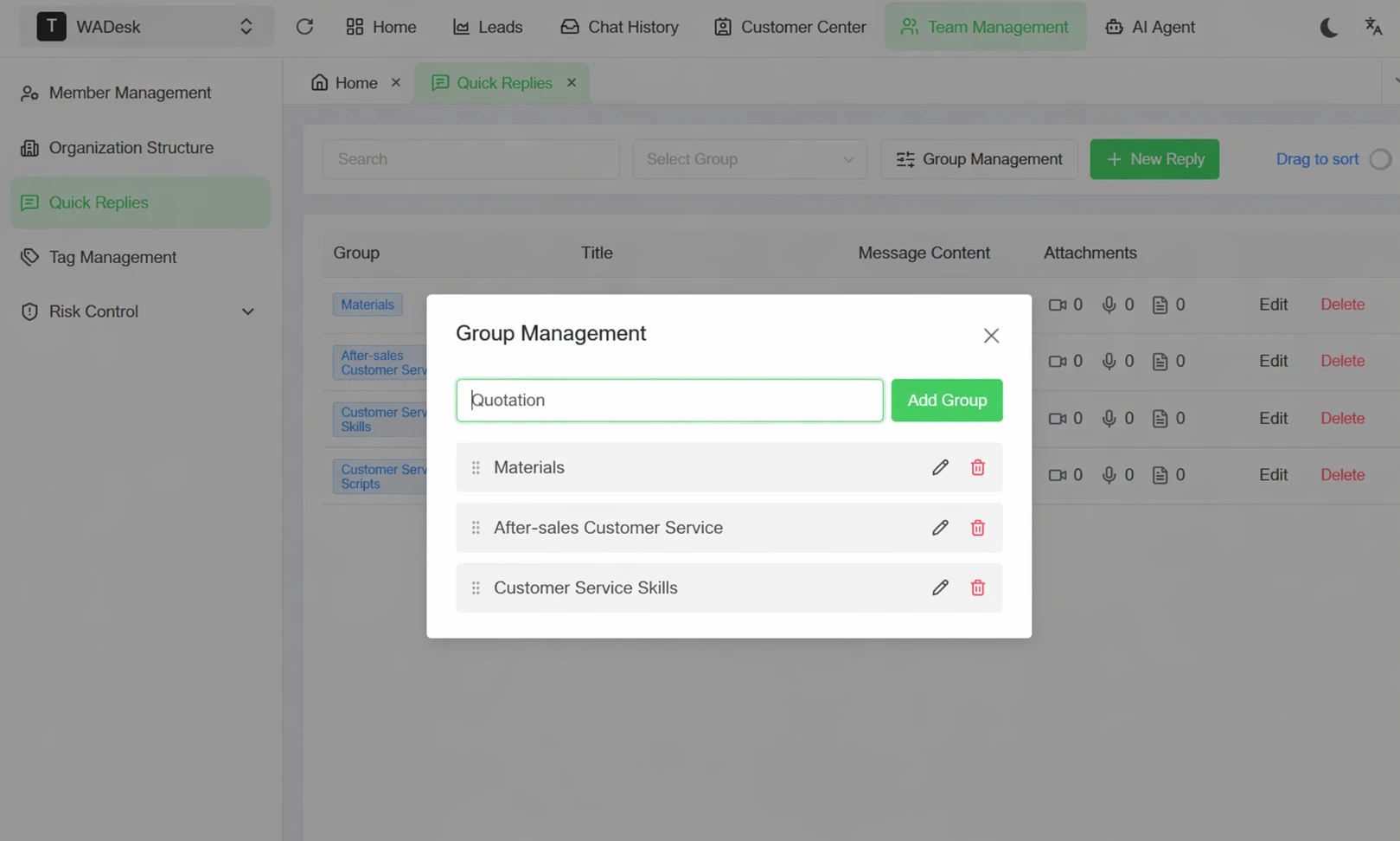
▲ Three groups: Materials (product comparisons / feature updates), Customer Service After-Sales (common after-sales questions), Customer Service Scripts (handling scenarios, talking points)—organized by client lifecycle. Each script is editable, with optional file attachments.
The 4 core capabilities of the Script Library:
| Capability | Real-world use |
|---|---|
| Group management | Classify by client stage (first touch / follow-up / after-sales) or by scenario (inquiry / quote / complaint) |
| Full-text search | Client asks about "warranty"? Search "warranty" and pull up the standard reply instantly |
| Drag-and-drop sorting | Drag the 5 most-used scripts to the top—no scrolling through long lists |
| Attachment support | Scripts can include product images, PDFs, and quote templates—send them all at once |
Layer 2: Quick Reply (One-Click Invocation During Chat)
The library solves "how to store scripts." Quick replies solve "how to use them."
Real-world usage:
When a rep is chatting with a client, high-frequency questions don't require switching windows:
- Client asks "what's your MOQ?" → Type
/to pop up the quick reply list → Select the MOQ 1000 entry → Send - Client says "I'll think about it" → Select "follow up in 3 days" entry → Send
- Client wants a sample → Select "sample request process" entry → Attach PDF → Send
The core difference:
| Without Quick Reply | With WADesk Quick Reply |
|---|---|
| Every reply is typed from scratch | Select a template in 1 second |
| Different reps have different reply styles | Team uses standardized scripts |
| New hires ask 5 times a day "how do I reply?" | They find templates themselves |
| Reply times for similar questions vary 5x | All reps respond in 5 seconds |
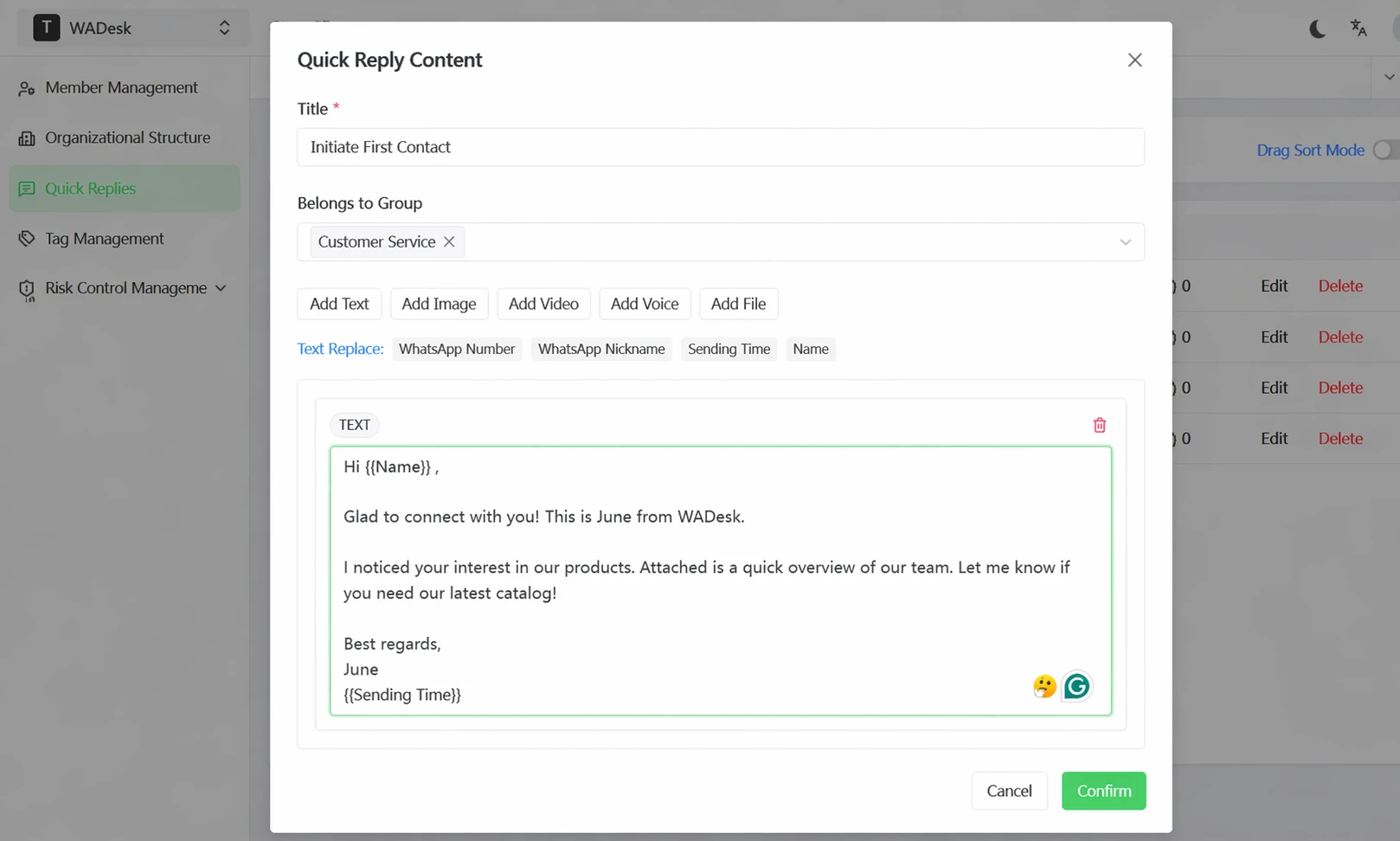
▲ Drag-and-drop sorting + role-based permissions: regular reps can only invoke, not edit; senior reps/admins can edit. Maintain script standards while giving sales room to personalize.
Real-World Data: 3 Weeks to 5 Days
The following data is based on actual operations from WADesk customers (illustrative estimates, actual results vary by team configuration):
| Metric | Without Script Library | After 30 Days with WADesk Script Library | Change |
|---|---|---|---|
| New-hire first-month independent close rate | 8% | 22% | 2.75x |
| Avg. response time (inquiry) | 12 min | 3.5 min | 3.4x |
| Independent ramp time | 3 weeks | 5 days | 71% faster |
| Client retention 30 days after rep leaves | 65% | 88% | +23% |
| Monthly team deals closed | 32 | 41 | +28% |
Why can new-hire close rates improve 2.75x in the first month? Because new hires no longer spend 80% of their time figuring out "what do I say?" They spend it on "understanding client needs"—the real work of selling.
Getting Started: Three Steps to Build Your Script Library
Step 1: Extract scripts from your top rep's chat history (Week 1)
Identify 1-2 reps with the highest close rates and ask them to:
- Share last 30 days of high-frequency reply conversations (with sensitive info removed)
- Have operations/management extract reusable script templates (strip personalized content)
- Tag each script with its usage scenario (inquiry / quote / follow-up / after-sales)
Step 2: Enter scripts into WADesk and group them (Week 1-2)
WADesk Team Management → Quick Reply → New Group:
- Recommended groups: Inquiries / Quotes / Follow-up / After-sales / Special scenarios (complaints / delays / returns)
- Keep each script to 80-150 characters (too long and the WhatsApp chat window gets crowded)
- Drag the 5-10 most-used scripts to the top of each group
Step 3: Make "template first, then personalize" standard (Week 2+)
- Train new hires: use the quick replies to learn standard scripts, then customize per client
- Weekly review: managers find "Why did rep A's reply get a client complaint?" in chat history → Turn it into a new script
- Monthly cleanup: archive/delete outdated scripts, add new ones
FAQ
Q1: Will WADesk Quick Reply make sales reps sound robotic?
No. Quick replies are a "starting move," not a "full copy-paste." For new hires, standardization means more consistent replies. For top reps, quick replies free up time for relationship-building. The key isn't "use templates or not"—it's "do you leave 30% of the script for the rep to customize?" WADesk's script library is designed to support personalization on top of templates.
Q2: How is WADesk's Script Library different from phone built-in text replacements?
Built-in text replacements are personal tools—other team members can't see or use them. WADesk Script Library is team-level—top reps' scripts can be invoked by all new hires; grouping, permissions, and analytics are all team-wide. More importantly, scripts can include attachments (PDFs, images, product comparison sheets), so you can send "text + materials" to a client in one second.
Q3: How do you avoid reps blindly copy-pasting templates and sounding mechanical?
Three approaches: ① Keep template scripts under 100 characters, leaving room for personalization; ② Team norm: "Templates are just openings/closings, the middle of the conversation must be written by you"; ③ Monthly review—mark chats where clients complained about mechanical responses, add "semi-templated" scripts (template + required variables). WADesk scripts can embed variables like Client Name / Company that the rep replaces before sending.
Q4: Are client tags and scripts separate? When do I tag?
WADesk's client tags and scripts are two separate modules:
- Client tags: Mark client attributes (source / value / stage), for filtering and follow-up strategy
- Script templates: Mark reply content templates, for fast responses
Best practice: tag first, then invoke script—if a client tag is "In Discussion," invoke the "follow-up nudge" group; if the tag is "After-sales, 3 days post-receipt," invoke the "satisfaction check-in" group. Tags define strategy, scripts define execution.
Q5: Does WADesk Script Library support multiple languages?
Yes. Scripts are text and can contain any language (Chinese, English, Arabic, Spanish, etc.). We recommend organizing by language (e.g., "Arabic Scripts") based on the markets your team serves, so reps in different regions can find the right scripts fast.
📋 Appendix: WhatsApp Sales Script Library Self-Check
Finished reading? Use this checklist to evaluate your team's script library:
Structure layer:
- Are scripts grouped by client lifecycle (inquiry / quote / follow-up / after-sales)?
- Is each script under 100 characters (to avoid client visual fatigue)?
- Are scripts organized by language (Chinese / English / other regional languages)?
Content layer:
- Do first-touch scripts complete "intro + needs discovery + next step" within the first 3 rounds?
- Do follow-up scripts hit the 24h / 3d / 7d timing points?
- Do after-sales scripts touch clients at 24h / 3d / 30d post-shipment?
Execution layer:
- Can new hires independently close deals using the script library in their first week?
- Is average response time under 5 minutes?
- Are new scripts being added to the library during monthly reviews?
Share your checklist results in the comments. Teams scoring 12/12 see 30%+ improvement in new client close rates within the next month.
Compliance note: Sales efficiency data shown are illustrative estimates based on common operational scenarios. Actual results vary by team size, product category, and client structure.