


This is one part of a complete team workflow — see the WhatsApp Operations Playbook for Export & Global Sales Teams.
When 3 Reps Run 6 Accounts, Trouble Follows
A Shenzhen electronics trading company gave each of their three sales reps two WhatsApp accounts — one for outbound prospecting, one for existing client care.
Week one: Smooth sailing. Week two: Everything fell apart.
Client got double-messaged. A prospect had just received a quote from Rep A. The next day, Rep B sent the exact same message. The client screenshot it and asked around: "What's wrong with this company?"
Critical message slipped through the cracks. A long-time client sent a bulk order inquiry to Rep C's account. C was on leave. Nobody checked that account. The client waited 48 hours, then moved to a competitor.
The boss had zero visibility. At month-end review, when asked "How many new clients did we follow up this month? What's our response rate?" — three blank faces, zero data.
This isn't a people problem. It's a tool problem.
3 Pain Points of WhatsApp Team Message Management
① Siloed accounts, trapped information
Each sales rep logs into their own WhatsApp Web on their own computer. Nobody can see anyone else's messages. Client assignments, follow-up stages, quotes given — all tracked by word-of-mouth and messy Excel sheets.
The result: Who's following which client, at what stage, and whether a deal is closing — the manager can only "ask and guess."
② No unified message pool — clients get stolen or dropped
When a rep is on leave, traveling, or in meetings, their WhatsApp accounts go unattended. A client might message them and wait hours — or an entire day — for a response.
In B2B export, clients can't wait. If you don't reply today, they'll find someone else tomorrow.
③ No management grip, no efficiency metrics
Without a team inbox, managers can't see:
- How many messages each rep handles daily
- Whether response times are fast or slow
- Which clients are being followed up and which are forgotten
It's all gut-feel management. Data-driven improvement is impossible.
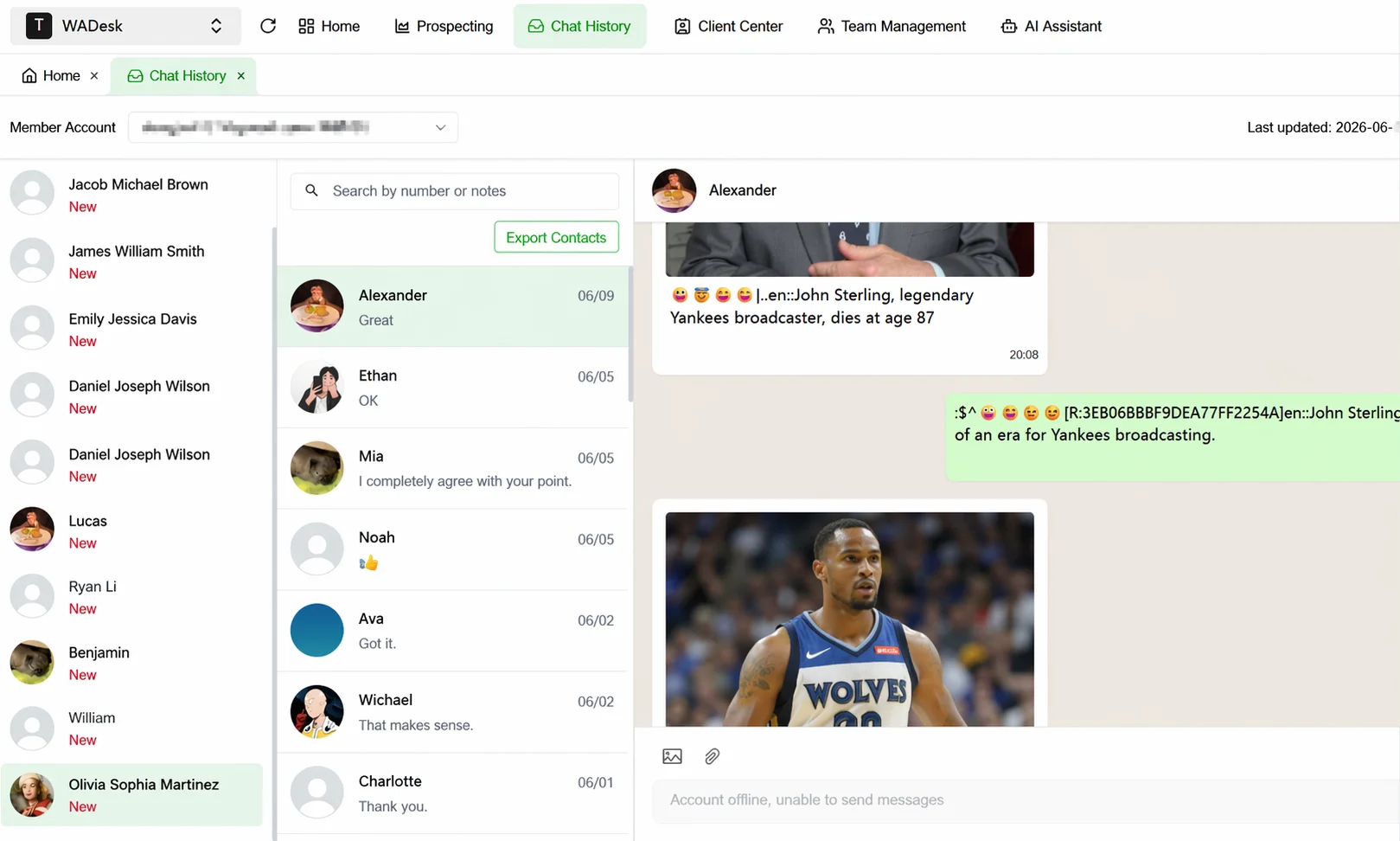 WADesk Team Inbox interface: all team accounts unified in one view
How WADesk Team Inbox Solves It
Unified Message Pool: All Accounts, One Screen
WADesk aggregates all team members' WhatsApp messages into a single inbox. Whether a rep manages 2 or 10 accounts, everything appears in one unified view.
- Filter by account, by client, or by read/unread status
- Real-time push for new messages — no manual refresh needed
- Messages sorted by time, most urgent always at top
Collision Detection: No Client Gets Double-Contacted
When two sales reps try to message the same client, WADesk triggers a collision alert:
- "This client has already been contacted by Rep X"
- Shows the last interaction date and follow-up stage
- Suggests who should continue the conversation
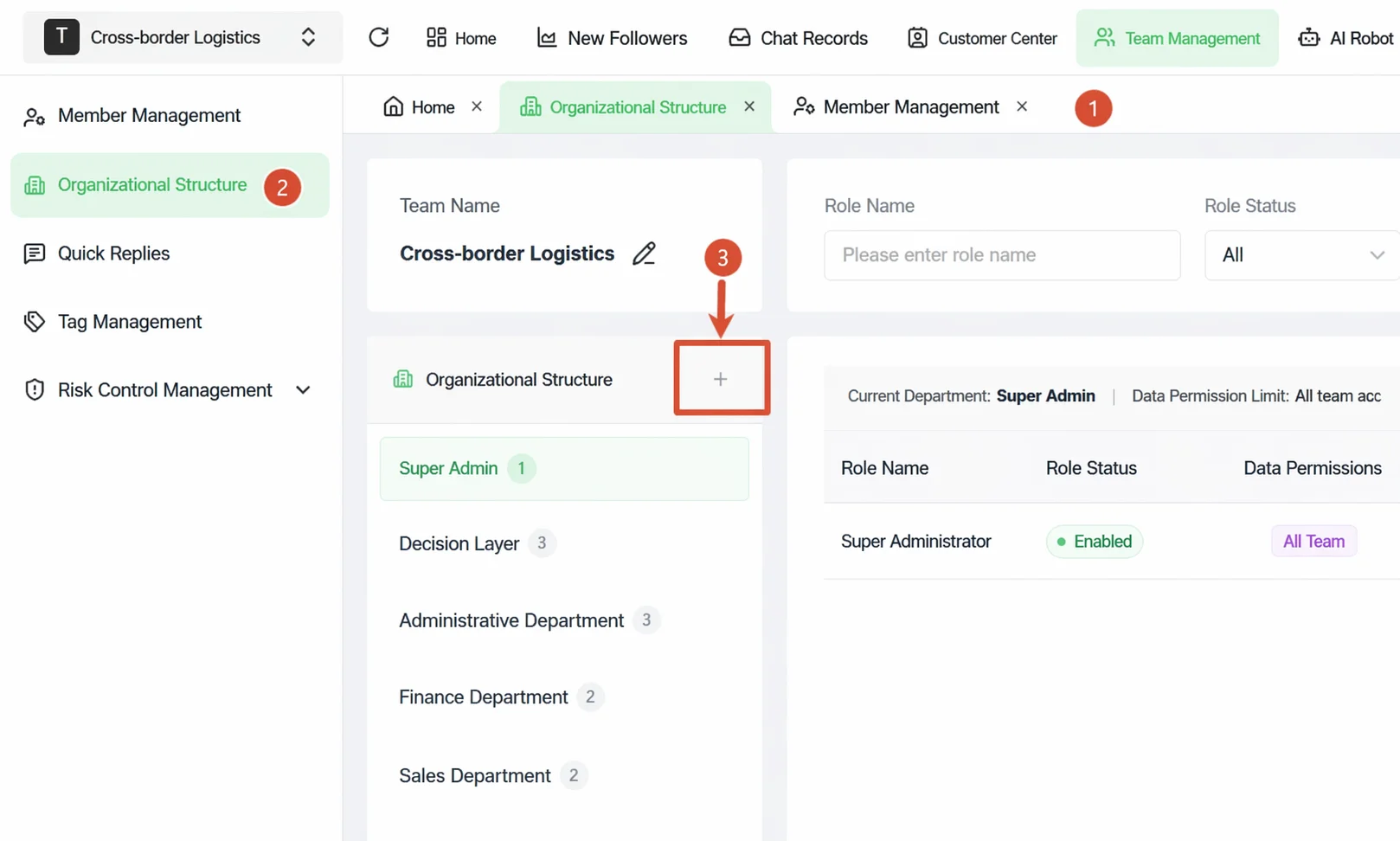 Team management dashboard: view member assignments and collision records
Transparent Assignment: Know Who's Handling What
Managers can access a backend dashboard to:
- View each rep's pending message queue
- Assign messages to specific team members
- Set response time limits with auto-notifications
- Track unread message ratios and spot issues early
Team Data Dashboard: Let Numbers Speak
The management backend provides real-time team metrics:
- Messages handled per rep per day
- Average response time
- Client satisfaction score (based on response quality)
- Overdue messages report
Still letting your reps manage accounts in isolation? WADesk Team Inbox unifies everything — no more missed messages or client collisions.
Get Started with WADesk →Before vs After: Team Inbox Impact
| Metric | Without Team Inbox | With WADesk |
|---|---|---|
| Avg client reply time | 32 min | 7 min |
| Collision rate | 15-20% | < 1% |
| Missed message rate | 8-12% | < 0.5% |
| Manager visibility setup time | "Ask around" 1hr+ | Dashboard, 5 min |
| New rep ramp-up time | 2-3 weeks | 2-3 days |
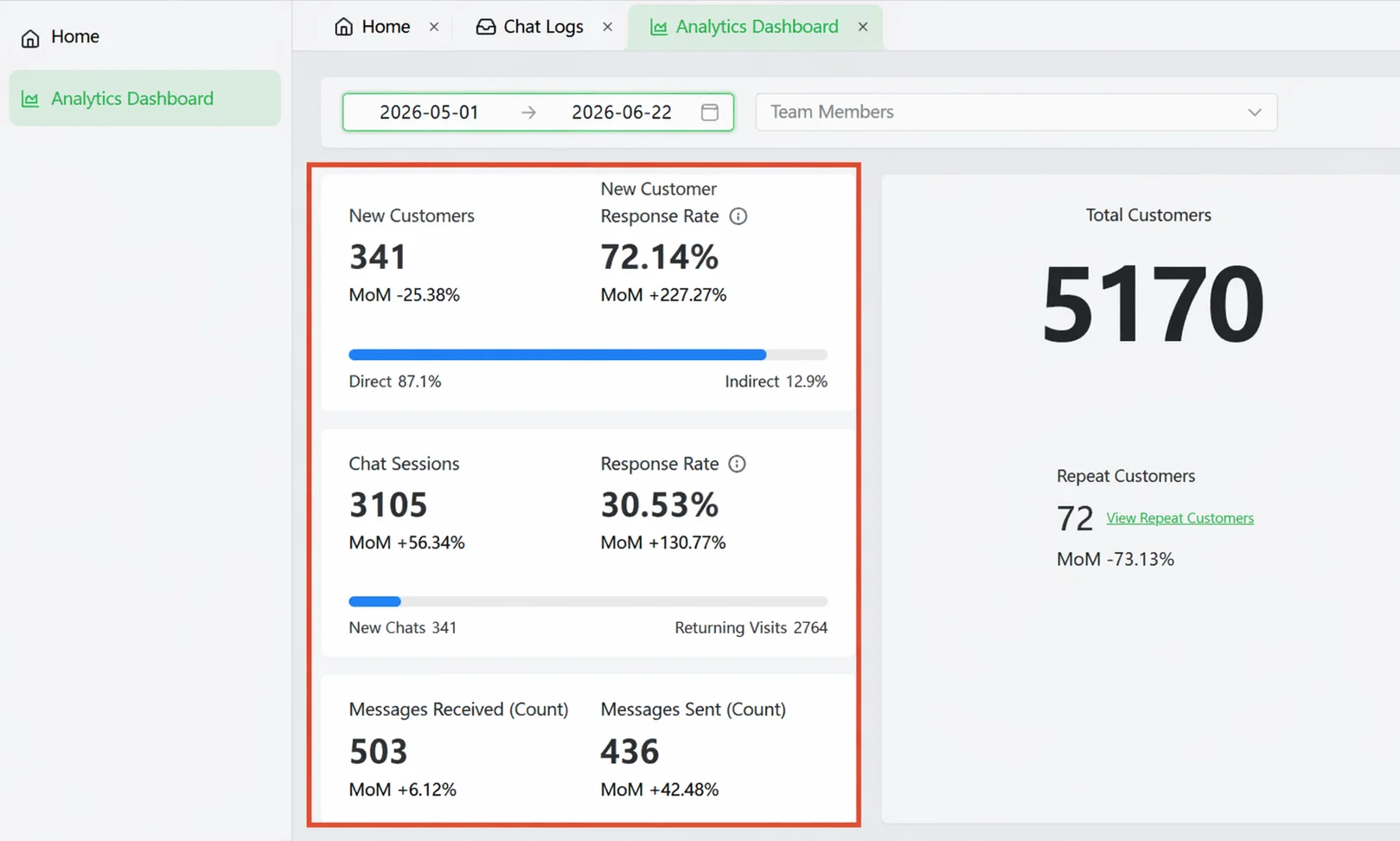 Management dashboard: real-time team messaging status overview
How to Get Started
Step 1: Download the WADesk Client
Download from the official website (Windows / macOS), install, and log in with your admin account.
Step 2: Add Team Members
Go to the management backend → Team Management → Invite Members. Set role-based permissions (Admin / Team Lead / Sales Rep).
Step 3: Assign WhatsApp Accounts
Each rep can add their own WhatsApp accounts within the client. Managers can view all connected accounts in the backend.
Step 4: Start Using the Unified Inbox
Launch the client — all team messaging appears in the unified inbox. Managers can monitor real-time messaging status from the backend anytime.
FAQ
How many WhatsApp accounts does WADesk Team Inbox support?
WADesk supports unlimited accounts per client. The more accounts you connect, the more value you get from unified management.
What happens when a sales rep leaves?
The manager can transfer the departing rep's WhatsApp accounts and client data to another rep with one click. Client assets never walk out the door with a departing employee.
Can multiple reps handle messages from the same account?
Yes. WADesk supports collaborative handling of the same WhatsApp account. Messages can be assigned to specific reps, and collision detection prevents duplicate follow-ups.
How is WADesk different from native WhatsApp?
WhatsApp native allows one person on one account with messages stored locally. WADesk unifies all accounts into one interface with team collaboration, manager monitoring, collision detection, and analytics — the difference between a personal ledger and an enterprise accounting system.
Is the Team Inbox useful for small teams?
Absolutely. Small teams benefit even more — fewer people means each person wears more hats, making it even easier to miss messages. A 3-5 person team sees dramatic improvements with WADesk.
Stop managing WhatsApp with gut feel and Excel sheets
Book a demo to see how WADesk can double your team's message response efficiency
Disclaimer: Performance data (reply time improvements, collision reduction) based on internal pilot results. Actual results may vary by team size, industry, and client base. WADesk complies with WhatsApp platform policies.