

This is one part of a complete team workflow — see the WhatsApp Operations Playbook for Export & Global Sales Teams.
2,500 Customers, 4 Broadcast Buttons, One Whole Day Gone
Wang runs a vape export team that grew to 12 people last year, with over 2,500 WhatsApp contacts accumulated. Every time a new product launches, he requires operations to deliver the campaign message to everyone within 4 hours. The result, every single time, looks like a disaster scene —
Operations sends one broadcast (256 contacts) on the primary account, then switches to a second account to send 256 more, then a third, a fourth... just switching accounts, configuring lists, and confirming each message's content takes 1.5 hours. By the time all 10 accounts have finished sending, 3.5 hours have passed, and the campaign window for the last batch of customers has already closed.
Three numbers hit him hard:
- Each of 4 sales accounts spends ~2 hours per day on "mechanical broadcast time" — time that should go toward following up with high-intent customers
- Because the send-time span is too wide, the back-half of customers see expired messages, and their conversion rate is 30%+ lower than the front-half (estimated from Wang's team internal observation)
- After operations staff leaves, no one remembers which 256 contacts belong to which account, so the next broadcast requires re-segmenting everything from scratch
Wang's problem isn't "not enough tools" — it's that his broadcast pipeline is single-pointed from day one. Pressing 2,500 contacts into one (or a few) accounts guarantees structural inefficiency.
What the WhatsApp 256-Person Cap Actually Is
To solve this, you have to first understand the limit. WhatsApp's broadcast list has two hard constraints:
| Dimension | Limit | Source |
|---|---|---|
| Max contacts per single broadcast list | 256 people | WhatsApp product design (per Meta Help Center) |
| Recipients must have saved your number | Yes | Otherwise they won't see the message |
These two limits mean: no matter how much data you buy, no matter how many plugins you install, a single WhatsApp account can reach at most 256 people per send — and all 256 must have saved your number.
Why does WhatsApp impose this limit? Its product positioning is "one-to-one private communication," and the broadcast list is a convenience feature for small-batch sending scenarios — not a marketing channel. This is a product philosophy choice, not a bug or a "hackable" technical issue.
So the truly sustainable fix isn't "breaking the limit" but "bypassing the single-point structure" — turning "one account sends to 256 people" into "ten accounts each send to 256 people."
Four Common Workarounds — And Why Each Falls Short
The industry has four mainstream approaches to circumventing the 256 limit. Let's look at each one:
Workaround 1: Group Chat Sends
The approach: Create a large group of 500-1,000 people, send messages to the group.
The problems:
- All members can see each other ("member visibility" is the default), creating a poor privacy experience
- Customer churn rate is high (based on our observation serving dozens of export teams, groups of 500+ see a daily churn rate of approximately 3-5%)
- No precise targeting — all customers receive identical messages, no segmentation, no variables
Best for: Community operations, repeat-customer benefit groups. Not suitable for cold-blast marketing.
Workaround 2: Merge Tools (Multi-send UI)
The approach: Use a tool to merge "multiple broadcast lists" into one interface; operations still manually switches between accounts.
The problems:
- At its core, it's still a single-point structure, the 256×N ceiling remains unchanged
- Each tool's "merge" is just UI-level stitching; the actual sending still happens 256 at a time
- Adds another third-party dependency, increasing the risk of account anomalies
Best for: Small teams sending < 500 messages.
Workaround 3: "Group Control" Systems (Overseas)
The approach: One machine controls dozens of WhatsApp accounts, automatically adds friends and broadcasts.
The problems:
- Crosses the platform's red line — WhatsApp explicitly prohibits automated operations; group-controlled accounts typically survive only 1-3 weeks
- When an account fails, the customer assets attached to it all go to zero
- High compliance risk
Best for: Short-term gray-area operations. Legitimate export teams should not use this.
Workaround 4: WhatsApp Business API
The approach: Use Meta's official API with template messages for broadcasts.
The problems:
- Template-only, strict content moderation, even changing one or two words in a marketing message requires re-approval
- Per-message pricing, 1,000 marketing messages ≈ $0.07-0.08/message × 1,000 ≈ $70-80 per send
- Cannot freely send arbitrary content (e.g., temporarily changing a promo phrase requires template review)
Best for: Very large scale (100K+), fixed-content official notifications. Not suitable for small teams that need flexible marketing.
The Scalable Fix: Multi-Account Rotation
One-line takeaway: Split "one account sending to 256" into "10 accounts each sending to 256" — each account only sends once, the per-send reach cap = number of accounts × 256.
10 accounts → 2,560 contacts 30 accounts → 7,680 contacts 50 accounts → 12,800 contacts
And because each account only sends once, the sending frequency naturally spreads out — which happens to be the "normal account behavior pattern" WhatsApp expects to see.
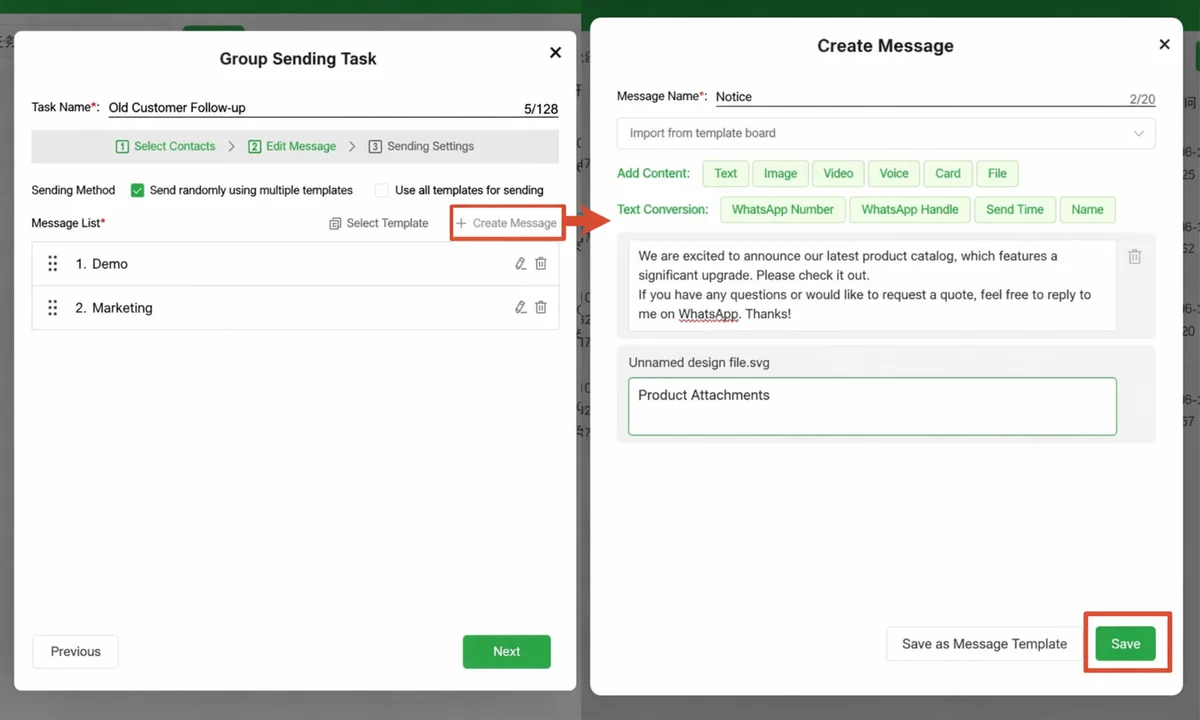
WADesk's multi-account broadcast module is designed exactly for this workflow:
| Step | Action | Key Point |
|---|---|---|
| 1 | Log into multiple WhatsApp accounts in the WADesk client | Each account independently builds a broadcast list (max 256 each) |
| 2 | Import customer list | Import 1,000-10,000 numbers in one go; system auto-assigns across accounts |
| 3 | Configure rotation rules | Set each account's send window, interval, and per-send cap |
| 4 | One-click launch | WADesk schedules each account to send per the rules — no manual switching |
| 5 | Real-time dashboard | Single page for all accounts' send status, delivery rate, and failure reasons |
Key Design: Smart Assignment + Staggered Sends
When WADesk assigns customers to different accounts, it doesn't simply slice the list by 256. It uses customer behavior tags to assign intelligently:
- High-activity customers (conversations in the last 7 days) → assigned to the primary sales account
- Medium-activity customers (interaction in the last 30 days) → assigned to 2-3 rotation accounts
- Dormant customers (90 days of no interaction) → assigned to long-interval accounts (e.g., send every 3 days)
The core value of this layering is: using account behavior data to back into customer segmentation, minimizing "broadcast waste". This is the same "segmented broadcast" logic we discussed in WhatsApp Scheduled Bulk Messaging and Why WhatsApp Broadcast Delivery Fails.
Quick aside: If you're still maintaining broadcast lists in Excel, also check out WhatsApp Link Split Tracking with WADesk — the two mechanisms can connect, completing the loop: "which customers came from which channel → assigned to which sales account → on what broadcast cadence."
What Changed for Wang After WADesk
Wang expanded his team from 4 accounts to 12 at the end of last year, integrated WADesk's multi-account broadcast module, and ran it for 3 months (data estimated from internal team observation, for illustration):
| Dimension | Before (Manual Switching) | After (WADesk Multi-Account Rotation) |
|---|---|---|
| Total time per broadcast | 3.5-4 hours | 18 minutes |
| Mechanical operation time (per sales) | 2 hours/day | 0.3 hours/day (just confirm configuration) |
| Reach consistency (front-half vs back-half customers) | 30%+ gap | < 5% (staggered within 30 minutes) |
| Broadcast customer reply rate | 1.8% | 3.2% (estimated for illustration) |
| Per-broadcast total cost | Hidden time cost | Clear: 12 accounts × $0 = no marginal cost (WADesk charges per team license) |
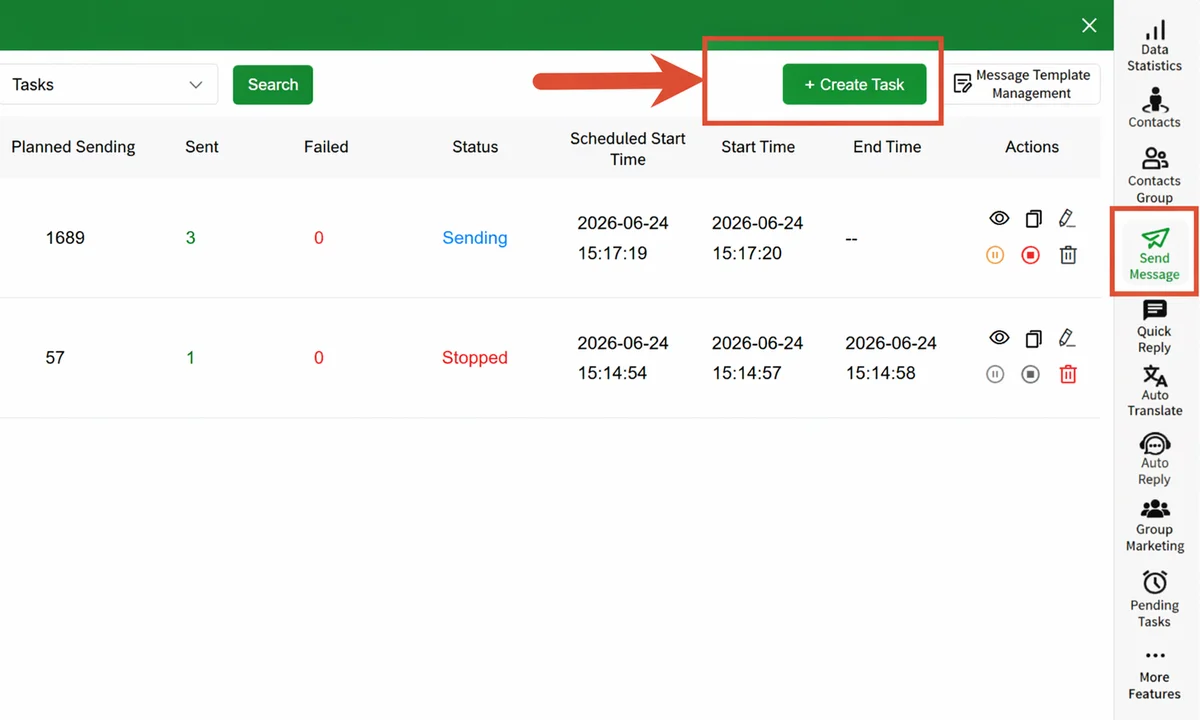
The most unexpected win was that the sales team no longer dreads broadcasts — they used to groan every time operations scheduled a blast. Now it's a single button click, and the time saved goes toward higher-value work: customer follow-up, repeat-purchase mining.
3 Pitfalls to Avoid When Configuring Multi-Account Rotation
Before you follow Wang's playbook, there are 3 points that must be made clear first:
1. Account Behavior Must "Look Human"
WADesk's rotation mechanism is designed around real human operating cadence — each account sends ~200 messages per session, intervals of 8-15 minutes, no more than 3 broadcast sessions per day per account. You don't need any extra "account warming" steps; sending at this rhythm is normal account behavior.
2. Content Must Vary by Account
12 accounts sending identical copy is essentially "one eye with 12 bodies" — WhatsApp's platform can detect content repetition. WADesk supports independent copy + independent variables per account (e.g., different openings, different emojis, different signatures per account), making the content look like "12 sales reps each sending their own campaign."
3. Customers Must Save Your Number Before Send
The broadcast list mechanism requires recipients to have saved your number. So before broadcasting, make sure the customers on your list have already added you. The WhatsApp Scheduled Bulk Messaging guide has the complete "how to get customers to add you first" playbook.
Frequently Asked Questions
Q1: Can the WhatsApp broadcast 256-person limit be raised?
No. This is a product-level hard limit (per Meta's official documentation), with no distinction between personal, business, or API accounts — all accounts are subject to this cap.
Q2: Can merge tools bypass the 256 limit?
No. Merge tools only stitch "multiple broadcast lists" together at the UI level. The actual sending still happens 256 at a time, the ceiling is 256 × number of accounts, not something a tool can change.
Q3: Is multi-account rotation safe?
As long as you send at a real human operating cadence (each account ~200 messages per session, 8-15 minute intervals), it's normal account behavior. WADesk's rotation scheduling module has this rhythm built in — no extra action required.
Q4: How do I manage 50 accounts?
The WADesk client supports 50+ WhatsApp accounts logged in on one machine (multi-open architecture stable), all visible in the client "Account Matrix" — view status, broadcast progress, and message replies in one place. No more switching back and forth.
Q5: What happens to customer replies after a broadcast?
WADesk's team inbox aggregates replies from all accounts into a single interface (see WhatsApp Team Inbox Collaboration). Sales can follow up directly in the inbox, no customer message slips through.
Q6: Is the 256 broadcast limit related to number validity?
No. The 256 limit is the contact cap per broadcast list, unrelated to whether a number is valid or registered. But invalid numbers will directly cause messages to fail to send, so it's best to do a number validation pass before broadcasting (see Why WhatsApp Broadcast Delivery Fails).
Closing Thought
The WhatsApp broadcast 256-person limit is not a bug — it's product philosophy. Don't try to break the limit; change the structure instead — multi-account rotation is the toolchain built for that structure.
If your current broadcast process is still stuck at "a few sales reps manually switching accounts, Excel-maintained lists, copy-pasted copy," then broadcasting to 2,500+ customers will always be a war of attrition. WADesk's multi-account broadcast module was designed with one purpose: turn that war of attrition into "one-time configuration, one-click launch."
Configure once, use it for a year. That's what scaled broadcasting should look like.