

This is one part of a complete team workflow — see the WhatsApp Operations Playbook for Export & Global Sales Teams.
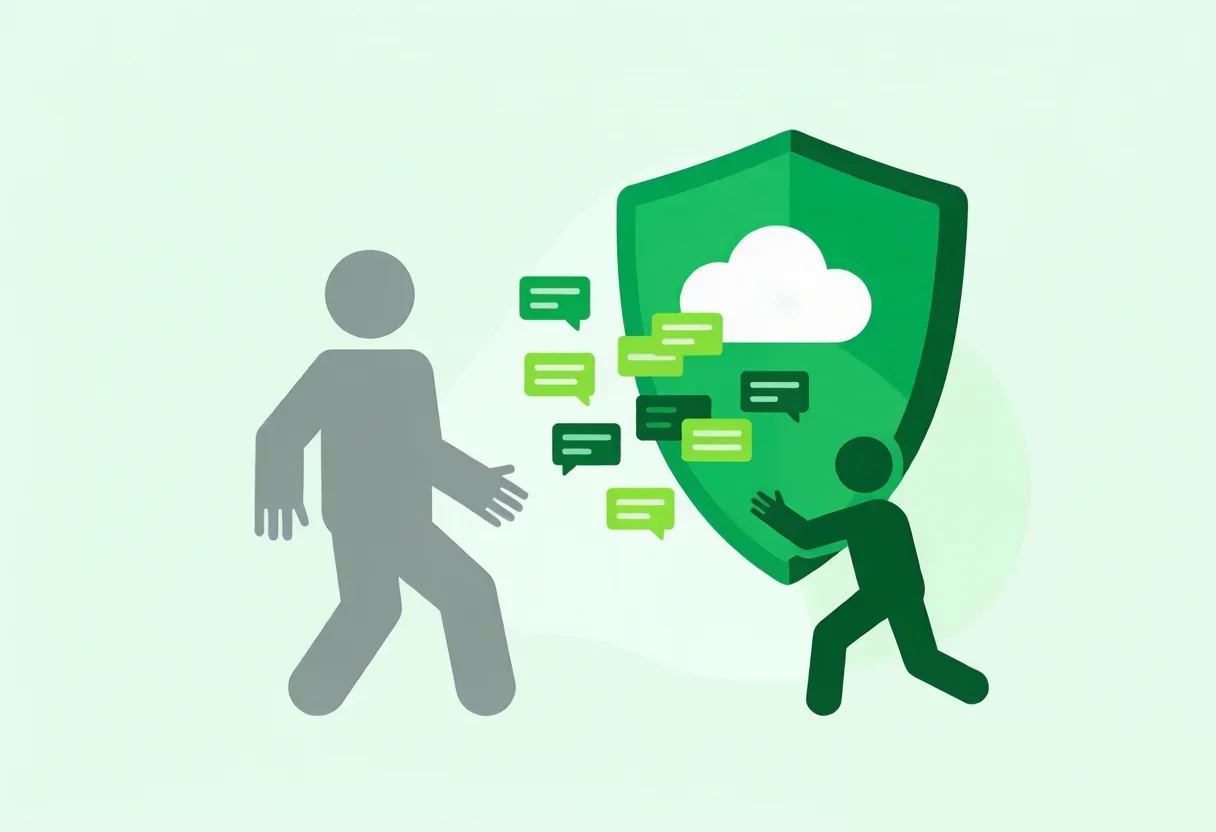
A Real Emergency
Friday afternoon. The export manager of a trading company in Hangzhou gets a message that stops him cold—his top European market sales rep Alex is resigning, effective next week.
Alex manages 3 WhatsApp accounts with roughly 500 European clients. Many are in the middle of active quote negotiations.
The immediate problems pile up:
- Client contact info is on Alex's personal phone—the company has no backup
- Quotes and product specs are buried in WhatsApp chat history—never exported
- Three major deals are in progress—only Alex knows the current status
The manager's first instinct: "Can Alex export all client data before he leaves?"
But the deeper issues are structural:
Same-day problem: Who takes over those 3 WhatsApp accounts? How do active quote conversations continue?
This week's problem: The incoming rep needs full context from past conversations. But Alex's chat history is on his personal phone—if he deletes WhatsApp or logs out, that context is gone forever.
This month's problem: Even with a replacement assigned, will clients trust a new voice on the same number? How many deals will die during the handover?
This isn't a rare scenario. For any trade team that relies on WhatsApp for client communication, "sales rep quits and takes clients with them" is the #1 unaddressed risk—because WhatsApp is fundamentally a personal tool with no built-in team management.
Why "The Rep Can't Take the Clients" Is Harder Than It Sounds
WhatsApp is tied to a phone number. When that number belongs to a departing employee, ownership is ambiguous at best.
Who owns the WhatsApp account?
If the rep used their personal number: the WhatsApp account belongs to them, not the company. The company has no way to recover access, no backup of the contact list, and no copy of the chat history.
Even with a company-provided SIM card, practical challenges remain:
| Attempted solution | Actual result |
|---|---|
| Ask rep to export contacts | Relies on goodwill, exports numbers only (no chat context) |
| Ask rep to forward chats | Manual, error-prone, privacy-sensitive |
| Demand the phone back | Legally shaky, and rep can remotely wipe WhatsApp |
| Insert SIM into a new phone | All chat history and contacts are lost—clean slate |
The handover window is too narrow
A rep typically gives 1–2 weeks' notice. During this period:
- Work handover takes priority over client engagement
- Incoming client messages may go unanswered
- Active quotes stall without resolution
Without a mechanism to lock down client data during this window, client loss after departure is almost guaranteed.
WADesk's Three-Layer Offboarding Protection
WADesk's "Departure Protection" isn't a post-mortem fix—it's a pre-configured, instantly executable three-layer defense.
Layer 1: Instant Disable (Day of departure, under 10 minutes)
When an admin confirms a team member's departure in WADesk, they can immediately:
Disable account login: The departing rep's WADesk access is revoked instantly. Even if the app is still open on their machine, the next refresh will show "Account disabled." No access to client data, chat history, or settings.
Retain WhatsApp accounts: The WhatsApp accounts managed by the departing rep remain in the system—they're not deleted or reassigned to a new number. They can be instantly assigned to another rep. Clients see the same WhatsApp number, so continuity is seamless.
How to do it: WADesk admin panel → Member Management → Find the member → Click "Disable."
No cooperation required from the departing rep. No need for them to hand over a phone or password. One admin does it all from the backend.
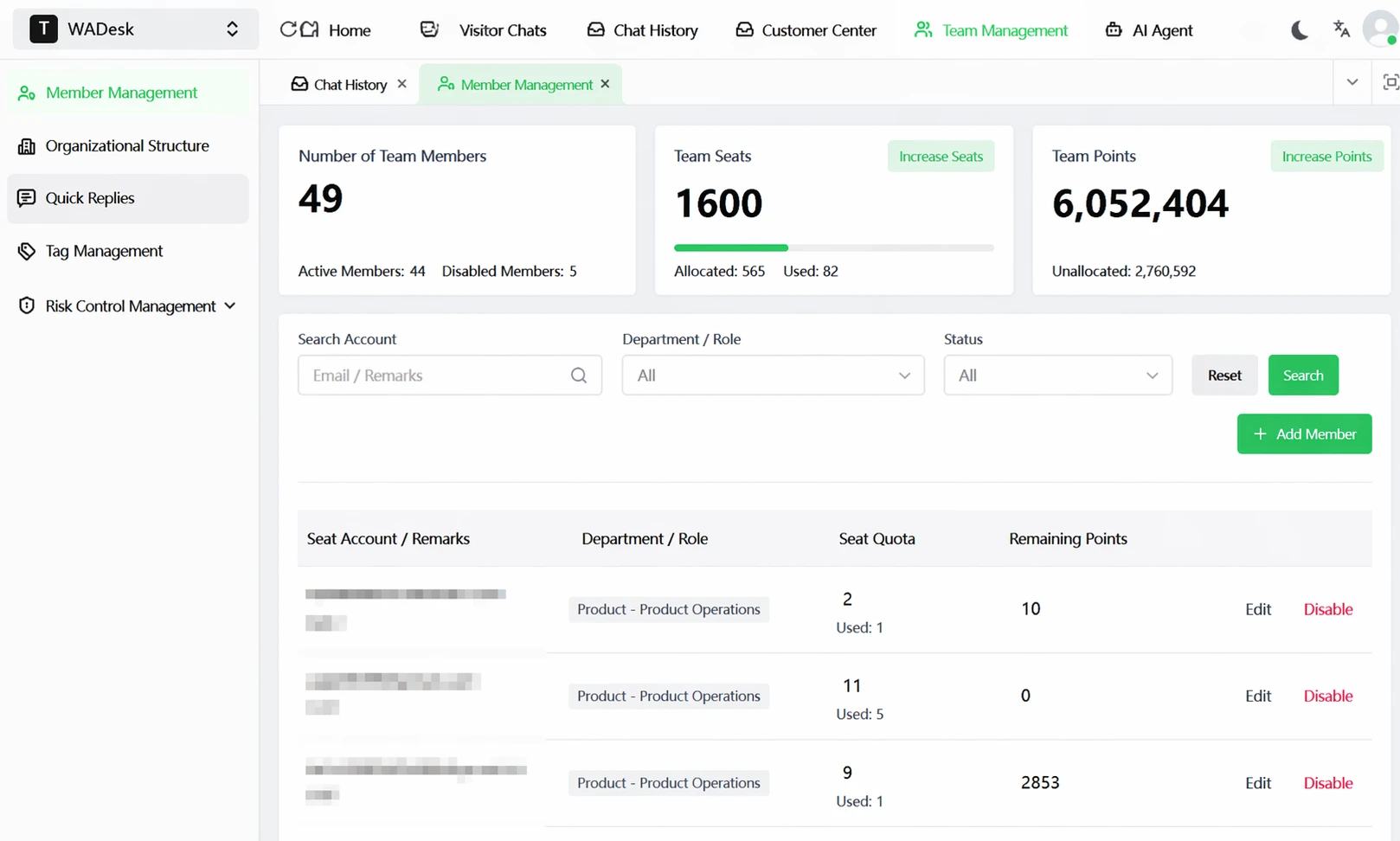
▲ One click to disable a departing rep. All WADesk access revoked instantly; WhatsApp accounts remain in the system for reassignment.
After clicking "Disable," a confirmation dialog appears that explicitly states the data retention policy—data will be retained for 30 days. You can reactivate the account anytime during this period. After 30 days without action, data will be permanently deleted. This 30-day window isn't a nice-to-have; it's a product-level guarantee.
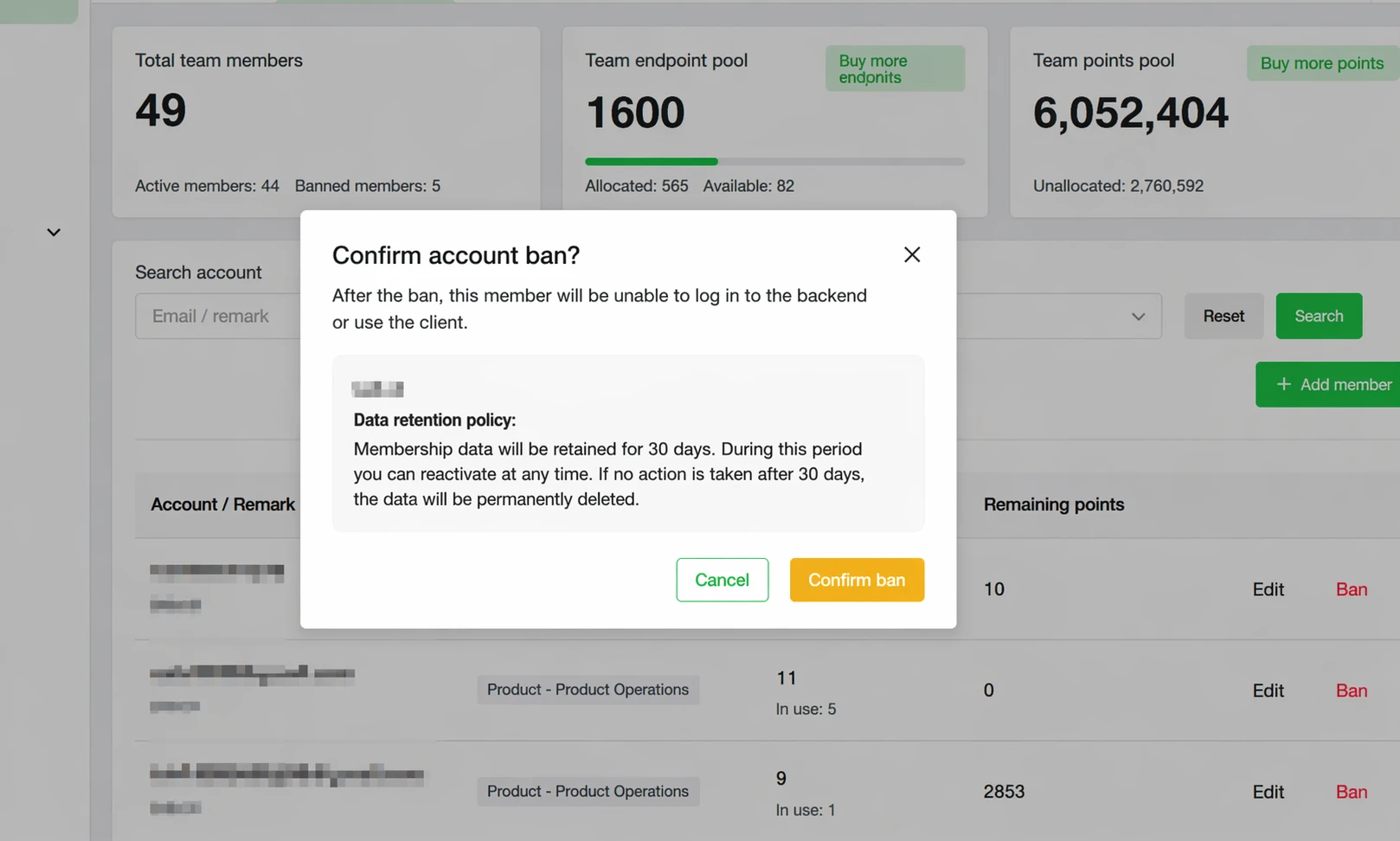
▲ The disable dialog states the data retention policy in plain language: 30 days to reactivate, permanent deletion after. This isn't a handshake agreement—it's built into the product.
Layer 2: Cloud Retention (Data preserved, history accessible)
Disabling the account is only the first step. For the replacement rep, the most critical need is full context on past client conversations. WADesk's cloud sync ensures:
- Chat history is synced in real time: Every message sent and received through WADesk is backed up to the cloud instantly. Even if the departing rep deletes their local cache, cloud data remains intact.
- Client profiles are preserved: All contacts, tags, notes, and follow-up records associated with the departing rep stay in the system.
- Full access for the replacement: When a new rep is assigned the account, they see the complete chat history, including the last message before departure.
The replacement opens the chat window and sees exactly what the departing rep saw—quotes, client preferences, unanswered messages. Nothing is missing.
WADesk's "Message Sync" module visualizes this as a dashboard showing each team member's local and cloud backup counts, groups, and sync status:
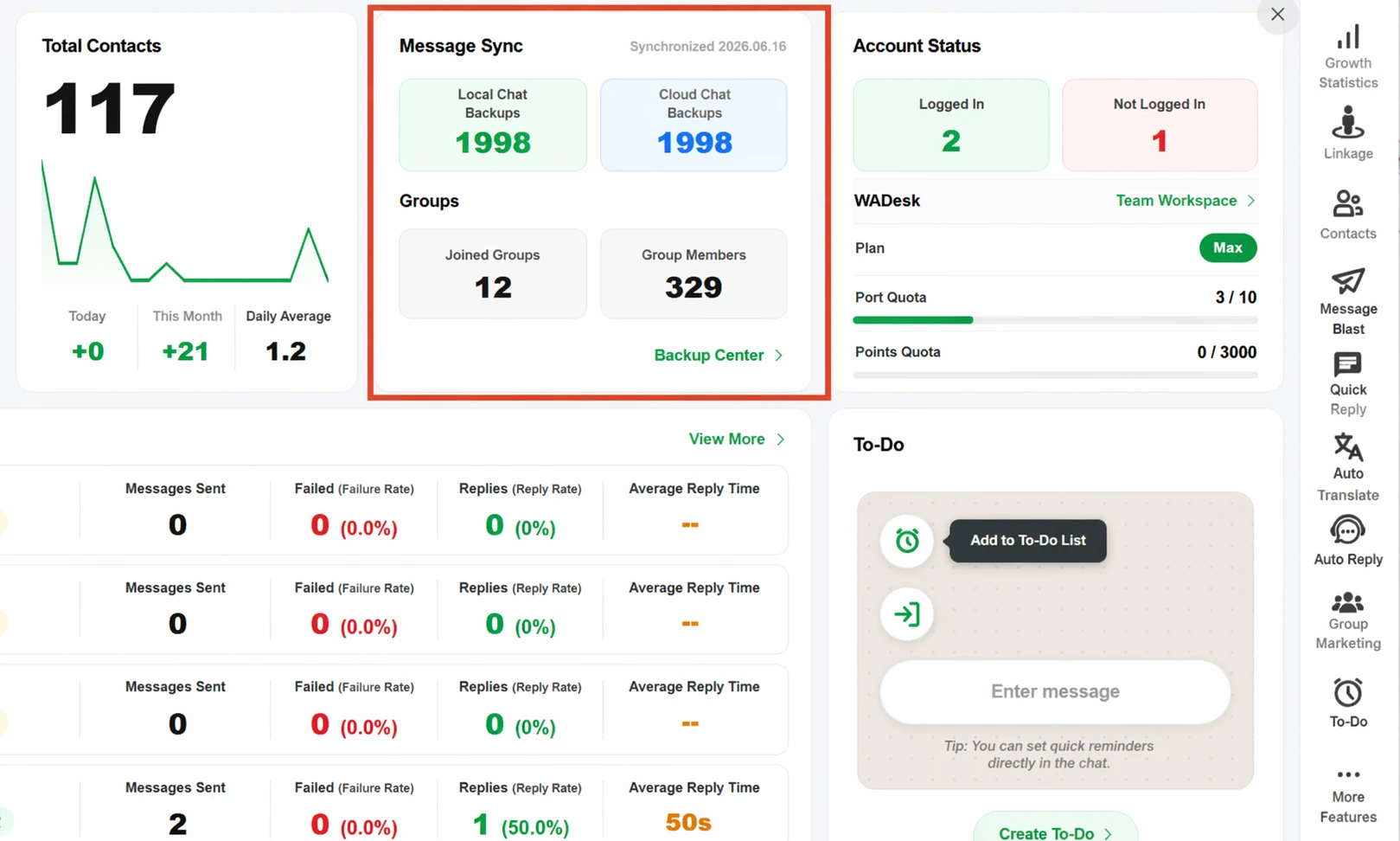
▲ WADesk message sync dashboard: local and cloud backups tracked in real time. After disable, data continues to live in the cloud, ready for the replacement rep to access.
Layer 3: 30-Day Reassignment Window (Smooth transition, zero loss)
Moving a client relationship isn't just about handing over a contact list—it's about making the client feel like nothing changed. WADesk's reassignment mechanism is designed around a 30-day transition window:
Day 1 (Departure):
- Departing rep's login is disabled
- Their WhatsApp accounts are marked "Pending reassignment"
- Admin selects the replacement rep
Days 1–7 (Message handover):
- The replacement rep logs in and sees all unanswered conversations
- System flags active conversations so the replacement can prioritize
- Crucially: the WhatsApp number itself doesn't change—clients keep messaging the same number
Days 8–30 (Active re-engagement):
- The replacement rep proactively reaches out to key clients: "Hi, I'll be your new contact going forward"
- With full chat history, they know the client's stage, preferences, and recent activity
- 30 days ensures every active client receives at least one meaningful touchpoint
Why 30 days? Most B2B trade buying cycles run 2–4 weeks. A 30-day window gives the replacement rep enough time to cover all active clients without a single deal falling through the cracks during handover.
With vs. Without WADesk: Departure Scenario
| Handover Milestone | Without WADesk | With WADesk |
|---|---|---|
| Rep resigns | Manager panics, starts negotiating for client data | Admin clicks "Disable," account locked in 10 minutes |
| Last working day | Rep may already be deleting chats or exporting contacts | Account disabled, data locked in cloud, rep can't access |
| Week 1 after departure | WhatsApp number unattended, client messages pile up, active quotes expire | Replacement rep logged in, sees full history, continues conversations |
| Week 2 | Manager tries contacting clients to announce "new contact" with zero context | Replacement rep filters high-priority unreplied clients from history, proactively re-engages |
| Week 4 | 30–50% of active clients lost during handover | 90%+ of active clients successfully transitioned |
Data note: Client loss percentages are illustrative estimates based on common industry scenarios. Actual results vary by industry, client relationship dependency, and handover process quality.
Getting Started: Don't Wait Until Someone Resigns
Most managers only think about client protection the day a rep hands in their notice—and that's already too late. Set up departure protection while your team is stable.
Step 1: Ensure all sales accounts are under WADesk management (Do this today)
If your team is still using personal WhatsApp to talk to clients, the first step is migrating all work WhatsApp accounts to WADesk's multi-account management system:
- Each rep's WhatsApp account linked to WADesk client
- Cloud sync enabled (default setting)
- Admin account with full member management permissions
Step 2: Create a departure protection SOP (Do this this week)
Work with your team lead to document:
- Who has permission to disable accounts (admin-level only)
- When disable should happen (same day as resignation confirmation)
- Replacement assignment workflow
- 30-day handover tracking template
Step 3: Monthly security check (Ongoing)
Spend 15 minutes each month reviewing:
- Are all sales accounts active in WADesk?
- Is cloud sync functioning correctly?
- Are member permissions properly scoped?
FAQ
Q1: After disabling a departing rep's account, can clients still send messages?
Yes. Disabling a rep's WADesk login only blocks their access to the system. The WhatsApp accounts themselves remain active. Clients sending messages to that number still get through—the replacement rep will see all unanswered conversations when they log in. Client experience is unaffected.
Q2: What if the departing rep uses WhatsApp on their personal phone?
When a WhatsApp account is linked to WADesk's multi-account system, it is "claimed" by the company through the shared session. Once the admin disables the rep in the backend and reassigns the account to a new rep, the departing rep's session is invalidated. The new rep accesses the account through WADesk and continues conversations seamlessly.
Q3: Can the replacement rep see all past chat history?
Yes, as long as the team's WADesk client had cloud sync enabled (it's on by default). Every message sent and received through WADesk is stored in the cloud. The replacement rep can view the complete conversation history for every client.
Q4: What if one account has too many clients for a single replacement?
Reassignment transfers an entire WhatsApp account to one primary replacement. If the client load is too high, the admin can first assign the account to a lead rep, then use WADesk's tagging and filtering features to share specific clients with other reps—data is shared, and reply permissions are controlled by role.
Q5: What happens after the 30-day window?
After 30 days, do a handover review: confirm every active client received at least one engagement, check for missed messages, and ensure the replacement rep has fully taken over the relationship. Also, reclaim the phone number or SIM associated with the departing rep to avoid future compliance issues.
Compliance note: Client loss data shown are illustrative estimates based on common industry scenarios. Actual results vary by industry, team size, and handover process quality. WhatsApp is a registered trademark of Meta Platforms, Inc.