

What Most Teams Get Wrong About Client Segmentation
A furniture export company owner in Foshan decided last year to "get serious about client management." He spent a week designing 12 client tags ("new client" / "old client" / "asked for quote" / "asked for sample" / "closed deal" / "lost deal"...), then assigned his team to tag all WhatsApp contacts.
Three months later he checked the data — and three things hit him hard:
- 80% of clients had only 1-2 tags. Tag coverage was terrible.
- The tag system existed, but reps still followed up by "gut feeling" on which clients to contact
- During the weekly "client management meeting," the team processed clients in WhatsApp message list order—no one cared about the tags
The owner's conclusion: "Client segmentation is useless. Just marketing hype."
The real problem isn't segmentation itself—the execution order is wrong. He was trying to layer tags on top of 5000 low-quality clients that the team was already carrying around.
Why "Build Tags First, Then Segment" Is Doomed to Fail
Most teams follow this sequence for client segmentation:
- Design 10-20 tags
- Have reps tag every client
- Expect reps to filter high-intent clients by tag and follow up
The process is theoretically fine, but execution has three hidden killers:
Killer 1: More tags = less motivation to tag
12 tags × 5000 clients = 1 hour/day just tagging. Reps give up by day 3. People don't keep detailed work past the 30% energy threshold.
Killer 2: "Dormant cost" crowds out segmentation time
Of those 5000 clients, 30-50% are "zombie clients" who haven't replied in 6+ months. But reps don't want to delete them—"what if they come back someday?" So these clients permanently occupy "new client" tag space, and the tag system collapses.
Killer 3: Tags are static; client "value" is dynamic
A "closed deal" client last week may become "in complaint" this week because of a product issue. A "high intent" client who doesn't respond for 3 weeks of follow-up automatically downgrades to "dormant." Static tags can't reflect a client's real state.
The Counterintuitive Step: Cut 30% of Dead Leads First, Then Segment
90% of teams treat "build tags" as the first step, but the right order is subtraction first, tagging second. Three steps:
Step 1: Value-scan all clients
Open your WhatsApp contact list, divide all clients into two groups based on "any meaningful conversation in the last 90 days":
| Status | Criterion | Share (typical trade team) |
|---|---|---|
| Active clients | Real conversation in last 90 days | 35-45% |
| Dormant clients | No conversation in last 90 days (regardless of past orders) | 55-65% |
Why 90 days? Because 90 days ≈ 3 months ≈ one full B2B procurement cycle. Longer and you risk excluding potential clients; shorter and you miss quarter-end opportunities.
Step 2: Archive dormant clients (don't delete!)
The right move for dormant clients is to archive, not delete—they really might "come back someday." But once archived, they no longer occupy your daily follow-up view.
Concrete execution:
- In WhatsApp or WADesk, mark dormant clients as "Long-term Client - Archived"
- Set a half-yearly "revival" task: every 6 months, send a single check-in message
- Remove from daily follow-up list
After this step, your "active client pool" has shrunk from 5000 to 1750-2250—reps suddenly find they can actually keep up.
Step 3: Apply 5-stage + 3-value segmentation to active clients
Now you enter the "tag" phase. But this time the tags only apply to 1800 active clients, reps' workload drops 60%, and segmentation has a real chance of executing.
WADesk's Client Segmentation Framework: 5 Stages + 3 Values
I recommend two parallel tag systems: "Sales Stage" (behavior-based) and "Client Value" (potential-based). Two systems managed independently, but both attached to clients.
Sales Stage (5+1 stages, reflecting current state)
| Stage label | Client state | Rep action |
|---|---|---|
| First Touch | First inquiry or WhatsApp add | Reply within 24 hours, use Stage 1 of 3-stage script |
| In Discussion | 2-3 reply rounds but no quote yet | Send product recommendations within 3 days, actively uncover needs |
| Decision-Making | Quoted, client evaluating internally | Follow up within 7 days, provide "internal evaluation" ammo (MOQ / logistics / quality proof) |
| Contracting | Order confirmed, awaiting payment | Send payment link same day, follow up on remaining balance |
| Closed-Won | Order closed, payment received | Switch to after-sales scripts (shipping notice + satisfaction check-in) |
| Closed-Lost | Client explicitly said no | Re-engage 6 months later, ask if needs have changed |
WADesk's tag management module pre-configures these 6 sales stages as a preset tag group—teams can use them directly without custom design.
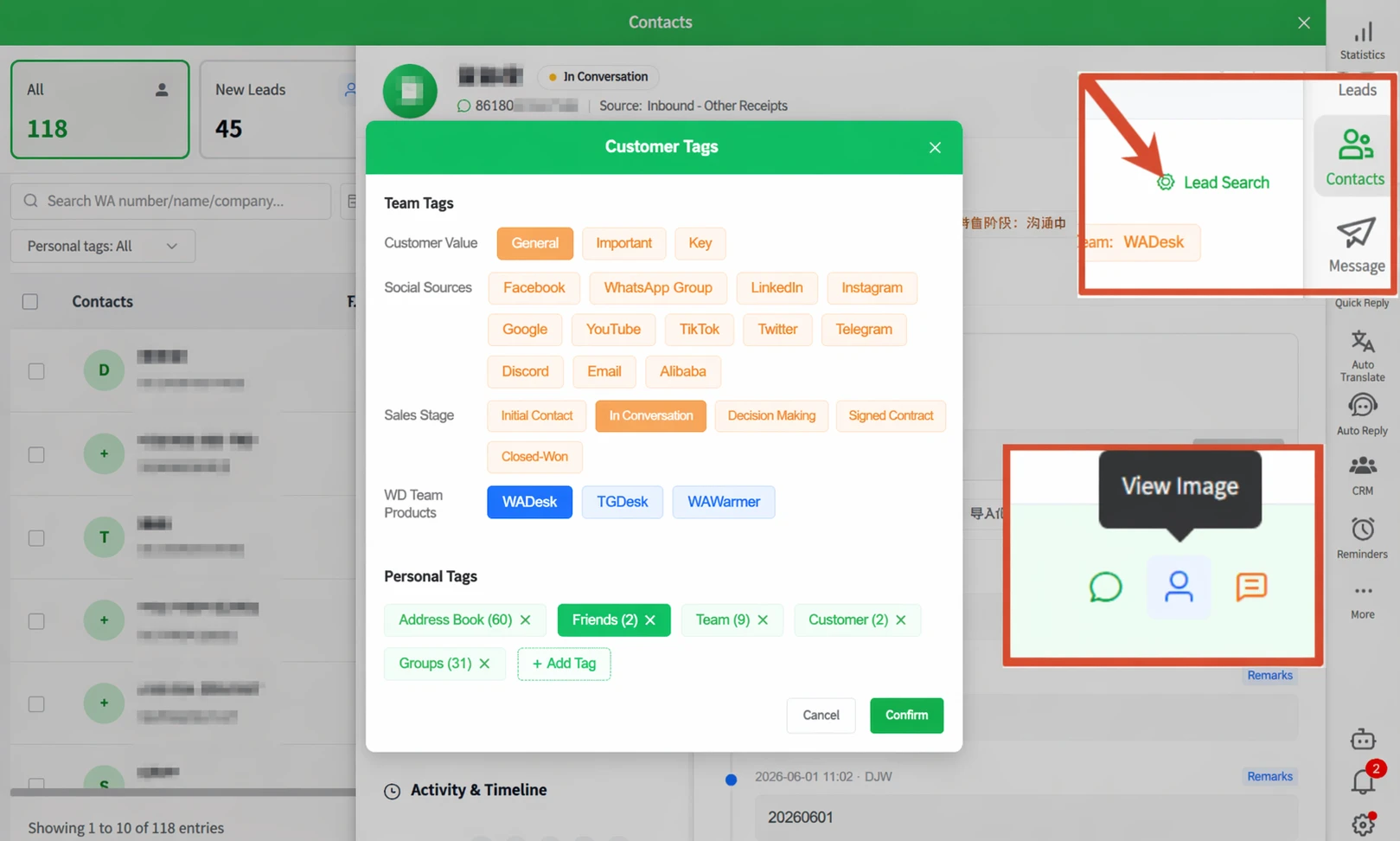
▲ Sales stage tags: First Touch → In Discussion → Decision-Making → Contracting → Closed-Won / Closed-Lost—covers the full sales funnel. Update manually or automatically as clients move between stages.
Client Value (3 tiers, reflecting long-term potential)
| Value label | Client characteristics | Follow-up priority |
|---|---|---|
| Core | Monthly spend > $10K / Quarterly repeat / Referral source | Sales director-level, weekly progress sync |
| Important | Monthly spend $3K-10K / Stable repeat business | Senior rep, weekly high-quality touch |
| General | Monthly spend < $3K / One-off buyer | Junior rep, monthly 1-2 touches |
WADesk's backend also makes "Client Value" a preset tag (Core/Important/General), configured as single-select—each client maps to exactly one value tier.
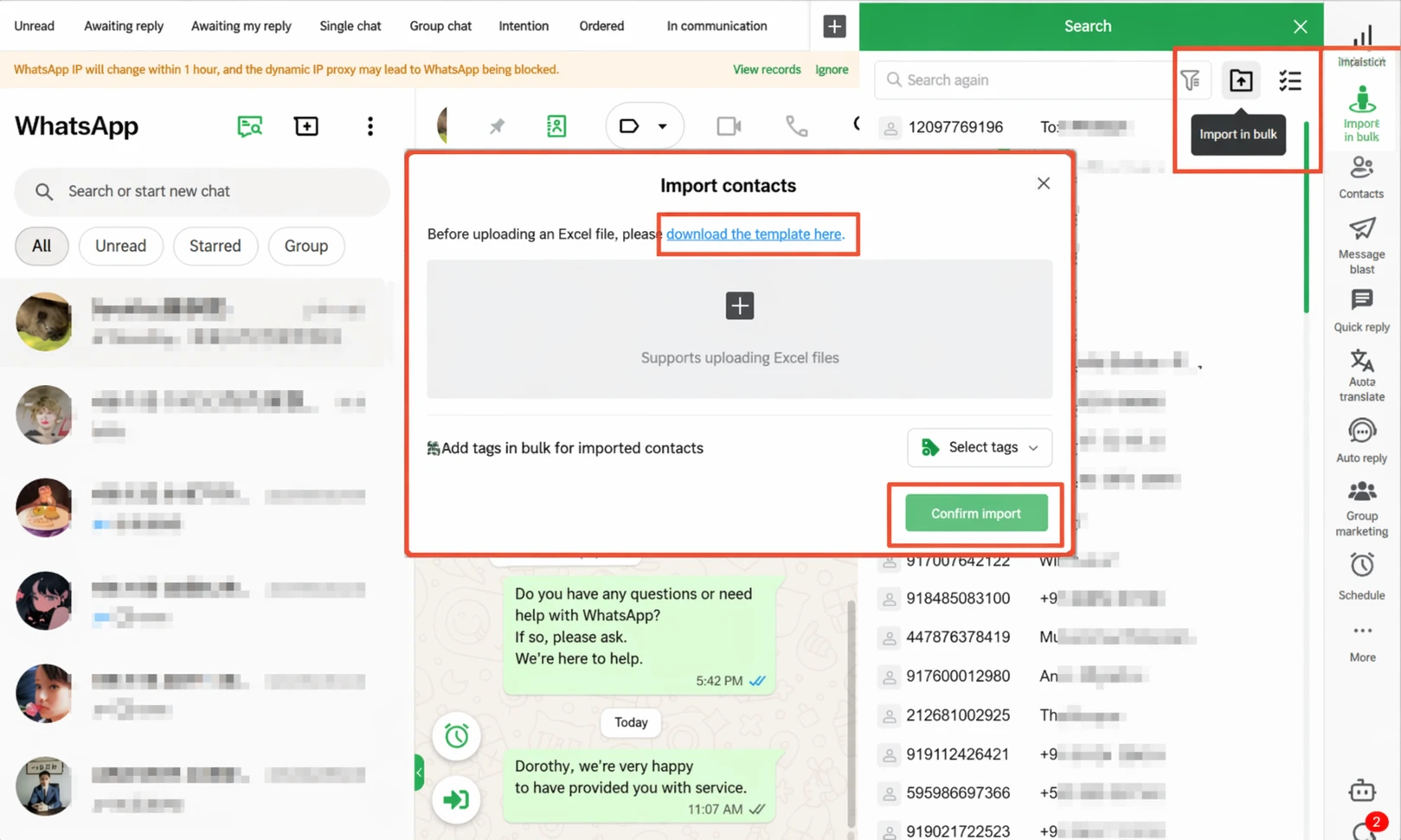
▲ Client value (single-select) + social source (Facebook/LinkedIn/YouTube/TikTok/Email/Alibaba) multi-select + sales stage (single-select)—three independent dimensions, no conflict between them.
Combining the Two Systems: 4 Typical Client Profiles
Combining "Sales Stage" and "Client Value" gives 4 typical client types, each with a different strategy:
| Client type | Stage + value | Follow-up strategy |
|---|---|---|
| High Priority: Core + In Discussion | Important client evaluating | Sales director intervenes, offers differentiated solutions |
| Sure Win: Core + Contracting | Important client about to close | Senior rep manages the close, avoids process errors |
| High Potential: General + Decision-Making | Average client evaluating | Junior rep continues, follows SOP |
| Wake-Up Pool: General + In Discussion (no response 3 weeks) | Signs of dormancy | Trigger 7-day re-engagement, downgrade after 3 no-responses |
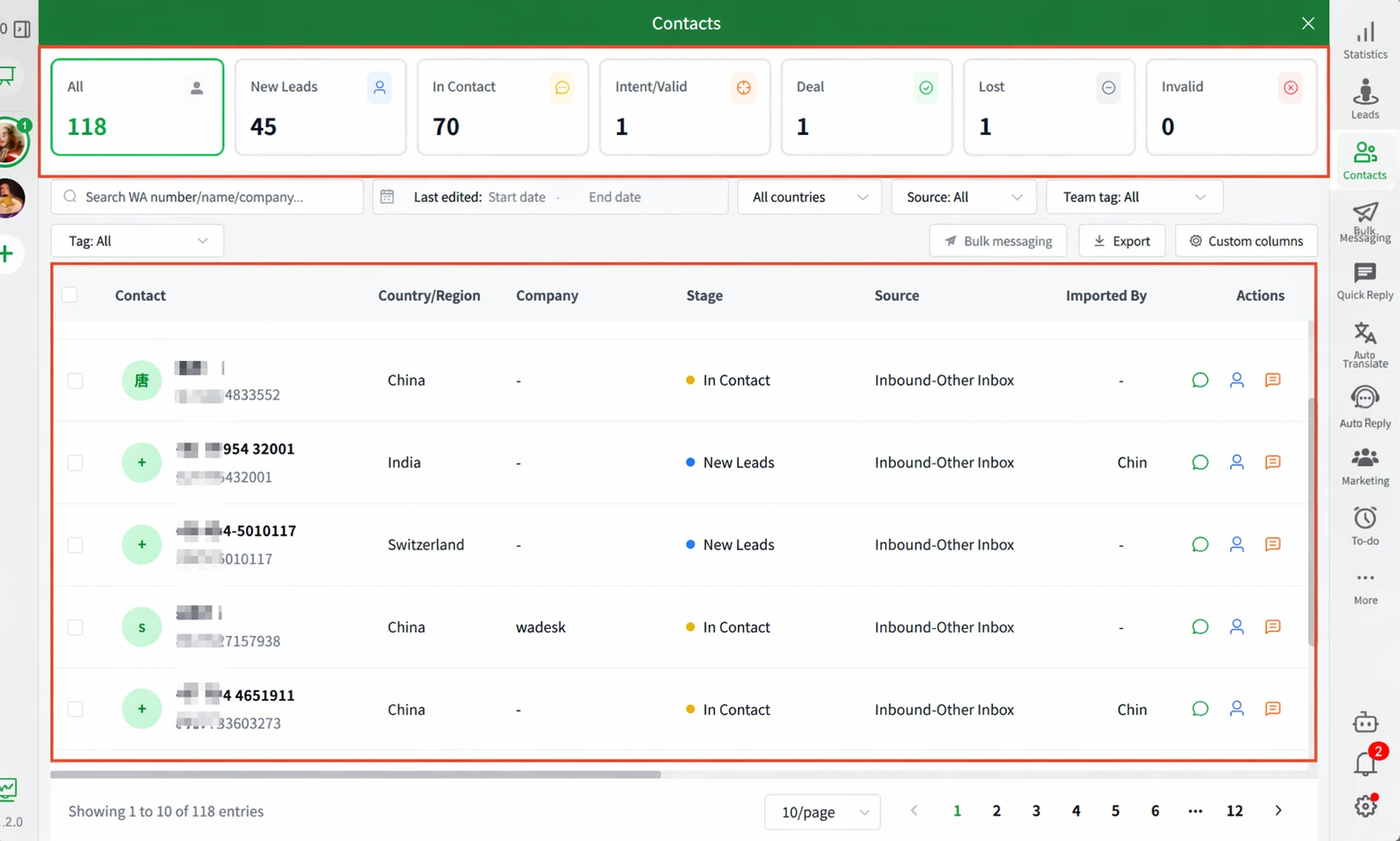
▲ Client list auto-categorized by stage: All 118 / New Lead 45 / In Discussion 70 / Intent 1 / Closed 1 / Lost 1 / Invalid 0. Automatic stats and classification—reps open the dashboard and know who to focus on.
4 Signals for Evaluating Client Value
Client value isn't arbitrary. Here are 4 standard signals:
| Signal | Core | Important | General |
|---|---|---|---|
| Historical purchase total | > $50K | $10K-50K | < $10K |
| Quarterly repeat frequency | Every quarter | 1-2 times/half year | One-off or rare |
| Initiative contact frequency | Proactive inquiries, no marketing push needed | Occasional proactive contact | Entirely rep-driven |
| Referral behavior | Brings in new clients | Occasional referrals | Almost none |
Practical recommendation: Run a "client value review" at the end of each month—adjust value tags based on these 4 signals. Client "value" isn't static—3 months of dormancy may demote "Core" to "General," and one large order can promote "General" to "Important."
Script Strategies for Different Stage Clients
Segmentation isn't just tagging—it's using different scripts for different tier clients. Here's a simplified practical guide:
Stage 1: First Touch → In Discussion (Goal: Build trust)
| Client signal | Response script |
|---|---|
| Client sends first inquiry | Reply within 5 min, self-intro + ask 1-2 use-case questions |
| Client asks "Are you a factory?" | Concise answer + 1 factory photo + 30-sec factory video |
| Client asks "Can you go lower?" | Don't discount directly. Ask: "Are you optimizing for budget or total cost of ownership?" |
Stage 2: In Discussion → Decision-Making (Goal: Differentiate value)
| Client signal | Response script |
|---|---|
| Client quoted, no response 3 days | Send "selection guide / case studies" for value, not chase for price |
| Client asks "How are you better than XX?" | Prepare 3 specific comparison dimensions (not vague "we're good quality") |
| Client says "I'll think about it" | "Sure. When you compare, which dimensions matter most? I can prepare the specific info you need" |
Stage 3: Contracting (Goal: Reduce late-stage drop-off)
| Client signal | Response script |
|---|---|
| Client says "Price is fine but I need to think" | Proactively offer risk-reducing options: trial order / split delivery / payment terms |
| Client hesitates on payment method (T/T vs L/C) | Provide professional recommendations based on amount / region / client type |
| Client delays payment 1 week | Friendly reminder + "We've reserved stock for you for 5 days" urgency |
Stage 4: Closed-Lost (Goal: Long-term wake-up)
| Client signal | Response script |
|---|---|
| Client says "We chose someone else" | Friendly end, 6 months later proactive check-in: "I heard you recently need new product category—would our latest catalog be useful?" |
| Client disappears completely | Don't disturb, 6 months later send "We've launched new products / activities, attached catalog for reference" |
Real-World Data: Conversion Rate Before vs. After Segmentation
Based on actual operations from WADesk customers (illustrative estimates):
| Metric | Before segmentation | 30 days after segmentation | Change |
|---|---|---|---|
| Clients actively followed per rep per day | 25-40 | 15-20 | -50% (cuts dead ones) |
| Follow-up → Quote conversion rate | 8% | 18% | 2.25x |
| Quote → Deal conversion rate | 15% | 22% | +47% |
| Monthly new high-intent clients | 12 | 24 | +100% |
| Dormant client revival rate (quarterly) | 3% | 11% | 3.7x |
Why can follow-up → quote conversion rate improve 2.25x? Because each rep now follows up on only 15-20 clients per day, meaning each client gets sufficient time and proper scripts, instead of 40 clients where 25 get "lost in the noise."
FAQ
Q1: Do I need a CRM system to do segmentation?
Not necessarily. WADesk's tag management + client list works out of the box—no external CRM required. But if you're already using Salesforce/HubSpot or other traditional CRMs, WADesk tags can sync as frontend data automatically—use WADesk as the "automatic collector" for WhatsApp client data, then let your CRM receive structured data.
Q2: How often should I update client "value" tags?
Recommend a month-end client value review. Specific steps:
- Sort by "last 90 days purchase total"
- Top 20% (80% of purchase contribution) → Core
- Next 30% ($1K-5K purchases) → Important
- Remaining 50% (< $1K) → General
- "General" clients with no interaction for 6+ months → demote to "Dormant" or "Archive"
Q3: Who updates the "Sales Stage" tag—reps or sales assistants?
Ideally the rep themselves—only they know the client's actual progress. But in practice, reps often forget to update. Three solutions:
- Weekly Monday morning meeting to review last week's conversations, update stages (simplest)
- Use WADesk's "auto stage detection"—system infers from chat behavior (client asks for price = In Discussion, payment confirmed = Contracting)
- Set stage-change triggers—if "In Discussion" has no response for 14 days, auto-flag as "Dormant" with reminder
Q4: How do I "wake up" dormant clients without being annoying?
Core principle: no proactive contact for 3 months, then use "value delivery" not "product pitch" after that.
- ✅ "We recently published product 5 use-case scenario documents. You mentioned pain point before—would this material be useful for you?"
- ❌ "We have a promotion running, want to take a look?" (too salesy)
8-15% revival rate is normal. Don't expect 50%+.
Q5: Should reps see a "client value leaderboard"?
Yes, but how you use it matters. If the leaderboard becomes "Rep A followed 5 Core clients and closed 4 deals this month"—that's a motivation mechanism. If it becomes "Rep B got 3 client complaints last week"—that's negative punishment. Best practice: Monthly "client value vs. follow-up effect" review—verify Core clients got the highest follow-up priority, dormant clients weren't mistakenly harassed, junior reps didn't over-follow General clients while ignoring Important ones.
📋 Appendix: WhatsApp Client Segmentation Self-Check
Step 1: Subtraction
- Do you know how many "90-day no-interaction" dormant clients you have on WhatsApp?
- Are dormant clients removed from the daily follow-up pool? (Archived to 6-month wake-up list)
Step 2: Stage tags
- Have all active clients been tagged with a "Sales Stage" (First Touch / In Discussion / Decision-Making / Contracting / Closed-Won / Closed-Lost)?
- Have all active clients been tagged with "Client Value" (Core / Important / General)?
- Is client value reviewed and adjusted at month-end?
Step 3: Execution loop
- Do different stage clients use different scripts (not a single template)?
- Do reps update client stages at least once a week?
- Is there a specific owner for the 6-month dormant client wake-up task?
All 12 checked = your client segmentation system is operational. Teams scoring 12/12 see average 30%+ increase in monthly deals within 30 days.
Compliance note: Client segmentation and conversion rate data shown are illustrative estimates based on common operational scenarios. Actual results vary by industry, region, and team configuration.