For many small businesses and individual sellers, providing instant, personalized customer service has become a key factor in improving competitiveness. The WhatsApp AI chatbot is becoming an increasingly popular solution to help businesses automate customer support. With a WhatsApp AI chatbot, businesses can quickly respond to customer inquiries, reduce labor costs, and improve overall service efficiency. However, despite its significant benefits, building and configuring a fully functional WhatsApp AI chatbot can still be a challenge for many small businesses. In this article, we will explore how to build a WhatsApp AI chatbot, the challenges businesses may encounter during the process, and how WADesk simplifies this process, making it easier for businesses to achieve their goals.
How to Build a WhatsApp AI Chatbot
Step 1: Register for a WhatsApp Business Account
The first step in building a WhatsApp AI chatbot is to register for a WhatsApp Business account. With a WhatsApp Business account, businesses can access the WhatsApp Business API and connect it with their chatbot. After completing the registration and verification, businesses can begin further setup and configuration.
Step 2: Choose a Chatbot Platform
To build a WhatsApp AI chatbot, businesses need to choose a chatbot platform. This platform should support WhatsApp API integration and provide chatbot-building tools. Many platforms offer code-based tools to help businesses create their chatbots.
Step 3: Configure the WhatsApp API
Configuring the WhatsApp Business API is a core step in building a WhatsApp AI chatbot. Businesses need to integrate their chatbot with WhatsApp's API, which typically requires some technical configuration, including obtaining an API key, setting up messaging, and configuring notifications.
Step 4: Design the Chatbot’s Conversation Flow
Once the API is configured, businesses can begin designing the chatbot’s conversation flow. This flow should include automatic replies to frequently asked questions, personalized greetings, and responses triggered by specific keywords. The design should ensure the conversation is simple, smooth, and able to efficiently address customer needs.
Step 5: Test and Deploy
After designing the chatbot, businesses need to conduct thorough testing to ensure it responds accurately based on customer inputs. Once testing is complete, the chatbot can be deployed on WhatsApp, and businesses can begin interacting with customers.
How Difficult Is It to Use a WhatsApp AI Chatbot for Small Businesses or Individual Sellers?
Although WhatsApp AI chatbots offer many advantages, small businesses or individual sellers may still encounter some technical challenges during setup. The main challenges include:
- API Integration and Configuration: Many small businesses lack technical staff, and configuring the WhatsApp Business API can seem complicated. Handling the API key setup, connection, and debugging can be challenging for businesses without development experience.
- Documentation and Compliance Requirements: Applying for the WhatsApp Business API requires submitting valid business documents and verification information, which can be a cumbersome process, especially for small businesses without prior experience.
- Cost Issues: While some platforms offer free features, using the WhatsApp API and chatbot services usually requires payment. For small businesses with limited budgets, this can be an important factor to consider.
How WADesk Makes It Easier to Build a WhatsApp AI Chatbot
Despite the technical challenges that may come with building a WhatsApp AI chatbot, WADesk provides a simple and convenient solution for businesses. With WADesk, businesses can easily create and manage their WhatsApp AI chatbot, even without technical expertise.
Simplified API Configuration
WADesk offers an easy WhatsApp API integration process, allowing businesses to connect their chatbots with WhatsApp without needing to dive into complex technical details. This process doesn't require businesses to invest a lot of development resources; WADesk hides the technical complexities in the backend, allowing businesses to focus on their needs and quickly deploy their WhatsApp AI chatbot.
Unified Automatic Reply in the Backend
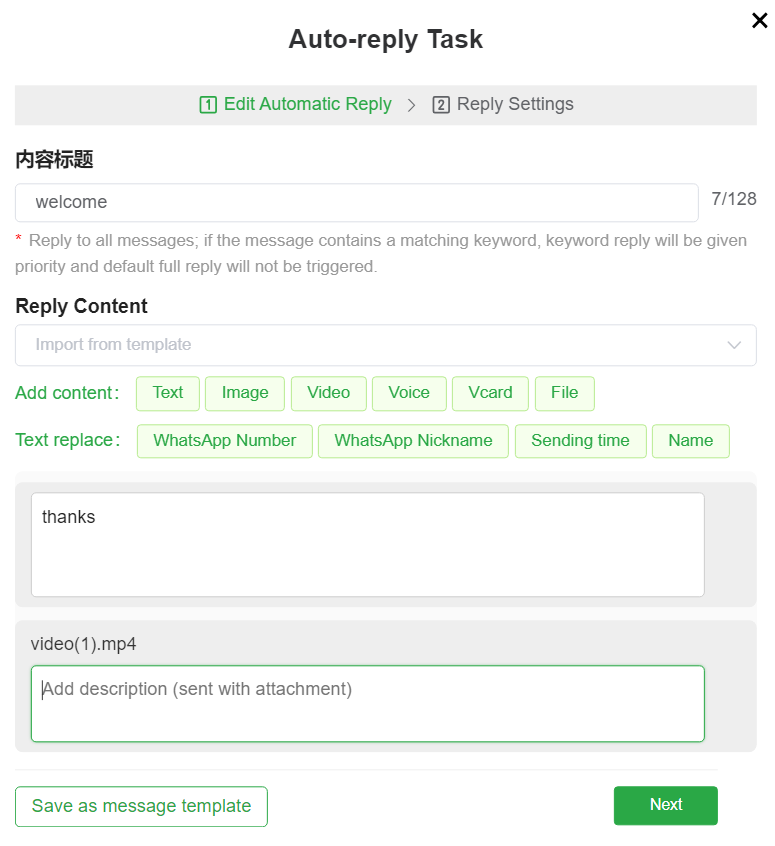
In WADesk’s backend, businesses can set up global automatic replies. This provides standardized templates for team communication, ensuring that customers receive consistent and professional responses whenever they contact the business. With simple settings, businesses can establish standard scripts for all team members to follow, ensuring efficient and uniform customer service.
Keyword-Triggered Responses
The keyword-triggered functionality allows the WhatsApp AI chatbot to respond automatically based on the customer’s input. Businesses can set keywords for common questions, helping customers quickly find the information they need. For example, when a customer types “price” or “discount,” the chatbot can immediately provide relevant product prices or promotions. This automated feature not only speeds up response time but also helps businesses efficiently manage a large volume of customer inquiries.
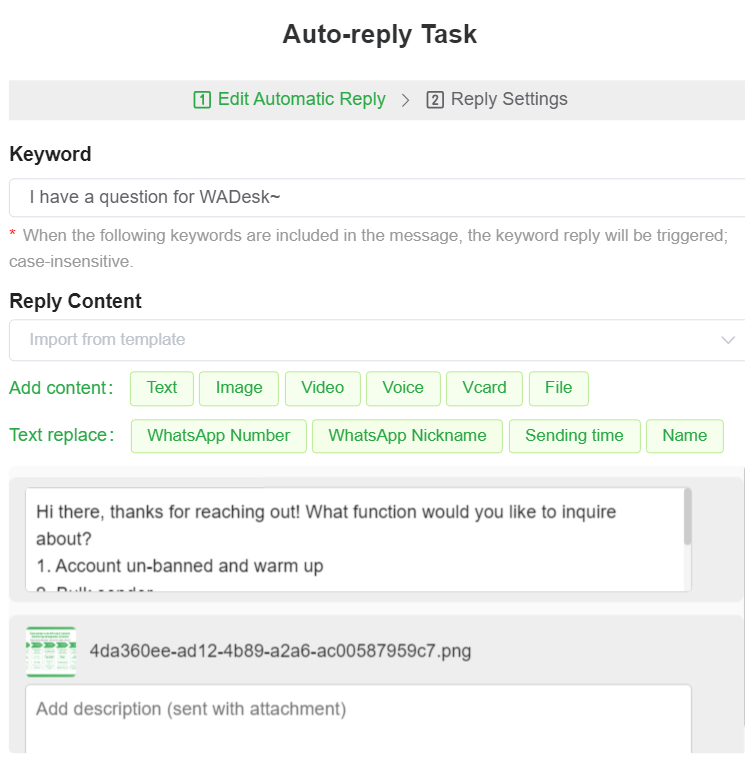
WADesk Chatbot Translation Feature
In addition to standard automated replies, WADesk provides a translation feature for the WhatsApp AI chatbot, helping businesses overcome language barriers and serve customers globally. With WADesk, businesses can translate the chatbot’s automatic replies into multiple languages, ensuring that customers speaking different languages can receive timely assistance.
Multilingual Support
WADesk’s translation feature supports automatic translation into multiple languages. Businesses can easily set up their chatbots to translate customer messages in different languages. For instance, if a customer sends a message in Chinese, the chatbot can automatically translate it into English or another language, ensuring that no matter what language the customer uses, they will receive a timely and accurate response.
Enhance Global Customer Service
By leveraging WADesk's translation feature, businesses can provide better service to their global customers. This not only improves cross-language communication efficiency but also offers more personalized and attentive support for customers in different regions. This feature is particularly beneficial for small businesses targeting international markets, allowing them to respond to customer needs in various languages, thereby enhancing the customer experience.
WhatsApp CRM Integration
Another key feature of WADesk is its CRM integration, allowing businesses to manage all customer interactions seamlessly. With WhatsApp CRM, businesses can track customer conversations, store customer data, and gain valuable insights into customer behavior. This integration enables businesses to offer more personalized and effective customer support, making it easier to follow up with leads and customers. The WADesk CRM ensures that every customer interaction is recorded, allowing businesses to provide better service and improve customer retention over time.
Quick Deployment and Management
WADesk offers an intuitive user interface that allows businesses to easily design and adjust their chatbot’s conversation flow, ensuring it meets customer needs and can be modified at any time. With WADesk's easy-to-use tools, businesses can deploy their WhatsApp AI chatbot without the need for complex development processes, achieving quick implementation.
Save Time and Costs
Through WADesk, businesses can save development time and costs while easily building their WhatsApp AI chatbot without technical staff, thus improving customer service and operational efficiency. The automated customer service process reduces the dependency on human agents, increasing response speed and customer satisfaction while freeing up more resources for business expansion.
Conclusion
Although small businesses and individual sellers may face technical challenges when setting up a WhatsApp AI chatbot, choosing the right platform and tools can significantly simplify the process. With WADesk, businesses can bypass complex technical steps, quickly create and manage their own WhatsApp AI chatbot, and focus on enhancing customer service and driving business growth. Moreover, WADesk's translation feature helps businesses break language barriers and provide more efficient and personalized services to global customers. By utilizing this feature, businesses can improve their interactions and customer satisfaction without language constraints. Additionally, the WADesk CRM integration allows businesses to streamline customer management and boost customer retention, making it easier than ever to deliver exceptional customer service.
Want to learn more about foreign trade?
WhatsApp unblocking/Unofficial/Unable to receive verification code?
What are WADesk's anti-blocking mechanisms and key features?
Scan the QR code to join the group, let's exchange ideas and make money together!