As Meta continues to tighten account risk control and compliance policies, WhatsApp account bans are becoming increasingly common. Once an account is banned, chat history, customer data, and follow-up records can be lost instantly. For this reason, knowing how to backup WhatsApp chat history is no longer optional, especially for users and teams that rely on WhatsApp for business communication. This guide explains how to backup WhatsApp chats, the limitations of native backup methods, and how a more secure solution like WADesk helps protect and inherit your WhatsApp chat data.

Native Methods to Backup WhatsApp Chat History
Before discussing third-party solutions, let’s first look at the official WhatsApp chat backup methods. This is usually the first way most users learn to backup WhatsApp chat history.
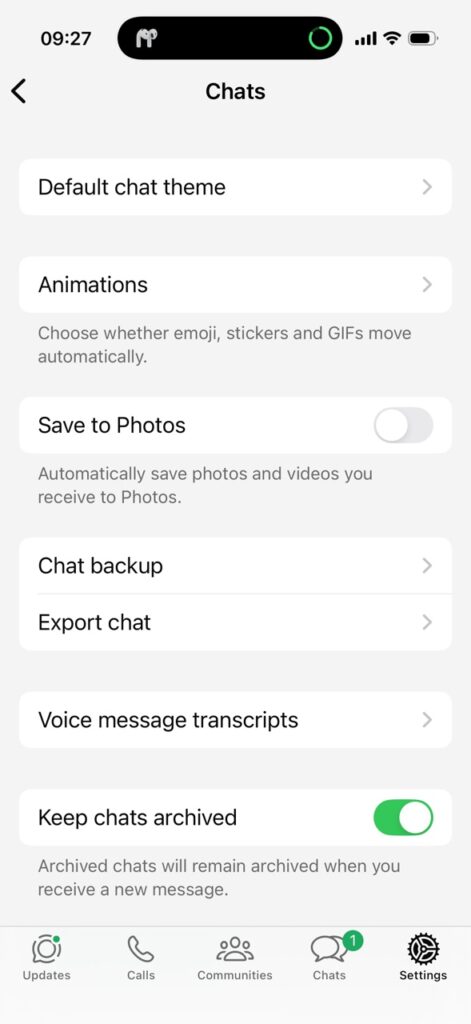
Automatically Backup WhatsApp Chat via Cloud Storage
WhatsApp natively supports backing up chat history to cloud storage:
- Android users can backup WhatsApp chats to Google Drive
- iPhone users can backup WhatsApp chats to iCloud
The typical path is:
WhatsApp → Settings → Chats → Chat Backup
You can configure the automatic backup frequency (daily, weekly, or monthly) and choose whether to include media files such as images, videos, and voice messages. This is the most basic and widely used method to backup WhatsApp chat history.
Limitations of Native WhatsApp Chat Backup
Although the official backup method may seem “safe and convenient,” its weaknesses become very obvious in real-world scenarios.
❌ Chat history is almost impossible to recover after an account ban
Once a WhatsApp account is permanently banned, even if you have previously backed up WhatsApp chat history:
● You can no longer log in to the account
● The backup file cannot be restored
● Customer chat history is effectively and permanently lost
❌ WhatsApp chat history cannot be inherited by a new account
Native WhatsApp chat backup is tightly bound to the phone number and account identity.
Changing numbers or registering a new account does not allow you to inherit previous WhatsApp chat history.
❌ Not suitable for teams or businesses
● Employee chat records are stored on individual devices
● Managers cannot centrally view or backup WhatsApp chats
● Employee resignation = immediate loss of customer chat assets
For foreign trade, private traffic, customer service, and sales teams, relying solely on native methods to backup WhatsApp chat history involves extremely high risk.
The Need for a More Professional WhatsApp Chat Backup Solution
If you fall into any of the following situations, it is strongly recommended to upgrade your WhatsApp chat backup method:
● Using WhatsApp for customer acquisition, deal closing, or after-sales support
● Multiple team members using separate or shared WhatsApp accounts
● Concerned about employees leaving with customer chat history
● Worried about account bans causing permanent loss of customer data
● Want chat history to be stored long-term, searchable, and inheritable
In these cases, a third-party, system-level solution to backup WhatsApp chat history is far more reliable than native backups.
Automatically Backup WhatsApp Chat History with WADesk (Recommended)
WADesk is a WhatsApp management and CRM system designed for individual sellers, foreign trade teams, and marketing teams, offering clear advantages when it comes to backup WhatsApp chat data.
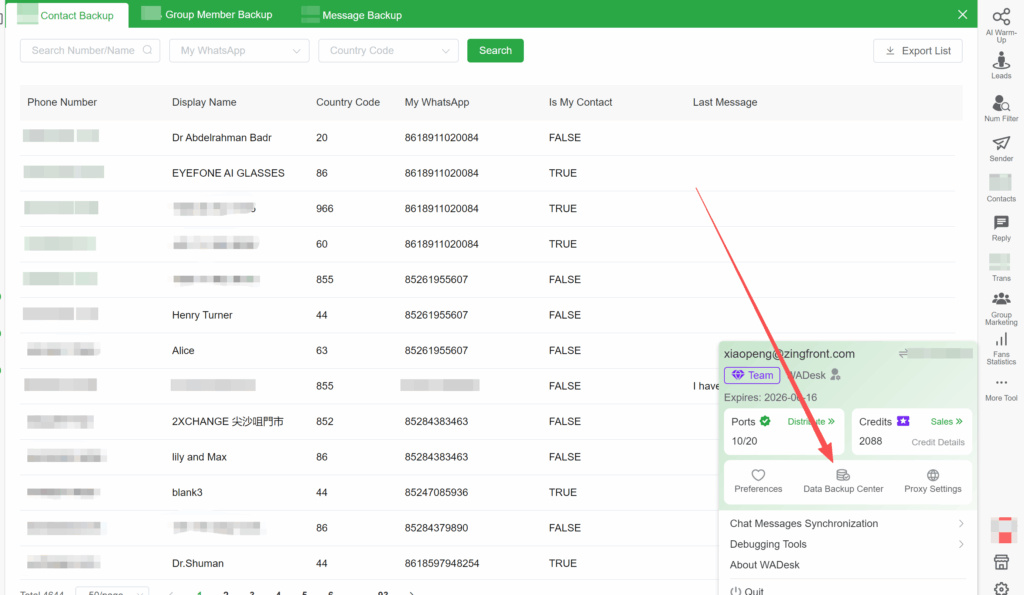
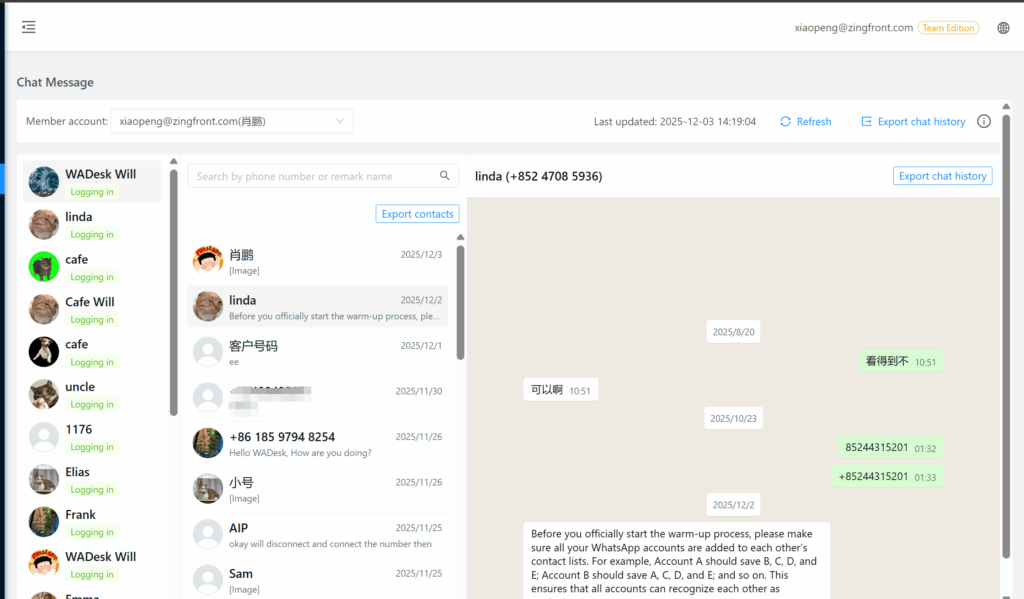
Automatic Backup of WhatsApp Chats and Contacts After Login
Unlike native backups, WADesk works in a very simple and direct way:
👉 As long as you log your WhatsApp account into the WADesk system, chat history starts backing up automatically.
● No manual operation required
● No dependence on local phone storage or cloud services
● Chats are synchronized and backed up in real time, even if the customer deletes messages
● Any contact that has interacted with your account can be backed up and exported
This truly enables you to chat and backup WhatsApp chat history at the same time.
Full Media Backup for WhatsApp Chats
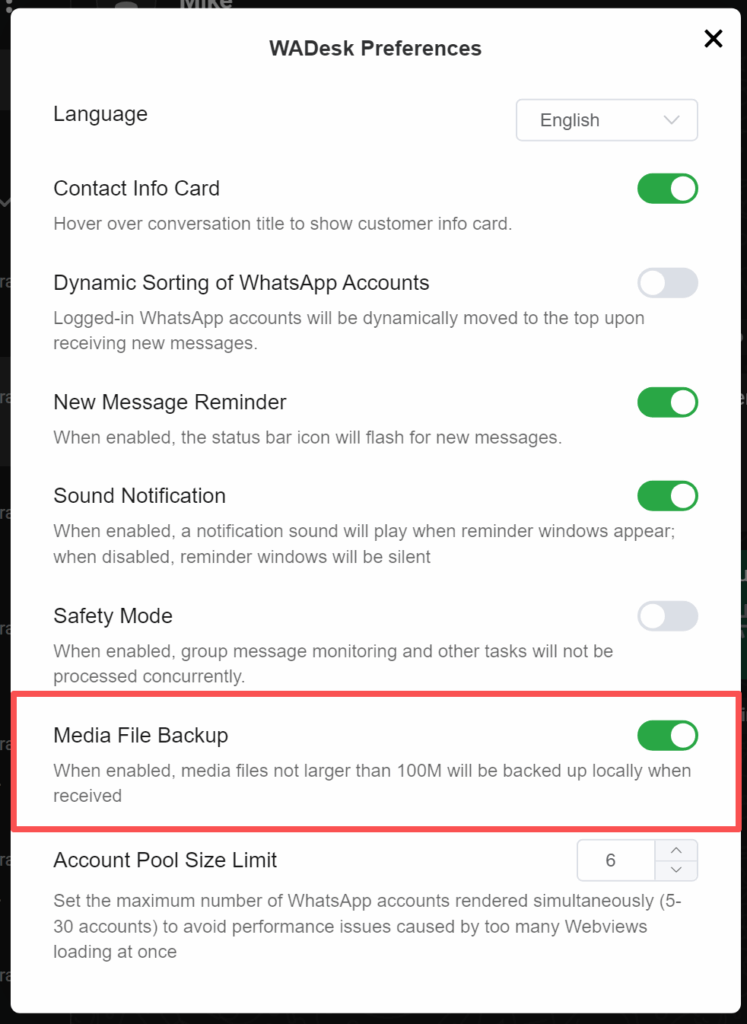
Many native WhatsApp chat backups do not reliably include media files. WADesk fully supports backing up:
● Images
● Videos
● Voice messages
All media files are backed up together with chat history and stored locally, ensuring complete and intact customer communication records.
Chat History Inheritance to Reduce Ban and Turnover Risk
One of WADesk’s most important strengths in backup WhatsApp chat history is its ability to preserve and inherit data:
● Even if a WhatsApp account is permanently banned
● Even if an employee leaves the company
● Even if a new WhatsApp account is used
👉 Historical chat records remain stored in WADesk’s contact module and can continue to be viewed and inherited.
Customer data no longer disappears with accounts or employees.
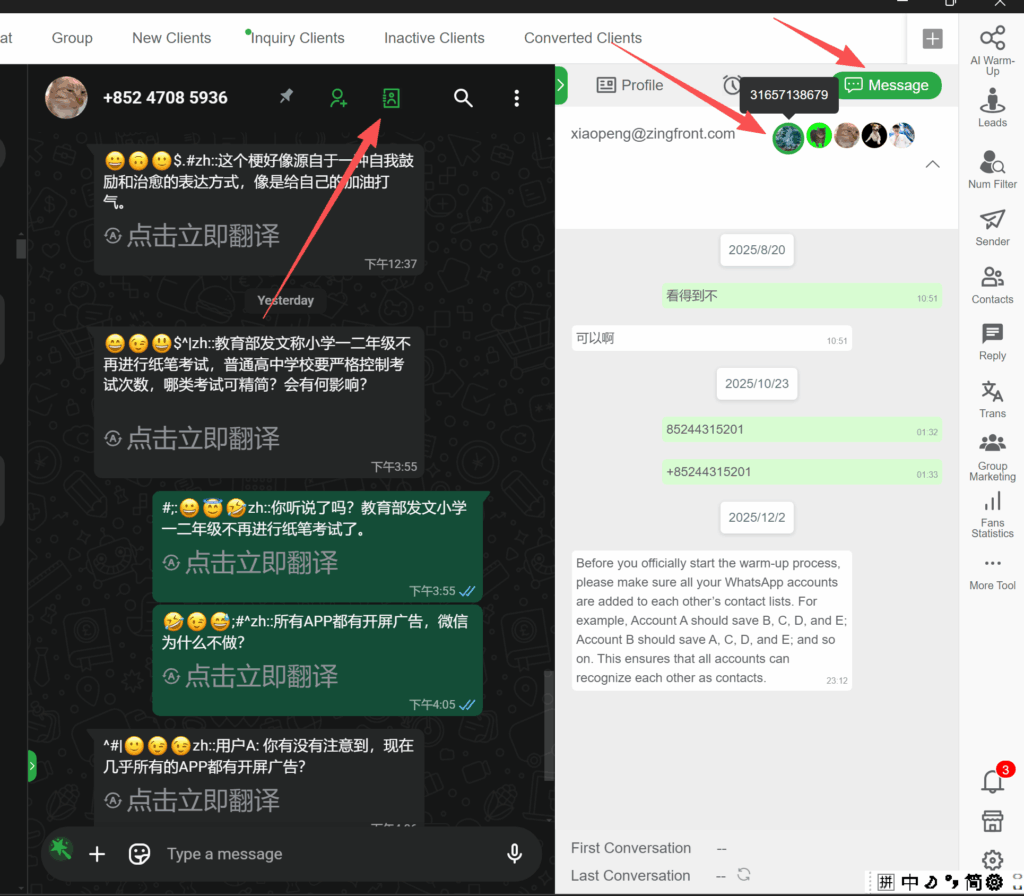
Centralized WhatsApp Chat Backup for Teams
For team users, WADesk supports centralized synchronization of all employees’ WhatsApp chats:
● Sync all employees’ WhatsApp chat history
● Team administrators can view chats at any time from the backend
● Unified backup and centralized management
● Prevent private deals, unauthorized transfers, and customer loss
This is especially critical for foreign trade companies, cross-border eCommerce teams, and customer support centers.
Native WhatsApp Backup vs WADesk WhatsApp Chat Backup
| Comparison Item | Native WhatsApp Backup | WADesk |
|---|---|---|
| Automatic backup | ✔️ | ✔️ |
| Media file backup | ❌ Unstable | ✔️ Fully supported |
| Chat history inheritance | ❌ | ✔️ |
| Centralized team management | ❌ | ✔️ |
| Protection against employee turnover | ❌ | ✔️ |
Backup WhatsApp Chat History Early for Maximum Security
In today’s environment where WhatsApp account bans are increasingly common, backup WhatsApp chat history is no longer optional—it is essential.
● Individual users: at minimum, enable native WhatsApp chat backup
● Business and team users: must adopt a more reliable, system-level WhatsApp chat backup solution
If you want to avoid:
● Losing all customers due to a single account ban
● Losing chat assets when employees leave
● Being forced to start from zero because chat history cannot be inherited
Then using WADesk to plan your WhatsApp chat backup strategy in advance is the most responsible choice for your business.
If you want to avoid losing customers due to a single account ban, staff turnover, or non-transferable data, using WADesk to plan your WhatsApp chat backup strategy in advance is the most responsible approach for your business.
Don’t wait until you lose your chat history to regret it. If you’re interested, feel free to contact Will to start securing your WhatsApp chat backup today!
【WhatsApp】:https://wa.me/8618911020084
【Telegram】:https://t.me/WADesk_Will
Want to learn more about foreign trade?
WhatsApp unblocking/Unofficial/Unable to receive verification code?
What are WADesk's anti-blocking mechanisms and key features?
Scan the QR code to join the group, let's exchange ideas and make money together!