

200 Business Cards From a Trade Show, Only 30 WhatsApp Leads?
Lisa runs a home goods export team and went to Germany for a trade show last month. Her 4-person team met 50+ customers per day. At the booth, she had every sales rep hand out their own WhatsApp contact card. Over 4 days, they collected 200+ business cards. The first thing back at the office was "add these customers to WhatsApp."
The result was brutal —
- Each of the 4 sales reps did their own adding; it took a full week to add just 30 customers
- The remaining 170 business cards sat in a drawer, never followed up on
- Even for the 30 customers they did add, no one knew which sales rep added them, which channel they came from, or how commissions should be calculated
- The sales reps started arguing — "I talked to this customer at the booth" / "No, I added them first"
Lisa realized the problem wasn't "how to add on WhatsApp" — it was "how to attribute after they're added." What she needed wasn't a QR code generator; she needed a "scan-to-attribute" lead-acquisition workflow.
Why Single-QR-Code Mode Always Fails
The first instinct of many teams is — make one WhatsApp QR code, stick it on the booth, the poster, the business card, the website. Technically fine, but logically it buries three landmines:
Landmine 1: Attribution Is Completely Broken
All customers get added to the same number, you can't tell whether this customer came from the trade show, the website, or a business card. All subsequent customer segmentation, targeted broadcasts, and ROI review become impossible.
Landmine 2: Customer Ownership Is Unclear
Once a customer is added, who owns them? Sales rep A or sales rep B? Ownership without rules is the start of finger-pointing. Performance reviews, commission calculation, and handover when someone leaves all become disasters.
Landmine 3: Single-Number Capacity Ceiling
A single WhatsApp number can only hold so many friends (the cap isn't low, but in practice, beyond 5,000 contacts, message delivery speed noticeably suffers). Single-number mode inevitably hits a capacity ceiling at scale.
After serving 30+ export teams, we summed up one rule: "Getting added" isn't the finish line; "landing with the right person" is the start. A single QR code solves the entry problem, but the attribution, follow-up, and performance review chain is what determines whether lead-acquisition spend becomes revenue.
Multi-QR Split Routing: One QR Code Per Sales Rep
One-line takeaway: Generate one independent QR code per sales account — after a customer scans, the message goes directly to that sales rep, and replies from all accounts aggregate into the team inbox — attribution, follow-up, and performance review are all wired through.
        Customer Scan Entry
              │
   ┌──────────┼──────────┐
   │          │          │
Sales A    Sales B    Sales C    ← Each with independent QR + independent WhatsApp
   │          │          │
   └──────────┼──────────┘
              │
              ▼
        WADesk Team Inbox   ← All conversations aggregated into one interface
              │
              ▼
     Sales Follow-Up / Admin View / Data Attribution
WADesk's QR code split-routing module delivers a complete implementation of this chain:
| Step | Action | Output |
|---|---|---|
| 1 | Generate independent QR code per sales account in WADesk client | Each account has its own QR code image (custom logo, copy) |
| 2 | Distribute QR codes to corresponding channels (Sales A's business card, Sales B's booth poster, website landing pages split by region) | After scanning, customers land in the assigned account |
| 3 | Customer messages enter the corresponding account's WhatsApp | WADesk inbox synchronously pulls all accounts' conversations |
| 4 | Sales reps see "my customers" in the inbox | Follow-up, replies, broadcasts all done in that interface |
| 5 | Admins view per-account lead-acquisition data in the dashboard | Who's strong at acquisition, which channels convert best — clear at a glance |
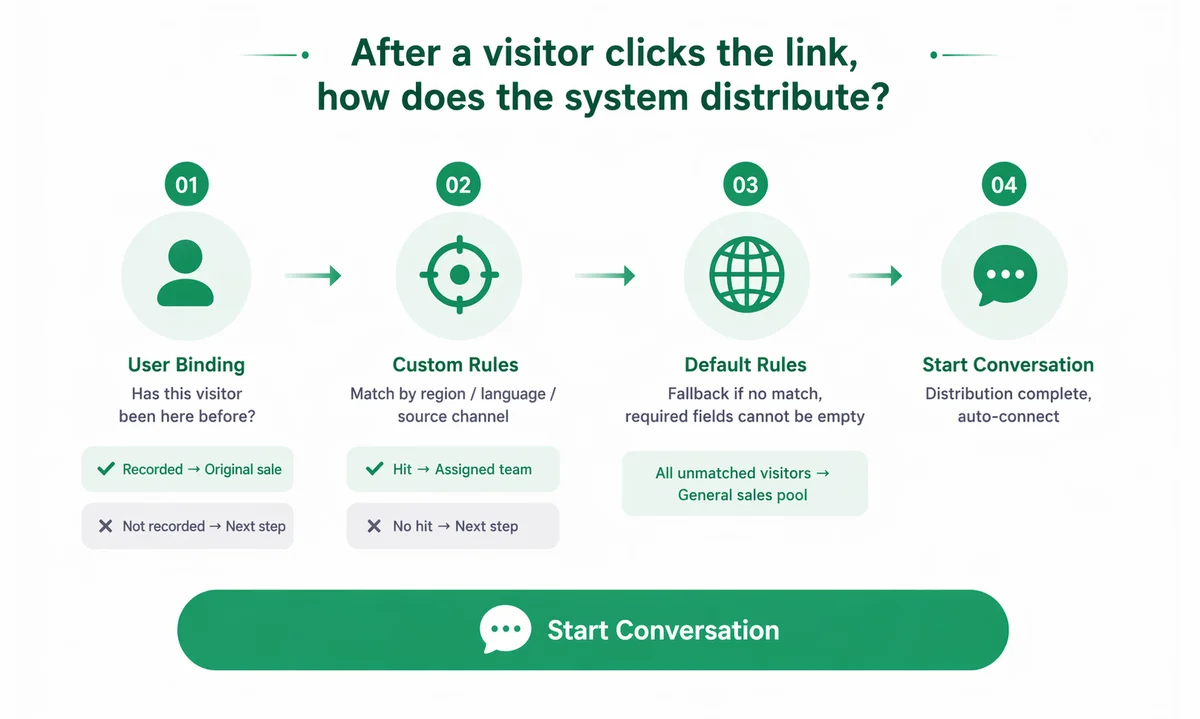
Key Design 1: QR Codes Are Independently Configurable
Each sales rep's QR code can be independently configured:
- Welcome message: Customer automatically receives a welcome message after scanning ("Hi, I'm Sales Rep A, happy to serve you")
- Attached parameters: Auto-tag the customer as "show-SalesA-2026-07" for later segmentation
- Trackable link: Behind the QR code is a short link that can track scan count, time, and region
Key Design 2: Auto-Aggregation Into the Team Inbox
Customers land in Sales Rep A's number, but Sales Rep A doesn't have to stare at their own number all day — WADesk's team inbox syncs all accounts' conversations into one interface (see WhatsApp Team Inbox Collaboration). Sales Rep A sees "all conversations on my account"; the admin sees "all conversations across the team."
Key Design 3: Link With Split-Tracking Links
If your lead-acquisition channels already use split-tracking links (e.g., Google Maps, Facebook ads, email signatures), you can have one channel per sales rep. For example:
- Google Maps channel → Sales A's QR code
- Facebook ads → Sales B's QR code
- Trade show poster → Sales C's QR code
Which channel a customer came from, which sales rep they belong to, the entire chain is crystal clear. This mechanism was covered in detail in 3 Costly WhatsApp Lead-Gen Mistakes — multi-QR takes "channel attribution" all the way down to the physical layer.
Lisa's Reworked Workflow
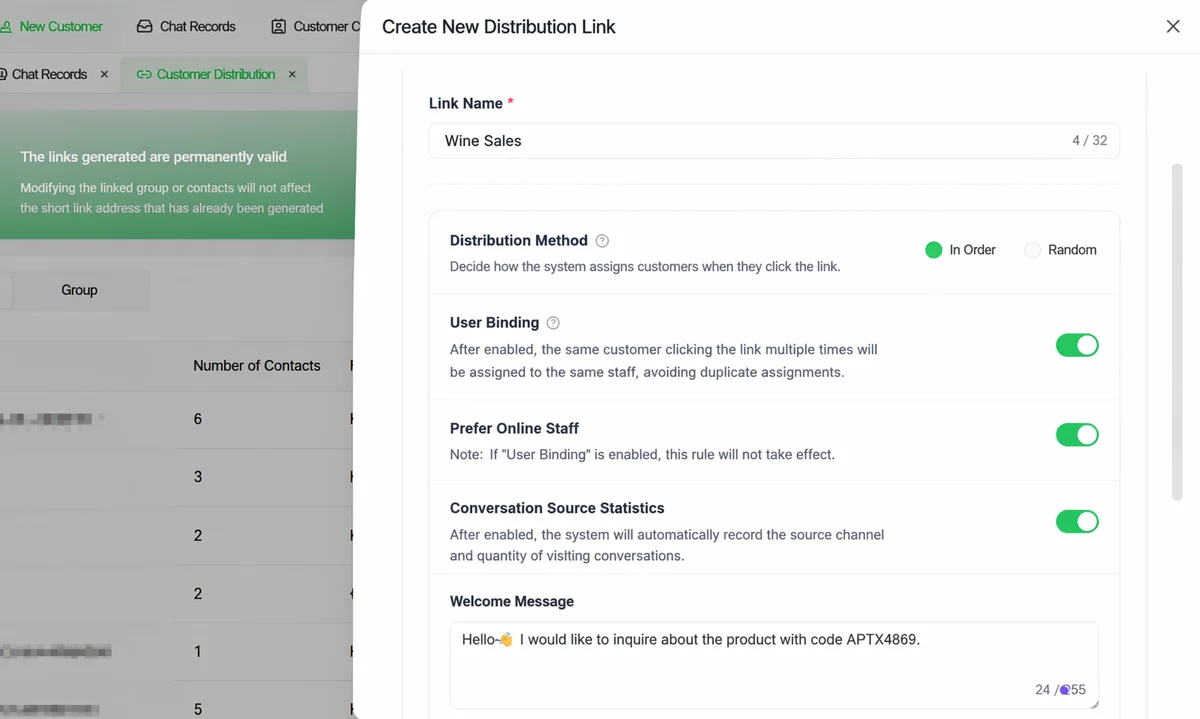
Lisa redesigned the trade show flow. Each of her 4 sales reps got a WADesk sub-account, with each account tied to an independent QR code:
| Dimension | Before (Single Number) | After (Multi-QR Split Routing) |
|---|---|---|
| Trade show customer add-to-WhatsApp conversion | 30/200 = 15% | 180/200 = 90% (customers scan on the spot) |
| Post-add ownership clarity | Whole company squabbles | Zero squabbles (auto-assigned to the sales rep whose QR was scanned) |
| Sales commission accounting | Manual reconciliation at month-end, 3 days to complete | 30-second export (auto-calculated by QR-bound account) |
| Customer follow-up response speed | ~4 hours average | 18 minutes (inbox aggregation, high follow-up efficiency) |
| Customer churn rate (30 days no follow-up) | ~40% | < 15% (estimated from internal observation) |
Data is estimated from Lisa's team internal observation, for illustration.
The most unexpected win was that sales reps stopped fighting over customers — because of the unclear ownership, the 4 reps would "collide on leads" at the booth. Now each rep has their own QR code, the customer is auto-assigned to them from the moment of the scan, and performance review is clear and transparent.
4 Practical Steps to Deploy Multi-QR Split Routing
Step 1: Open Independent Sub-Accounts for Each Sales Rep
In the WADesk client, log each sales rep into an independent WhatsApp sub-account (the multi-open architecture supports 50+ accounts). Each account is an independent "lead entry."
Step 2: Generate and Configure QR Codes
Enter the "QR Code Management" module → select the corresponding sales account → configure welcome message + customer tags → generate the QR code image (supports PNG/SVG download).
Step 3: Distribute to Corresponding Channels
- Business cards: Print that sales rep's QR code on the back of their card
- Trade show posters: Large QR code + short call-to-action ("Scan to add your dedicated rep")
- Website landing pages: Split by region/language/product into different QR codes
- Social media: Instagram and TikTok bios host the corresponding sales rep's QR code
Step 4: Follow Up + Attribute
After a customer scans, the message enters the corresponding account and syncs to the WADesk inbox. Sales follow up, admins view attribution — the entire chain lives inside one system.
Frequently Asked Questions
Q1: How do I generate a WhatsApp QR code?
The simplest way is in the WhatsApp client, "Settings → Linked Devices → Show QR code," but that only generates a code for the current account. To do multi-account split routing, you need to generate independent QR codes for each sub-account in WADesk, and configure welcome messages, tags, and trackable parameters.
Q2: Can I switch sales reps after a customer scans?
Technically yes, but it's not recommended right after the customer adds you — it disrupts the first impression and trust. If a switch is genuinely needed (e.g., the original rep leaves, follow-up team changes), WADesk supports one-click handover of a customer to another sales account, with the full chat history preserved (see WhatsApp CRM Customer Protection).
Q3: How do I manage multiple sales accounts?
The WADesk client supports 50+ WhatsApp accounts logged in on one machine (multi-open architecture stable). All accounts' QR codes, conversations, and broadcast progress are visible in one interface — admins don't need to log in one by one.
Q4: What's the difference between QR codes and split-tracking links?
QR codes are mainly for offline scenarios (trade shows, posters, business cards, outdoor ads) — customers scan with their phone camera. Split-tracking links are mainly for online scenarios (email signatures, social media ads, website buttons) — customers click the link. The two can be linked within the WADesk system — the same sales rep can have both a QR code (offline) and a split-tracking link (online).
Q5: How soon after a scan does the customer get the welcome message?
WADesk by default sends the welcome message 5-15 seconds after a customer scans. The interval is configurable (0-60 seconds); we recommend keeping it short for a better customer experience.
Q6: Can I add tracking parameters behind the QR code?
Yes. WADesk's QR codes support binding a short link, auto-tracking scan count, scan time, and scan region. This data feeds into the WADesk analytics dashboard (see WhatsApp Sales Dashboard) for channel attribution and ROI review.
Q7: How does QR code work with Google Maps lead generation?
Customers dug up from Google Maps can be sent a "add on WhatsApp" link (with split-routing parameters) directly from the WADesk client; clicking takes them to the corresponding sales account. The full flow is detailed in How to Mine WhatsApp Leads From Google Maps.
Closing Thought
A QR code is not "a shortcut to add a friend" — it's "the physical entry point for lead attribution."
One QR code can't solve attribution. Ten QR codes, combined with a team inbox and a data dashboard, can fully wire the chain from "acquisition → follow-up → conversion." When a customer is auto-assigned to the right sales rep from the moment of the scan, the entire team's lead-acquisition efficiency jumps a level.
WADesk's QR code split-routing module is designed exactly for this chain — one code per sales rep, one code per channel, one code per dataset. Configure once, benefit for the long term.