

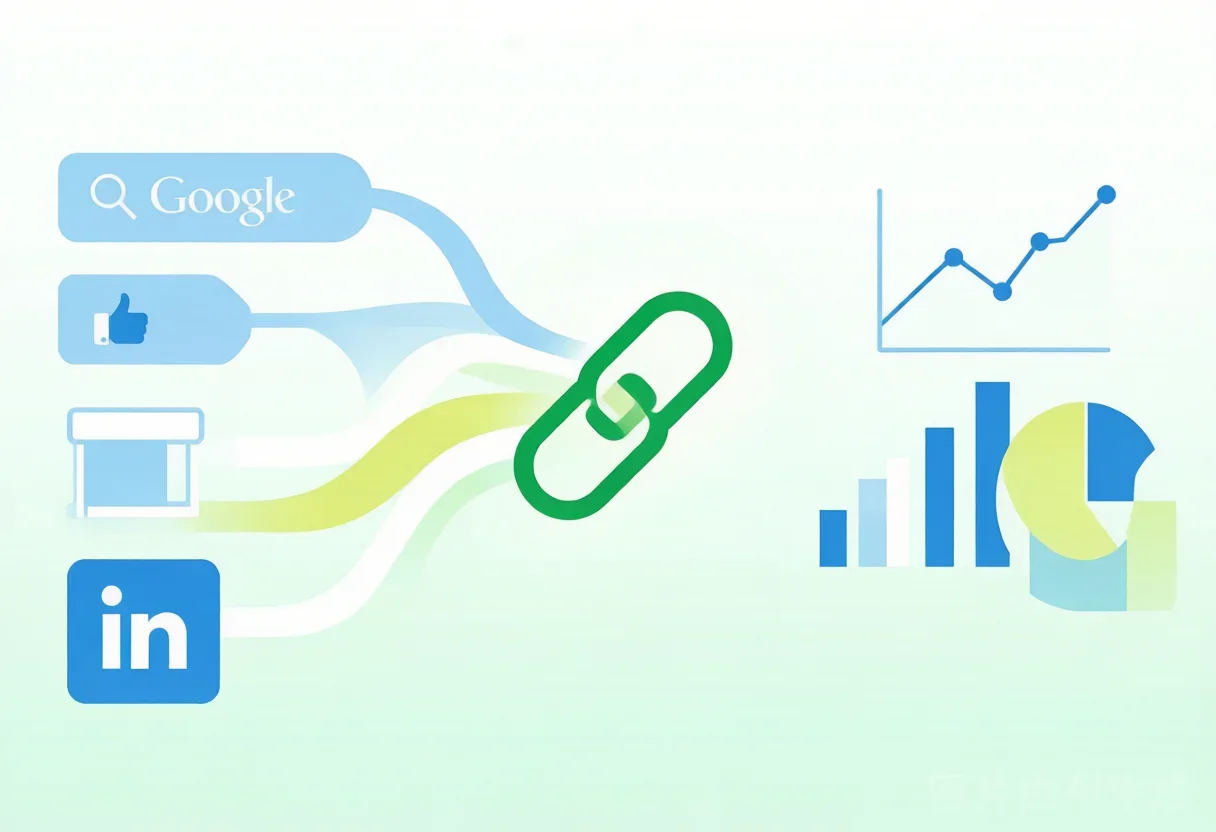
The Problem: "My WhatsApp inbox is growing, but I don't know where from"
A B2B electronics exporter in Shenzhen was spending over $80,000 a year on Google Ads, Facebook, LinkedIn, and overseas trade shows. By the end of 2025, they had accumulated over 4,000 WhatsApp contacts. On the surface, things looked great.
But their owner couldn't answer three simple questions:
- How many Google Ads leads actually converted? — No idea
- What was the cost per lead from Facebook? — No idea
- Did trade show visitors have the highest close rate? — No idea
"Every channel looks like it's working, and every channel seems to be bringing in leads. But which one actually gives us the best return? We're completely in the dark."
This isn't unusual. Most trade teams use a single WhatsApp number to catch all traffic—a trade show attendee scans the same QR code, an ad clicker lands on the same number, a LinkedIn prospect messages the same account. All leads are mixed together. You only know "we got 4,000 contacts" but not which channel each came from, which ones are worth doubling down on, and which ones are burning budget.
The result: good channels stay underfunded, bad channels quietly drain your budget.
Why "One Number for All Traffic" Kills Your ROI Visibility
Relying on one WhatsApp number for all channels creates three core blind spots.
Blind spot 1: No source attribution
When all leads come through one account, you see "1,200 new contacts this quarter" but have zero data to attribute them to specific campaigns, channels, or regions. Your next budget allocation is based on gut feel—"I think Google Ads is doing okay, let's throw another $15K at it."
Blind spot 2: ROI is a guessing game
| Scenario | Channel A (Google Ads) | Channel B (Facebook) | Channel C (Trade Show) |
|---|---|---|---|
| Budget (quarterly) | $20K | $10K | $15K (incl. booth) |
| New WhatsApp contacts | Unknown | Unknown | Unknown |
| Converted deals | Unknown | Unknown | Unknown |
| ROI | Guess | Guess | Guess |
Every cell in the table is blank—because you have no way of tracking which channel sent which lead.
Blind spot 3: No accountability for response time
With all leads pooled into one account, every inquiry lands on the same sales rep's screen. A high-intent lead from a Google ad search sits in exactly the same queue as a casual browser from social media. The sales rep responds to whoever pings them first, not whoever has the highest conversion potential.
WADesk Split Links: Turn Every Channel Into a Measurable Funnel
WADesk split links (WALink) solve the attribution problem with a simple principle: give every traffic source its own door, then let the data tell you which door is printing money.
How split links work
A split link looks like any regular URL—click it, and it opens WhatsApp automatically. But WADesk's split links have three levels of capability:
Level 1: Create up to 10 independent links
Each split link can be configured independently:
| Setting | What it does | Example use case |
|---|---|---|
| Target account | Which WhatsApp account the visitor lands on | Channel A → Sales rep 1, Channel B → Sales rep 2 |
| Country routing | Only visitors from specified countries are accepted | Europe traffic → English rep, Middle East → Arabic rep |
| Channel tag | Label for source attribution | "google-ads-q3" / "canton-fair-oct" / "fb-campaign-A" |
| Default message | Auto-sent welcome message on first interaction | "Thanks for reaching out! I'm your dedicated account manager." |
Level 2: Automatic source tracking
When a lead clicks a split link, WADesk automatically logs:
- Total clicks for this link
- How many clicked users added the WhatsApp contact
- Whether they started a conversation within 7 days
- Which sales rep they were routed to
All data is grouped by link—no manual tagging needed.
Level 3: Data dashboard with side-by-side comparison
The admin dashboard displays performance data for all split links in one view—clicks, adds, and conversion rate per link.
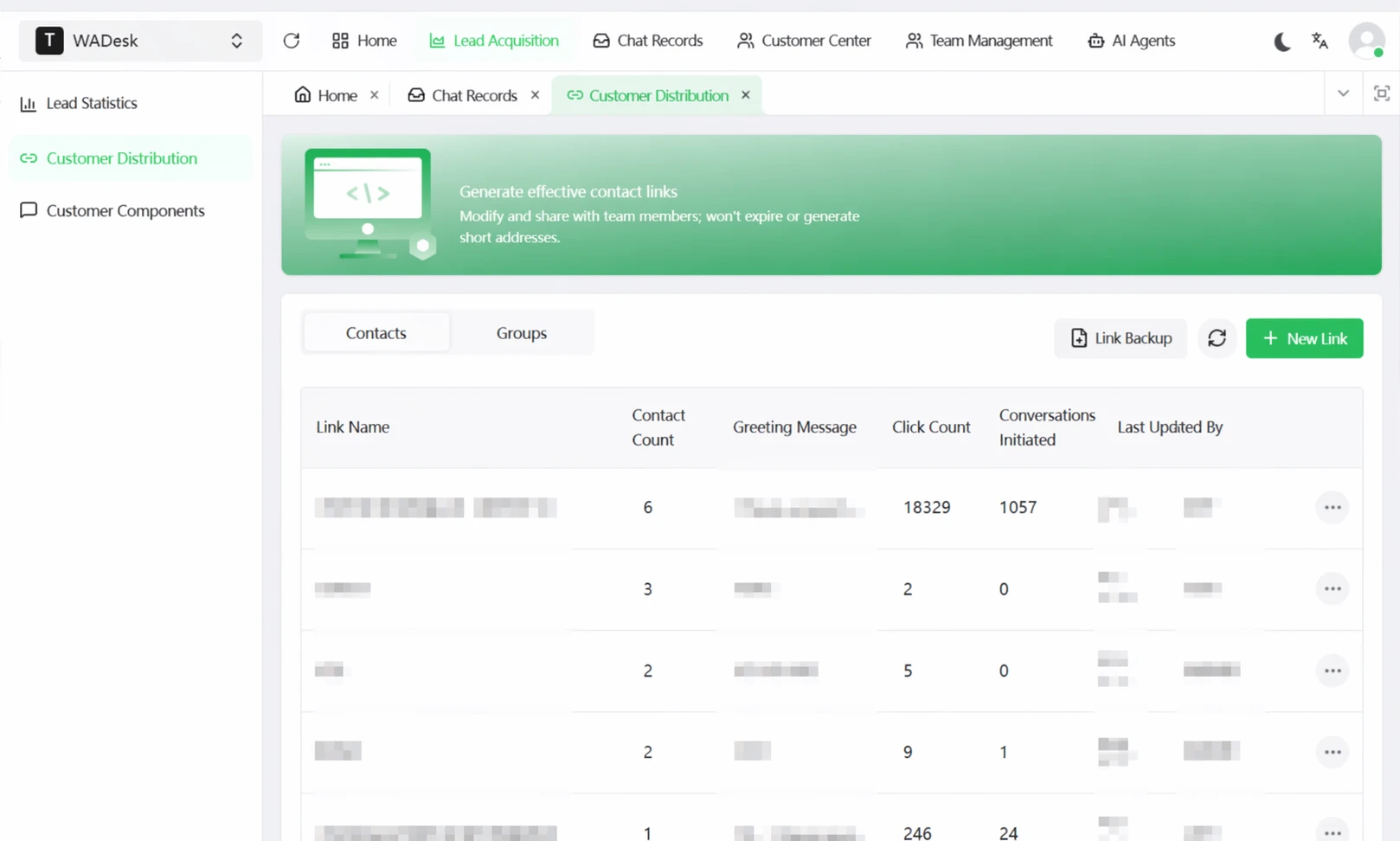
▲ Every split link has its own performance row—clicks, adds, and conversion rate at a glance. No more guessing where your budget should go.
Clicking into a specific link reveals per-click granular data—each click record shows the visitor's IP, country, device, source channel, and whether they started a conversation, sorted by time. This is true source attribution: not just "how many leads from each channel," but "who clicked from where, on what device, at what time."
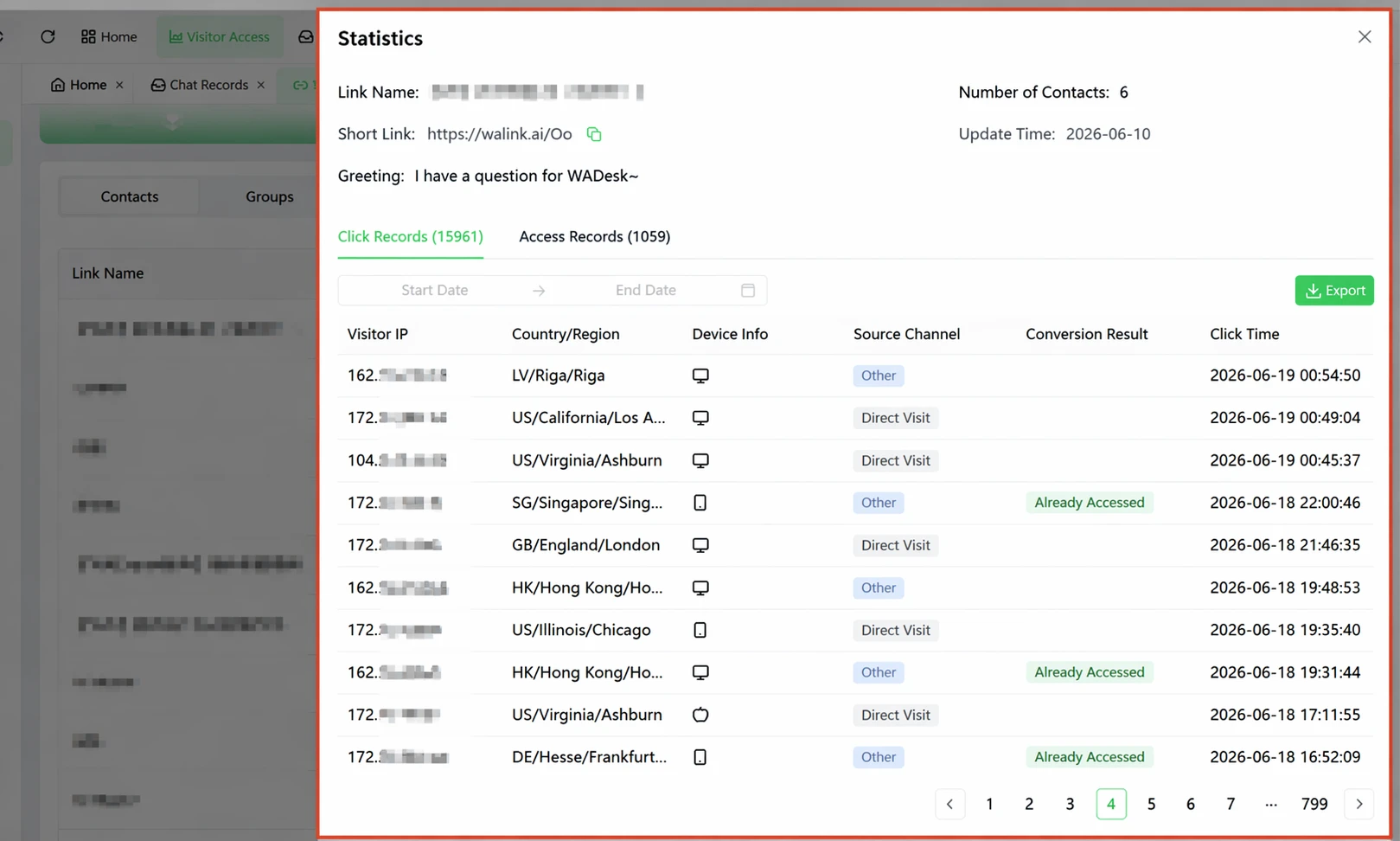
▲ **Per-click tracking**: every click logs IP, country, device, source channel, and conversion status (connected / visited only / failed). 15,961 clicks, 1,059 successful conversations—real data from a single split link.
Real-World Scenario: Three Links, Three Funnels
The same Shenzhen electronics exporter implemented WADesk split links for their three main channels:
| Channel | Split Link Tag | Budget | Clicks | Contacts Added | Add Rate | Assigned To |
|---|---|---|---|---|---|---|
| Google Ads | google-electronics-q3 | $15K | 3,200 | 480 | 15% | Rep A |
linkedin-dealer-q3 | $8K | 1,100 | 385 | 35% | Rep B | |
| HK Electronics Fair | hk-electronics-fair | $12K | N/A | 220 | On-site | Rep C |
Three key findings:
Finding 1: LinkedIn had the highest add rate but the lowest volume. At 35%, LinkedIn leads were the most motivated. But with only 1,100 clicks per quarter, total volume was capped.
Finding 2: Google Ads had the highest absolute volume with a solid add rate. 3,200 clicks produced 480 new contacts at 15%—standard for paid search. But with 30 eventual deals from that pool, it had the highest absolute ROI of all three channels.
Finding 3: Trade show on-site scans had a 100% add rate but conversion depended on follow-up speed. Of the 220 contacts from the show, over 60% never initiated a conversation if not contacted within 3 days.
| Metric | Google Ads | Trade Show | |
|---|---|---|---|
| Leads per quarter | 480 | 385 | 220 |
| Deals (quarter) | 30 | 22 | 8 |
| Cost per lead | $31 | $21 | $55 |
| Est. ROI | 1:4.5 | 1:3.8 | Renewal effect |
Decision: Google Ads budget was increased from $15K to $22K (highest ROI), LinkedIn held at $8K (steady quality), and the trade show strategy shifted from a general booth to a targeted vertical exhibition.
Three Advanced Split Link Strategies
Strategy 1: Country-based routing
Running one ad campaign across multiple countries? Create one split link and configure country routing:
- U.S. visitors → English-speaking sales team
- Saudi visitors → Arabic-speaking sales reps
- Brazil visitors → Portuguese-speaking reps
One ad campaign + one split link = coverage across multiple markets without multiplying your campaign management.
Strategy 2: Channel split for A/B testing
If you want to know "which channel performs better at the same budget, Facebook or Instagram?" the answer is simple: create one split link for each platform, run identical creative at the same budget, and compare after a month. No complex attribution models needed.
Strategy 3: Full-cycle trade show tracking
Set up three split links for each trade show: one for pre-event social media promotion, one for the on-site QR code, and one for post-event follow-up. This creates a complete attribution funnel:
Pre-event (30 scans) → On-site (150 scans) → Post-event (80 responses)
Stacking data from all three links gives you the show's full-cycle ROI, not just a "scans collected" number.
▲ One ad campaign covering three markets: split links automatically route each visitor to the right sales team based on their country.
Getting Started: Three Steps to a Tracked Funnel
Step 1: Map your current traffic sources (Day 1)
List every channel driving traffic to your WhatsApp—Google Ads, Facebook, LinkedIn, trade shows, website QR codes, YouTube, email signatures. Every source gets its own split link.
Step 2: Create split links and swap your URLs (Week 1)
In the WADesk admin panel, create a split link for each source. Key settings:
- Channel tag with a naming convention like
{channel}-{campaign}-{quarter}for easy filtering - Target account matched to channel quality (high-intent channels go to senior reps)
- Country routing for multi-market campaigns
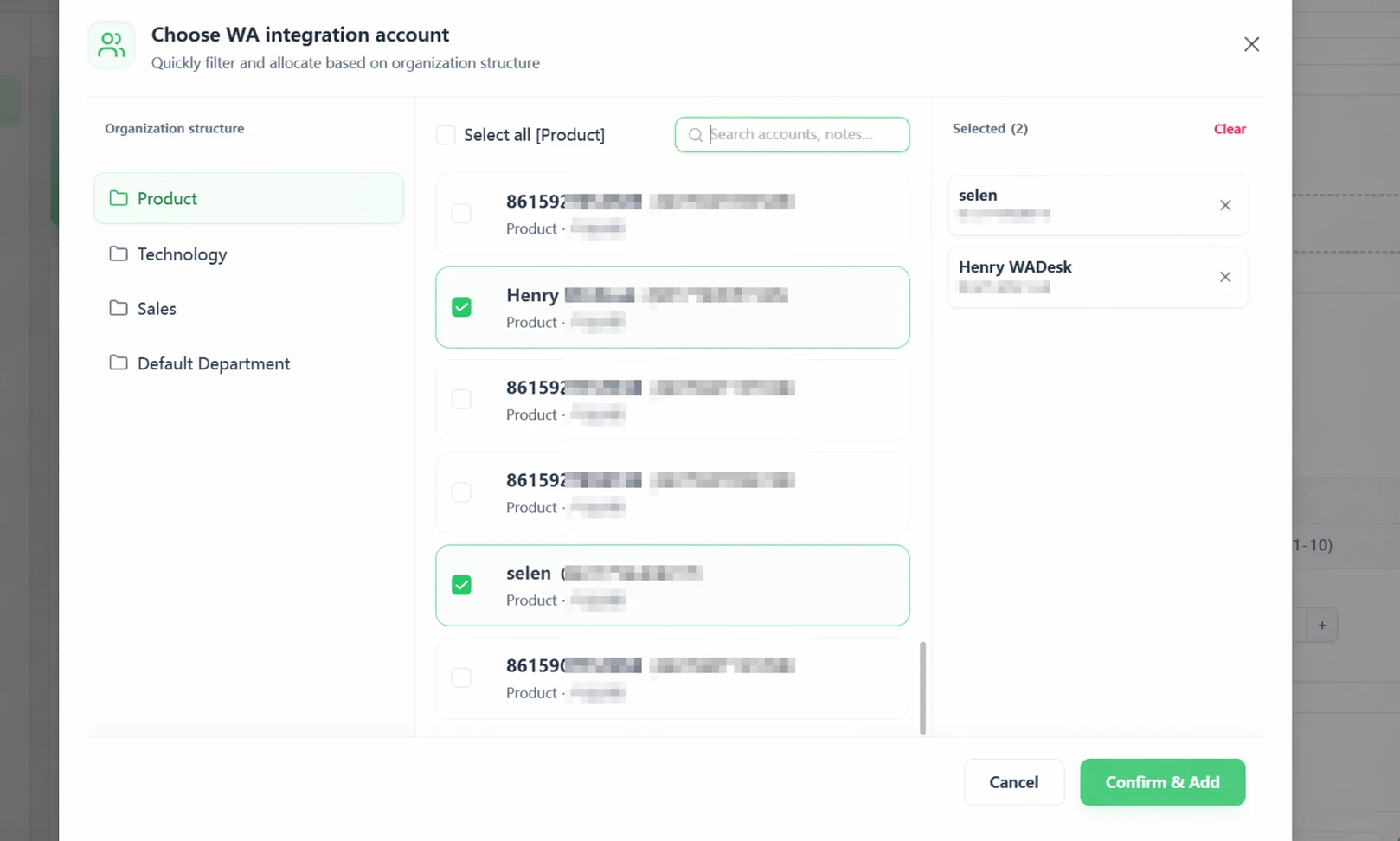
When creating a link, the system shows a "Select WhatsApp Reception Account" dialog—you can assign the link to specific team members by department or role:

▲ Creating a split link: assign to sales reps by department, multi-select supported (2 selected here).
Then replace all your existing "click to WhatsApp" URLs with the corresponding split links.
Step 3: Weekly performance review (Ongoing)
Spend 15 minutes each week on the split link dashboard, tracking three metrics:
- Add rate (clicks → contacts added): measures traffic quality
- Conversation start rate (conversations started within 7 days): measures lead intent
- Cost per lead (channel spend ÷ contacts added): measures channel efficiency
After 4 weeks of data, adjust budgets based on actual performance.
FAQ
Q1: How many split links can I create? Is 10 enough?
Up to 10 links. For most trade teams, this is sufficient: Google Ads (1–2), Facebook/Instagram (1–2), LinkedIn (1), trade shows (1–2), and website/social media permanent links (1–2). You'll have room to spare.
Q2: How accurate is the click data? What about click fraud?
WADesk split link tracking is server-side and measures real link click events. There's a natural discrepancy between ad platform click counts and WADesk click counts (some users click an ad but don't complete the redirect). WADesk recommends using "contacts added" as your primary performance metric—an actual contact add is closer to a real lead than a click.
Q3: What's the difference between a regular WhatsApp link and a split link?
A regular WhatsApp link does one thing: it opens a chat with a specific number. A WADesk split link adds three capabilities: ① country-based routing directs visitors to different accounts by location; ② source tracking records clicks, adds, and conversations per link; ③ auto-routing distributes traffic across multiple sales accounts.
Q4: Can I use split links in Google Ads and Facebook Ads?
Yes. Split links generate standard HTTPS URLs that work with any platform that supports links—Google Ads, Facebook, LinkedIn, email, SMS, QR codes on trade show banners. No special setup required.
Q5: What about existing leads before I created the split link?
Split links only track traffic from the moment they're created. For historical data, use WADesk's customer tagging feature to manually label existing contacts by source (if known) as a transitional measure.
Compliance note: Lead cost and conversion data shown are illustrative estimates based on common operational scenarios. Actual results vary by industry, region, and campaign quality. Google Ads, Facebook, LinkedIn are trademarks of their respective owners.