

A high WhatsApp broadcast failure rate is rarely about the broadcast tool itself. In 90% of cases, the two steps before broadcast were skipped — poor lead sourcing and no number verification.
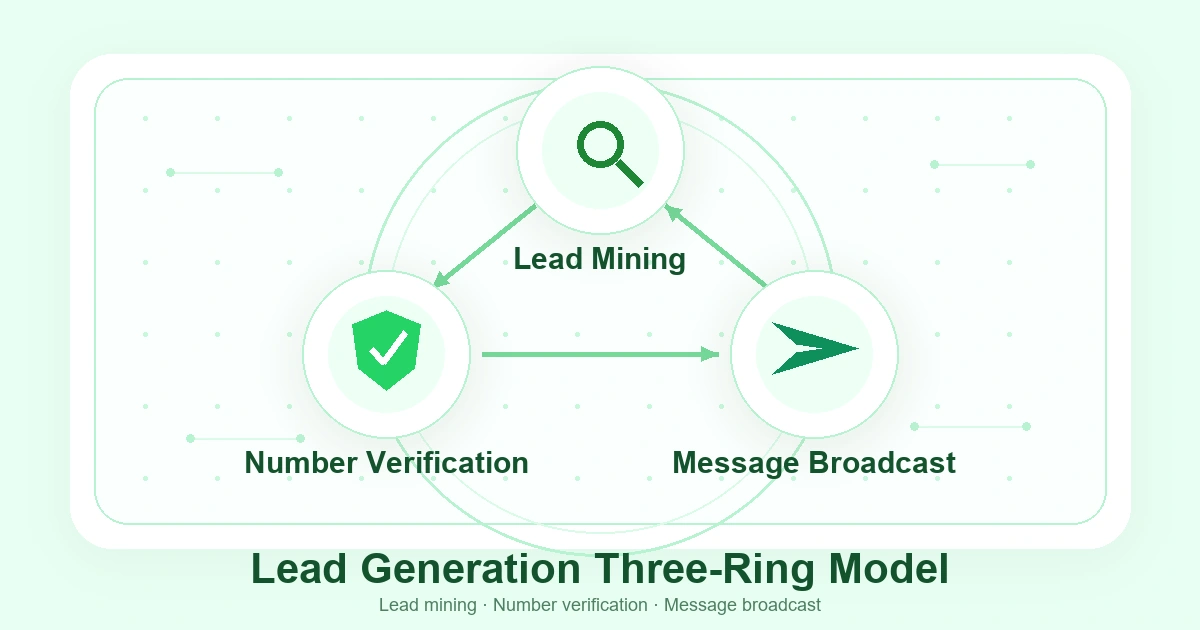
The fix is the "Three-Ring Outreach Model": Ring 1 — actively mine high-quality leads (Google Maps + Smart Links), Ring 2 — batch-verify number validity (registration status, activity, business type, dedup), Ring 3 — configure smart broadcast strategy (interval control + variable personalization + mixed media). Close all three rings, and delivery rate jumps from under 40% to over 90%.
2,500 Messages Sent. Only 1,000 Actually Delivered?
Mr. Chen runs a consumer electronics export business with a team of five sales reps, each sending at least 500 WhatsApp messages a day. It sounds like a lot of volume — but after two months, the results didn't match the effort.
When he dug into the data, the problem was worse than he thought:
- A "global buyer list" he paid ¥3,000 for had nearly half its numbers unregistered on WhatsApp
- Among the remaining numbers, a significant portion were dead, deactivated, or abandoned
- Of the messages that actually went out, a substantial share never reached their targets — WhatsApp's platform filtered them out due to high-frequency, repetitive sending patterns
Of every 2,500 messages, maybe 1,000 actually reached a real person. And of those 1,000, the reply rate was under 3%.
Here's the core issue: most foreign trade teams follow a linear "get a list → broadcast → wait for replies" approach. But WhatsApp outreach has never been a straight line — it requires at least three interconnected stages operating as a closed loop.
The Three-Ring Outreach Model: Why Your Broadcast Keeps Failing
In short, WhatsApp broadcast failure is not a broadcast problem — it's a problem of the two rings before broadcast being systematically skipped.
Most teams think of WhatsApp outreach as a two-step process: get a list, then fire away. But based on our experience working with dozens of foreign trade teams, a complete, controllable WhatsApp outreach pipeline is actually three interlocking rings:
        ┌──────────────────────┐
        │   Ring 1: Lead Mining │
        │  Google Maps + Links  │
        └──────────┬───────────┘
                   │
                   ▼
        ┌──────────────────────┐
        │ Ring 2: Verification │
        │  4-Dimension + 3-Tier │
        └──────────┬───────────┘
                   │
                   ▼
        ┌──────────────────────┐
        │  Ring 3: Broadcast   │
        │ Interval + Var + Media│
        └──────────────────────┘
Ring 1 failure (poor sourcing): Many teams get their contact lists from trade show name cards, third-party data vendors, or scraped public directories. These lists share three fatal flaws — no recency (many numbers are already dead), no industry relevance (low target-customer match), and no verifiable origin (quality is completely opaque).
Ring 2 failure (skipping verification): This is the single most overlooked step. Most teams take a fresh list and start broadcasting immediately, with zero verification. WhatsApp number validity is dynamic: a valid number today may be deactivated tomorrow; an active user last week may have switched numbers this week. Broadcasting without verification means gambling with real labor hours and real costs.
Ring 3 failure (crude broadcast strategy): When the first two rings are broken, broadcast directly hits a wall — messages go to invalid targets. WhatsApp, as an end-to-end encrypted communication platform (per Meta's official documentation), has automatic message routing that deprioritizes anomalous sending patterns. High-frequency, repetitive content gets flagged for lower delivery priority, meaning many messages never actually reach user devices.
The result: break any single ring, and the entire outreach pipeline's efficiency collapses exponentially. Let's break down each ring in detail.
Ring 1: Lead Mining — From "Buying Lists" to "Building Your Own"
The takeaway: A purchased list is a black box — you don't know where the numbers came from, how fresh they are, or whether they match your industry. A mined list is traceable and verifiable at every level.
1.1 Google Maps Mining: Batch Targeted Business Number Discovery
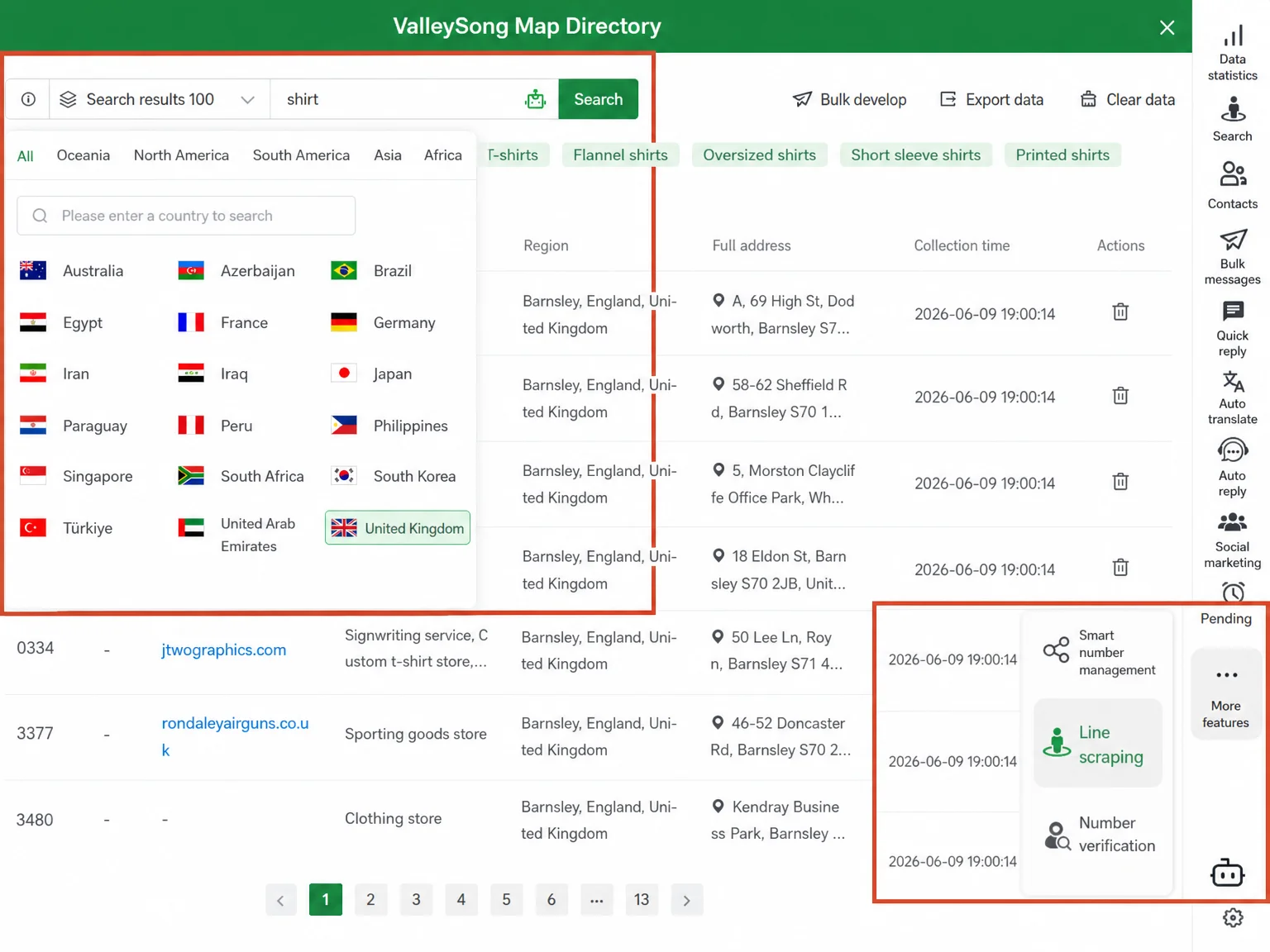
Google Maps is one of the largest and most frequently updated business information databases on the planet. WADesk's Lead Mining module connects directly to Google Maps' search API — you input an industry keyword and a target region, and the system automatically scans map listings for public business data and extracts WhatsApp numbers.
How it works:
- Open the "Lead Mining" module in the WADesk desktop client
- Enter an industry keyword (e.g.,
electronics importer,phone accessories wholesaler) and a target region (e.g., Dubai, São Paulo) - Set the batch size (100 / 200 / 500 / 1000 / 2000)
- The system scans and returns a matching business list — company name, address, website, WhatsApp number
The three core advantages over purchased lists: transparent data sourcing (you can verify each business on Google Maps directly), real-time freshness (no "business that shut down three years ago" ghosts), and industry + region precision (instead of a vague "Middle East buyers" dump).
If you're comparing WhatsApp management tools, our 2026 WhatsApp CRM Deep Comparison breaks down the lead mining capabilities of each tool in detail.
1.2 WhatsApp Smart Links: Let Clients Come to You
Mining is active outreach — but passive inbound matters just as much. WADesk's Smart Links let you generate unique WhatsApp short links for every channel: your trade show booth, Google Ads landing page, LinkedIn profile, email signature.
When a prospect clicks the link, the system automatically routes them to the right sales rep based on your preset rules. You can track clicks, conversions, and assignments for every link, letting you identify which channels bring the highest-quality leads.
In short, Smart Links and Google Maps mining create a push-pull system: mining is active outreach, links are passive inbound. Together they cover every touchpoint a potential client might encounter.
Ring 2: Number Verification — The QA Gate Before Broadcast
The takeaway: Skipping verification and broadcasting directly is like spending 100% of your labor and time to reach less than 60% of your intended targets. Verification is the ROI dividing line for broadcast.
2.1 What Does Verification Actually Check?
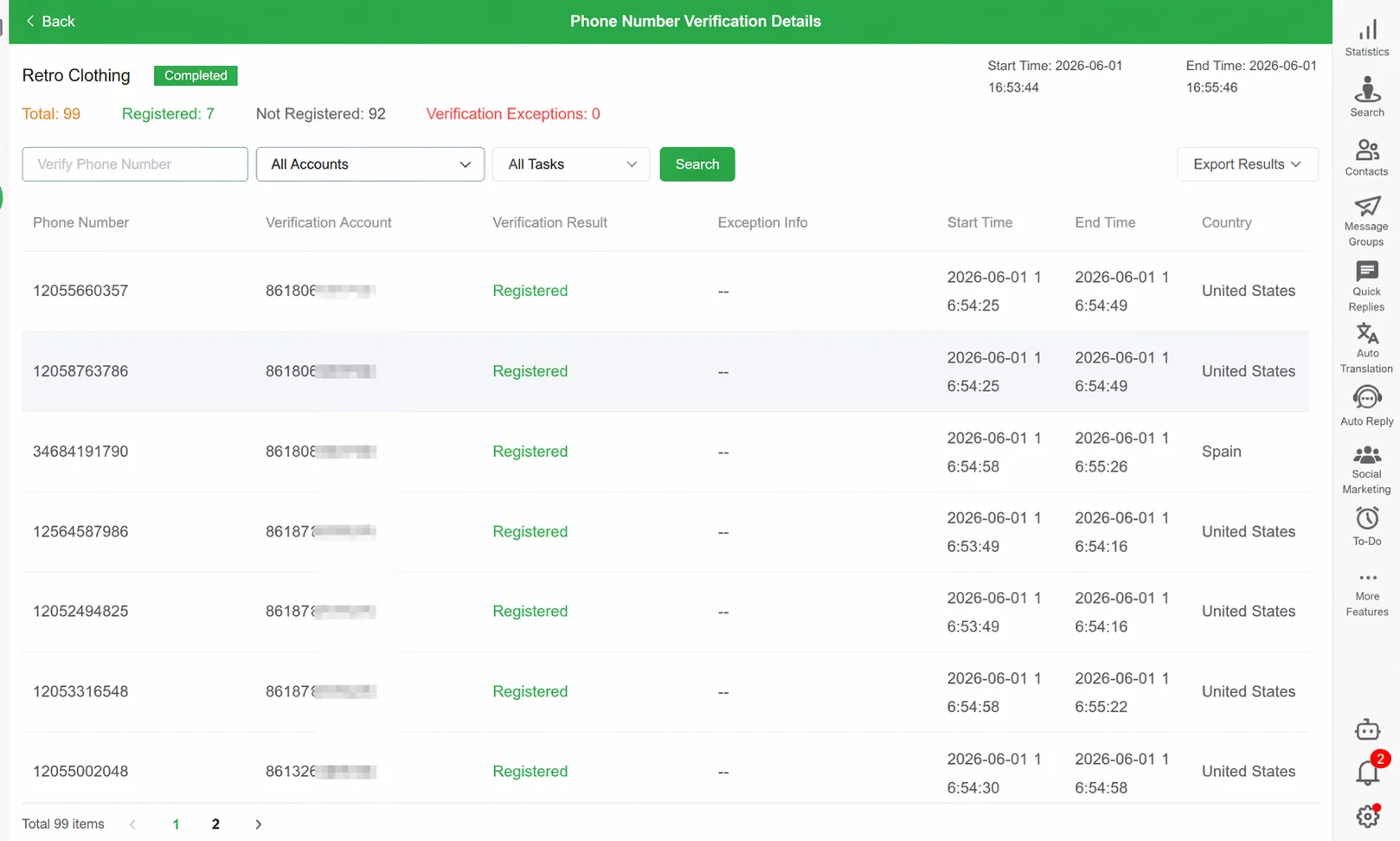
Most people think number verification just checks whether a number is registered on WhatsApp. In reality, effective verification spans four dimensions:
| Dimension | What It Checks | Why It Matters |
|---|---|---|
| Registration | Is the number registered on WhatsApp? | Filters out unregistered numbers, directly reducing wasted sends |
| Activity | Has the number been used recently? | Flags dormant "zombie numbers" to avoid wasting broadcast capacity |
| Business Type | Personal or Business account? | Distinguishes individual buyers from businesses, informing outreach tone |
| Dedup | Does this number already exist in another lead list? | Prevents the same prospect being contacted by multiple reps |
WADesk's verification module supports batch import and verification. Drop in your Google Maps leads, trade show contacts, and third-party lists all at once — the system automatically runs all four checks and returns results.
2.2 What To Do With the Results?
After verification, numbers are classified into three tiers:
- Green (verified, active): WhatsApp registered and active — move directly to broadcast queue
- Yellow (needs attention): Registered but inactive, or a Business account. Still valuable, but adapt your approach (e.g., timing, personalization level)
- Red (exclude): Not registered on WhatsApp or flagged as invalid — remove from queue
Reference data point: Based on feedback from multiple teams using WADesk's verification, a 5,000-entry "business procurement list" typically yields ~65% green, ~18% yellow, and ~17% red after verification. That means without verification, nearly one-third of your broadcast volume is wasted — costing not just time and resources, but degrading overall account communication quality with each invalid send.
Ring 3: Broadcast — It's Not Just About "Sending"
The takeaway: High-quality broadcast isn't about speed — it's about how closely your sending pattern resembles a real human. Cadence, content variation, and format diversity — three dimensions, each equally critical.
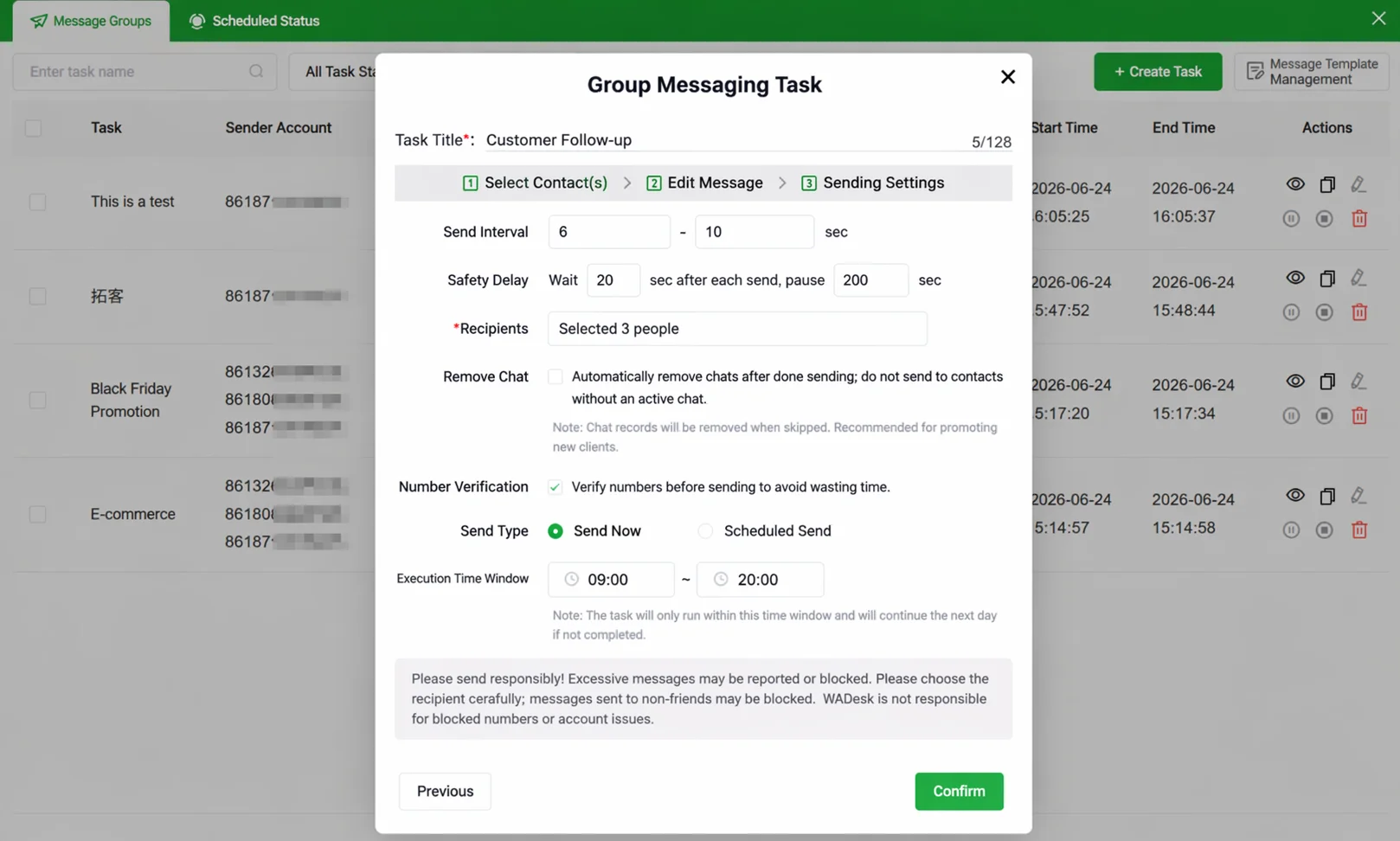
3.1 Four Configurations That Determine Broadcast Performance
With the first two rings closed, the broadcast ring's core task is delivering messages as naturally as a real person would. WhatsApp follows Meta's Commerce and Business Policies and has automatic rhythm protection for message sending. WADesk's four broadcast configurations are all designed around one principle: mimic natural communication.
① Interval control: Set a reasonable gap between each message (recommended: 8–15 seconds). A real person doesn't fire off 50 messages in one second. WADesk supports custom intervals and auto-pauses when it detects the recipient is online, aligning with natural conversation rhythm.
② Phased daily volume planning: Each account's daily sending volume should match its usage history. The core reason: WhatsApp handles new accounts and long-active accounts differently. For new accounts, we recommend capping at 50/day for the first week, then gradually increasing. Mature accounts can go higher, with a reference ceiling of 200–300/day — exact figures depend on account activity history and message type.
③ Content variables — the overlooked "differentiation" lever: This is the most neglected yet highest-impact configuration. Send 500 contacts the exact same message, and WhatsApp's routing mechanism identifies it as repetitive content and deprioritizes delivery. WADesk supports inserting variables ({name}, {company}, {city}) into message templates, auto-replacing them at send time so every message has textual uniqueness. This personalization not only improves delivery success but significantly boosts reply rates — because personalized messages are far more likely to be opened as genuine private messages.
④ Mixed-media sending: Don't just send text. WADesk broadcast supports six message formats (text, image, video, voice, contact card, document). Mix 2–3 formats per campaign — for example, an image + text product intro followed by a contact card share — and your sending behavior reads much closer to natural, multi-modal communication.
3.2 Gradual Scaling for New Accounts
If you're using a newly registered WhatsApp number, the guiding principle is gradual scaling, not full throttle from day one. WhatsApp's first 1–2 weeks for a new account are a critical observation window — the platform evaluates communication patterns based on initial behavior.
Recommended scaling rhythm:
| Phase | Timeline | Daily Volume | Core Activity |
|---|---|---|---|
| Adaptation | Days 1–3 | 5–10 messages | Send only to saved contacts, one-way notifications |
| Ramp-up | Days 4–7 | 10–30 messages | Send to green-verified numbers, with variables + images |
| Stabilization | Week 2+ | 30–50 messages | Normal broadcast, mixed media formats |
| Maturity | Week 3+ | Gradually scale to 100–200 | Dynamically adjust based on account activity and reply rate |
The logic behind this schedule: let the account's communication curve rise smoothly, rather than a sharp "broadcast spike" that stands out.
Full Workflow: The Three Rings Closed
When all three rings are connected, a complete, controllable, measurable WhatsApp outreach pipeline looks like this:
Google Maps Mining
      ↓
Smart Links inbound →  Unified Lead Pool
      ↓
Batch Verification →  Dedup + Classify (Green / Yellow / Red)
      ↓
Green Numbers →  Broadcast (Interval + Variables + Mixed Media)
      ↓
Replies →  Auto-assign to sales → Client asset retention
In this closed-loop workflow, every step has clear inputs and outputs, and every step is quantifiable. You're no longer "rolling the dice" — you're running a process.
Industry Case: An LED Lighting Team Before and After
The following case is based on real operational scenarios from WADesk users. Specific figures are illustrative estimates:
| Metric | Before WADesk | After WADesk | Change |
|---|---|---|---|
| Lead source | Purchased lists (5,000/mo) | Google Maps mining + Smart Links | Traceable, controlled |
| Number validity rate | ~40% | ~85% | ↑ 112% |
| Daily volume per account | 300 (no pacing) | 120 (phased) | Quality over quantity |
| Actual message delivery rate | ~45% | ~92% | ↑ 104% |
| Reply rate | ~2% | ~8% | ↑ 300% |
| Messages blocked/bounced (monthly) | ~600 | ~40 | ↓ 93% |
Note: Figures are illustrative estimates. Actual results vary by industry, region, and team configuration. Delivery improvement is primarily driven by verification eliminating invalid sends; reply improvement by variable personalization increasing open intent; bounce reduction by optimized sending rhythm.
Want to see real improvement in your team's delivery rate and reply rate? Start by building the first ring.
Get Started with WADesk →ROI Estimate: The Hidden Cost of Skipping Verification
Many teams think "verification is a hassle." But quantify the hidden cost, and the math becomes clear:
Assume 1,000 messages/day, with labor + time cost estimated at ¥0.5 per message (editing, sending, follow-up):
| Scenario | Validity rate | Effective sends | Wasted sends | Monthly waste (22 workdays) |
|---|---|---|---|---|
| No verification | 60% | 600 | 400 × ¥0.5 | ¥4,400 |
| With verification | 85% | 850 | 150 × ¥0.5 | ¥1,650 |
| Monthly delta | — | +250/day | — | Save ~¥2,750 |
This is just direct labor cost. Factor in the wasted waiting time from blocked messages, the dead-end effort from low delivery rates — and the real hidden cost of skipping verification is far higher. As we discussed in protecting client assets when sales leave, client asset value ultimately shows up in "effective reach," not "messages sent."
Getting Started: Three Steps to Close the Rings
Step 1: Run Your First Mining Campaign (Week 1)
Open "Lead Mining" in WADesk, pick your target industry and region, and run a 500-entry batch. Import the results into your lead pool for your first self-sourced lead list. At the same time, generate a Smart Link and place it on your LinkedIn profile or email signature to start testing passive inbound.
Step 2: Run Your First Verification Batch (Week 2)
Take all the leads you accumulated in Week 1 (mining + inbound), plus any old purchased lists you have lying around, and run them through number verification. Look at the results — which numbers are alive, which are dead, which are duplicates. You'll immediately feel how wasteful "broadcast without verification" really is.
Step 3: Configure and Send Your First Campaign (Week 3+)
Take your green-verified numbers and configure your first broadcast. For new users, start conservative: 12-second interval, 80/day cap, 2 variables, mixed image + text. Run for a week, observe delivery and reply rates. Adjust parameters based on data, and find the optimal configuration for your industry and region.
Common Misconceptions
Misconception 1: "Bigger lists are better"
5,000 unverified entries are worthless next to 500 verified green numbers. Broadcast is about delivery quality, not volume. Redirect the resources wasted on 3,000 dead sends to 500 real prospects with personalized, variable-driven messages — the difference is an order of magnitude.
Misconception 2: "Verify once, that's enough"
WhatsApp number validity is dynamic. Re-verify each batch within 24 hours before broadcast. Any leads unused for more than 7 days must be re-verified before the next campaign. Building "verify first, broadcast second" as a process discipline beats any single technical fix.
Misconception 3: "Faster broadcast = better results"
WhatsApp's message routing adjusts delivery priority based on communication behavior patterns. A short burst of high-volume, similar-content messages — even with slight variations — can trigger deprioritization or delayed delivery. Slow and steady wins. Fast and reckless gets you stuck. Once messages are throttled or delayed, restoring normal communication cadence typically takes 24–48 hours — during which every rep's workflow is affected. That cost dwarfs the benefit of a few faster messages.
FAQ
Q1: How accurate are Google Maps mined numbers?
Google Maps business data is maintained by business owners or auto-populated by Google. WhatsApp number accuracy varies by region and industry. Based on feedback from multiple teams using WADesk's mining feature, accuracy runs ~70–85% in Western markets and ~55–70% in Middle Eastern and Southeast Asian markets. Mined numbers must always go through Ring 2 (verification) before broadcast — this is exactly why Ring 1 and Ring 2 must close together in the model.
Q2: How long does verification take?
WADesk supports batch verification. A 500-number batch takes approximately 3–5 minutes. Speed depends on network conditions and batch size. We recommend importing no more than 2,000 at a time and running verification in smaller batches for more stable results.
Q3: What's the maximum daily broadcast volume?
There is no one-size-fits-all hard limit. The right number depends on account usage history, recent activity levels, message content diversity, and more. The phased scaling rhythm described in Ring 3 is a reference tested across multiple teams — starting small with new accounts and scaling gradually is far more sustainable than chasing volume from day one.
Q4: How does WADesk relate to the WhatsApp Business API?
WADesk follows a non-API approach — meaning messages are not subject to Meta Business API template approval, message formats are more flexible, and you're not charged per message. However, non-API routes require more deliberate attention to sending rhythm and adherence to platform usage policies. For a detailed comparison of both approaches, see our 2026 WhatsApp CRM Deep Comparison.
Build your own Three-Ring Outreach Model with WADesk — turn broadcast delivery from guesswork into a controllable metric.
Get Started with WADesk → Book a Demo →Demos are customized to your team size and industry by a product consultant. Approximately 30 minutes.
Compliance note: The broadcast strategies described in this article are intended to help users optimize message delivery within WhatsApp's platform guidelines. Actual results are influenced by account usage history, industry characteristics, regional differences, and other factors. Data cited is illustrative and based on user feedback; it does not constitute a guarantee of results. WhatsApp is a registered trademark of Meta Platforms, Inc. All third-party platform names mentioned are trademarks of their respective owners.