

A buyer asks for a catalog on WhatsApp, receives a quotation two days later, and then says, “Let me check with purchasing.” A week later, the messages still exist, but the status of the opportunity is unclear: who owns it, what is blocking it, and when should the team follow up?
That is the real problem behind how to use WhatsApp as a CRM. Every active opportunity needs four things to remain visible: customer context, one accountable owner, the current sales stage, and a dated next action. A WADesk WhatsApp CRM workspace keeps those details next to the conversations your team already handles.
How to Use WhatsApp as a CRM: The Seven-Step Workflow
Use this WhatsApp sales workflow to turn scattered chats into a process the team can manage across accounts, reps, and handovers:
| Step | What to do | Result |
|---|---|---|
| 1. Capture | Log each inquiry and its source | Findable lead |
| 2. Qualify | Record decision-relevant facts | Prioritized opportunity |
| 3. Assign | Name one owner and a backup rule | Clear responsibility |
| 4. Build context | Organize the customer facts around the chat | Usable handover |
| 5. Set the stage | Record the latest completed milestone | Evidence-based pipeline |
| 6. Schedule action | Set the next action and due time | Accountable follow-up |
| 7. Retain | Record the outcome and future trigger | Continued relationship |
A short record the team maintains is more useful than a detailed form it stops updating.
Can WhatsApp Really Work as a CRM?
WhatsApp can support CRM work, but a chat inbox is not a complete sales process. The WhatsApp Business app includes lists for organizing contacts and quick replies for frequently used messages. These tools help an individual seller work faster, but do not define team ownership, a shared sales stage, or the next promised action.
| Setup | Works well when | Where it becomes fragile |
|---|---|---|
| WhatsApp Business app | One person handles a manageable number of short conversations | Ownership and follow-up live in one person’s memory |
| Multi-account workspace | Reps need to work across several WhatsApp accounts | Visibility alone does not define responsibility |
| WhatsApp CRM workflow | The team manages longer sales cycles, quotations, multiple reps, and handovers | It fails when the process asks reps to maintain too many fields |
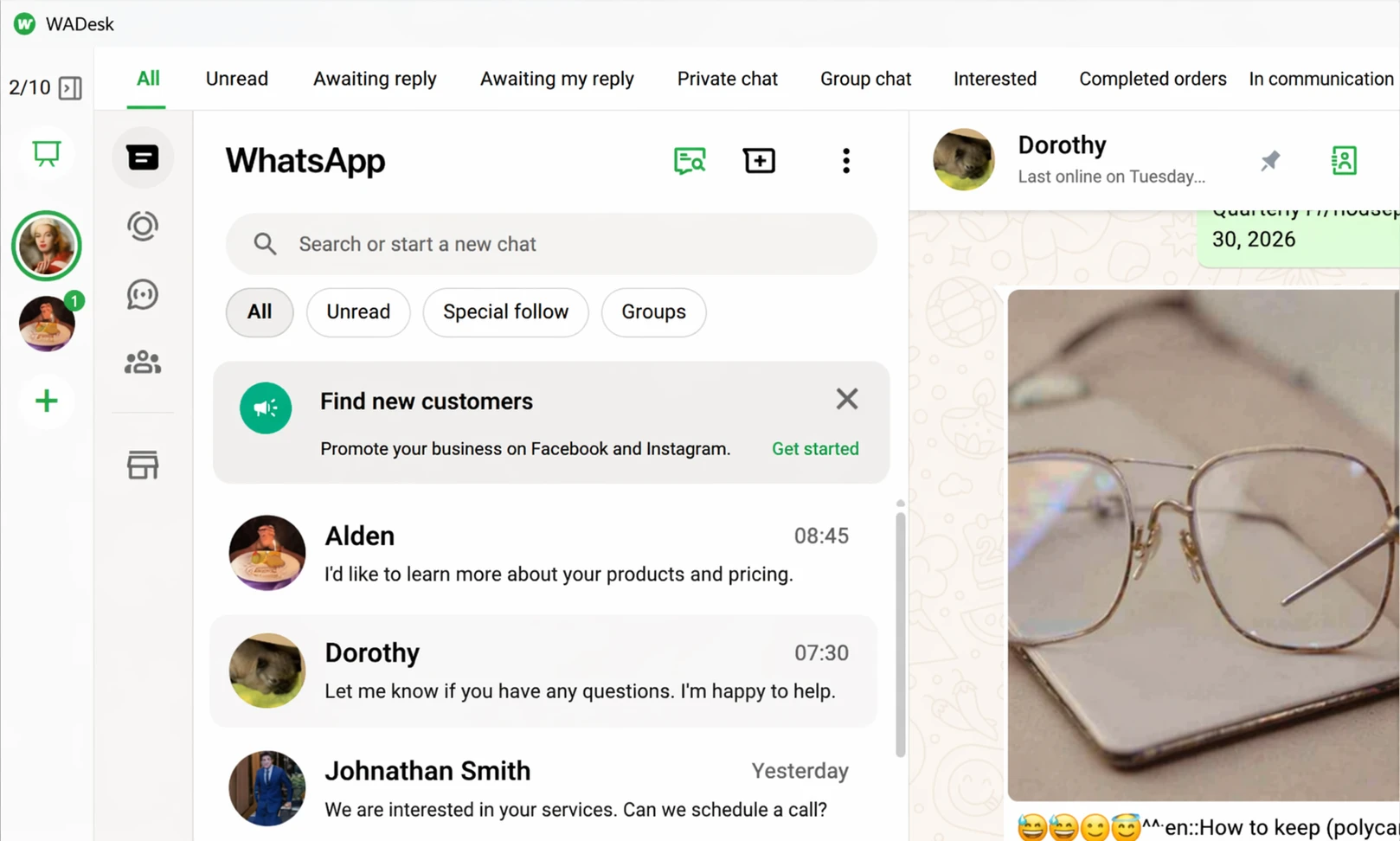
A multi-account workspace makes conversations accessible; the CRM workflow adds responsibility and sales status.
Step 1: Capture Every Inquiry With Its Source
WhatsApp leads may arrive from a website button, click-to-WhatsApp ad, exhibition, referral, distributor, or direct message. Record the receiving account, source when known, market or language, original request, and arrival time before asking a rep to complete the rest of the profile.
A multi-account WhatsApp workspace keeps inquiries from being trapped in separate sessions or devices. If you use distribution links, set the routing rule and source naming before traffic starts; the WhatsApp lead distribution guide covers the practical setup.
For shared inbound leads, route each inquiry into the agreed queue before assigning it to a rep.
Step 2: Qualify Without Turning the Chat Into a Form
Qualification focuses on facts that change a sales decision. If an equipment buyer asks, “Can you send the price?”, acknowledge the request and ask for the missing facts required to quote correctly rather than sending a twelve-question form.
| Field | Example | Why it matters |
|---|---|---|
| Company and role | Atlas Packaging, purchasing manager | Identifies the buyer and decision context |
| Market | Mexico | Supports routing, language, and logistics decisions |
| Product or use case | Automatic carton sealer | Routes the right expertise |
| Quantity or scope | Two production lines | Clarifies the size and complexity of the request |
| Timing | Installation needed in Q1 | Shows urgency and feasibility |
| Open question | Requires 220V configuration | Identifies what a specialist must confirm |
Store these facts in customer profile fields and tags instead of leaving them buried across messages. The customer profiling and tags guide shows a practical structure. Automation may summarize answers, but people still confirm prices, inventory, discounts, delivery commitments, technical specifications, and contract terms.
Step 3: Assign One Accountable Owner
One representative may send a catalog, another answer an MOQ question, and no one remains responsible after the buyer stops replying. Give every qualified opportunity one primary owner; specialists can contribute without taking over responsibility for the next move.
Assignment rules may follow territory, language, product line, existing relationship, source, or workload. WADesk’s team backend includes a public lead pool, assigned-lead views, customer assignment, and reassignment. These controls assign the customer or lead to a team member, not the WhatsApp account itself.
Define who covers an absent owner and how the team handles duplicate or cross-territory leads. If two reps have already contacted the same buyer, pause further outreach, confirm the existing relationship, and leave one person responsible for the next response.
Step 4: Build a Customer Record Around the Conversation
Store stable facts such as company, market, product, and role in profile fields. Use tags for categories such as source, segment, priority, or sales stage, and update changing details—such as the current objection or promised review date—as the deal progresses.
A usable handover should show who the customer is, what has already happened, who owns the lead, and what must happen next. Interpret the conversation instead of copying every message into a separate note.
Step 5: Use Evidence-Based Sales Stages
Useful pipeline stages describe completed commercial milestones. “Hot” and “cold” may indicate priority; “Quotation Sent” records a completed action, but only when the team knows which version was sent, when it was sent, and who received it.
| Stage | Entry evidence | What must be recorded |
|---|---|---|
| New Inquiry | A customer request arrived | Source and original request |
| Qualified | Need and basic fit were confirmed | Product, market, scope, timing |
| Quotation / Proposal | A formal proposal was sent | Version, date, assumptions, owner |
| Evaluation / Negotiation | The buyer is reviewing, testing, or negotiating | Open issue and next checkpoint |
| Won | A purchase order, signed contract, or other agreed confirmation exists | Result and internal handoff |
| Lost | The opportunity closed without a sale | Specific loss reason |
| Retention / Reorder | The first transaction or project is complete | Service or reorder timing |
Add sample, demo, technical validation, tender, or implementation stages only when they change responsibility or required work. Do not advance a deal because a keyword appeared in the chat: “price” does not prove a quotation was sent, and “looks good” is not proof of an order.
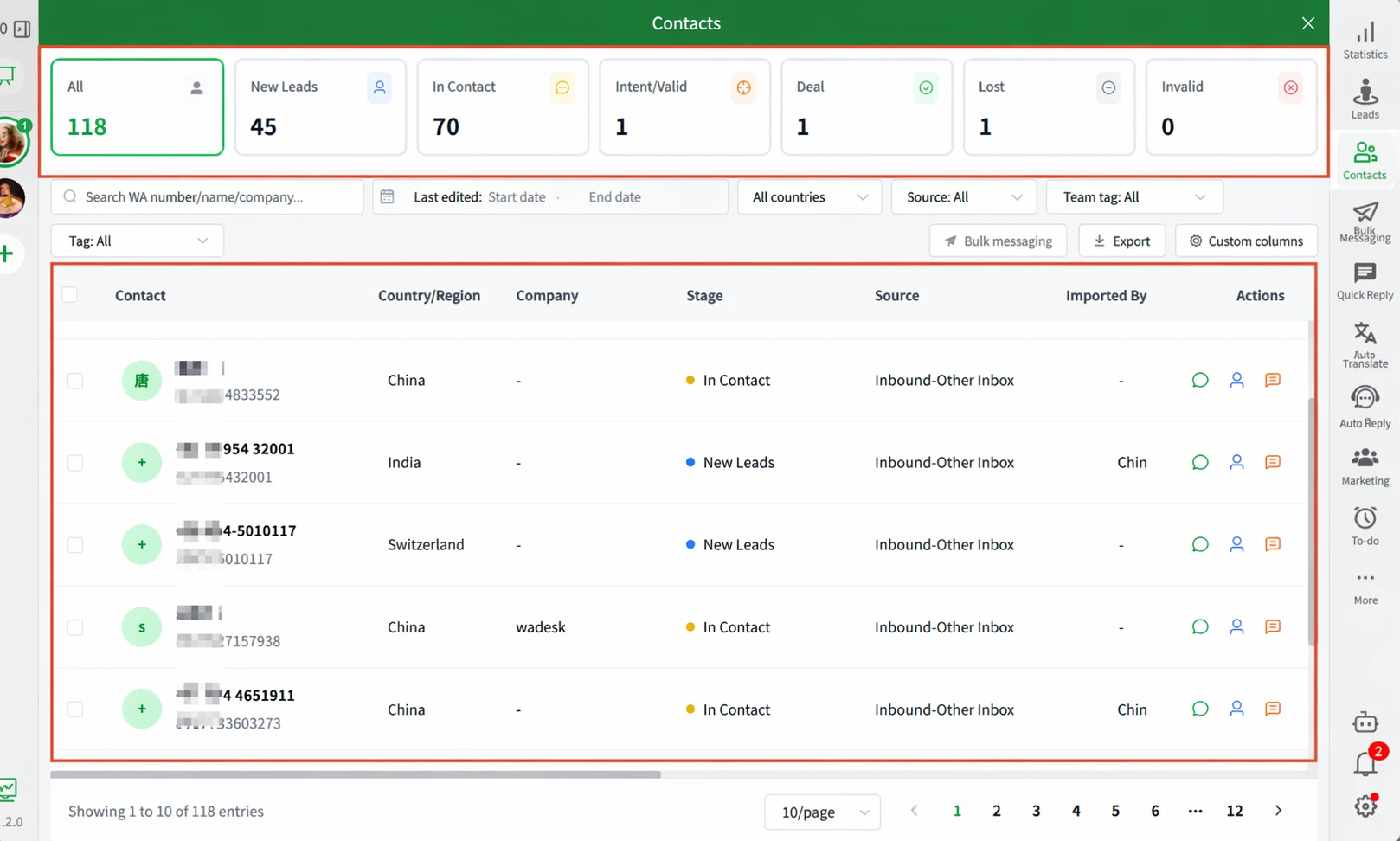
Customer stages make commercial progress filterable without separating it from the WhatsApp conversation.
Step 6: Attach a Next Action to Every Active Opportunity
When a buyer goes quiet, the conversation quickly falls below newer chats. Replace “follow up later” with a specific task such as “confirm the 220V specification with engineering by Thursday.”
Next action + owner + due time
Refer back to the buyer’s situation instead of asking, “Any update?” For example:
Hi Ana, you mentioned that your technical team would review the 220V requirement this week. We have now confirmed that configuration for Model X. Would it help if I updated the quotation before your purchasing meeting?
WADesk’s desktop client lets a rep create a dated reminder from the working context. A reminder is an internal task for the salesperson; it does not automatically send a customer message or decide how to respond.
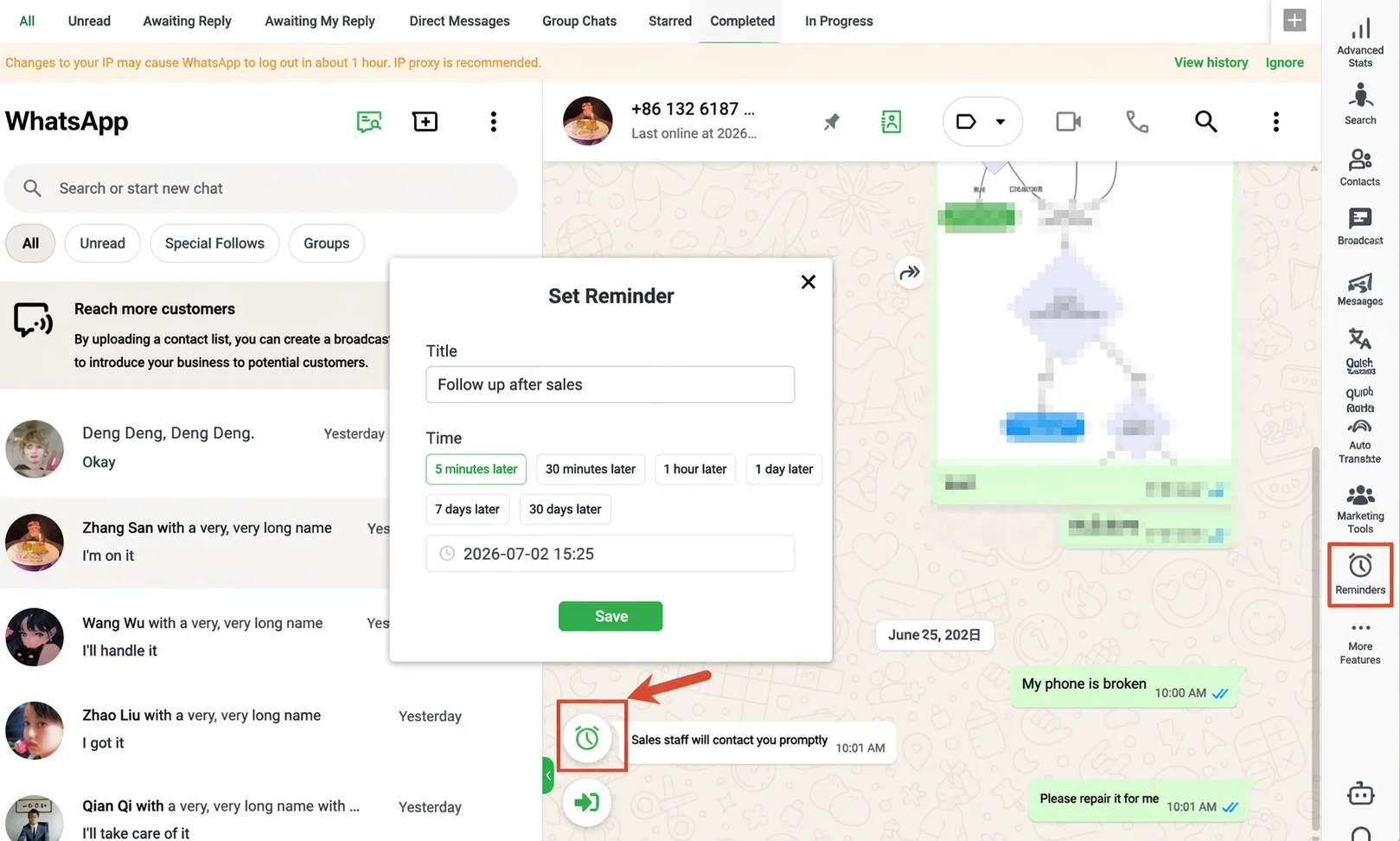
The reminder records when to return to this customer; the rep still decides what to send.
Base the reminder on the buyer’s stated review date or deadline rather than a fixed daily sequence. If no date was agreed, set an internal checkpoint and review the conversation before sending another message. See the WhatsApp follow-up SOP for a fuller follow-up rhythm.
Step 7: Close the Loop After a Win, Loss, or Handover
A win may move into payment, order processing, implementation, delivery, service, renewal, or reorder. Record the result, internal reference, post-sale owner, unresolved questions, and expected renewal or reorder window. For a loss, use a specific reason such as wrong specification, price gap, canceled project, another supplier, or postponed timing.
When ownership changes, record the new owner, unresolved questions, and the relevant order or payment reference instead of duplicating transactional data in the CRM. Have a manager review the handover.
A postponed project may deserve a future follow-up date; a confirmed poor fit usually does not. Keeping those outcomes separate prevents the sales pipeline from filling with inactive opportunities that nobody intends to pursue.
Minimum Viable CRM Record for an Active Opportunity
| Field | Example |
|---|---|
| Customer | Atlas Packaging, Ana Ruiz |
| Source | Interpack 2026 follow-up |
| Need | Two carton-sealing lines for a Mexico facility |
| Owner | Lucia — LATAM sales |
| Stage | Quotation / Proposal |
| Last milestone | Quotation V3 sent on 14 September |
| Open issue | Technical team reviewing 220V configuration |
| Next action | Send the confirmed specification and offer a revised quote |
| Due time | 18 September, before the purchasing meeting |
This is enough for another rep to understand the opportunity and continue it. Add fields only when they change routing, qualification, reporting, or the next action.
Metrics That Reveal Workflow Problems
Track a small set of measures tied to visible workflow failures:
- Unassigned lead rate: active inquiries without a named owner.
- Overdue next-action rate: active opportunities whose due time has passed.
- Stage aging: time spent in one stage without a new commercial milestone.
- Handover completeness: transferred opportunities with an owner, stage, open issue, and next action.
- Quotation-to-order rate: won opportunities divided by opportunities that received a formal quotation.
These are workflow definitions, not universal dashboard labels. Calculate them from the fields and reports your team maintains. Message volume alone is not a sales outcome; a rep can send more messages while leaving qualification and customer follow-up unresolved.
Review the exceptions behind each measure. An overdue task may reflect poor discipline, but it may also show that the due date was never updated after the buyer changed the purchasing schedule.
Where WADesk Fits Into the Workflow
WADesk connects several WhatsApp accounts with shared customer records, tags, sales stages, lead assignment and reassignment, reminders, and team visibility. It helps teams manage the work between the first WhatsApp inquiry and the next sales action.
It does not replace systems that control inventory, formal quotations, contracts, orders, invoices, payments, accounting, or finance. The workflow works best when the team has agreed stage definitions, assignment rules, and a minimum record for active opportunities.
Frequently Asked Questions
Can WhatsApp replace a CRM?
Not completely. WhatsApp can remain the main conversation channel, but teams still need a structured way to assign leads, record sales stages, schedule follow-ups, and preserve customer context.
Is WhatsApp Business enough for a sales team?
It may be enough when one or two people handle a small number of short sales conversations. Once several reps share leads or quotations stay open for weeks, the team needs shared records and clear assignment rules.
How do you stop sales reps from taking customer relationships with them?
Keep customer profiles, sales stages, conversation context, and current tasks in a company-managed workspace. Assign each lead to a team member, define reassignment during offboarding, and review the transfer before access changes. Tools support continuity, but the company still needs a documented handover process.
Can WADesk automatically send follow-up messages?
The reminder described in this workflow is an internal task, not an automatic customer message. The rep chooses the timing and wording, then sends the message. Scheduled or automated messaging is a separate workflow with its own configuration and review.
What metrics should a WhatsApp sales team track?
Start with unassigned leads, overdue next actions, time spent in each stage, handover completeness, and quotation-to-order rate. Each measure points to a specific process failure. Message volume can provide context, but it is not proof of pipeline progress.
Final Takeaway
Knowing how to use WhatsApp as a CRM means keeping the customer, owner, sales stage, and next action visible after a chat moves down the inbox. If your team manages leads across several people or accounts, book a team walkthrough to see how WADesk handles assignment, customer records, and follow-up reminders.