


This is one part of a complete team workflow — see the WhatsApp Operations Playbook for Export & Global Sales Teams.
The problem: more leads, slower response
An industrial equipment export company with 10 sales reps and 25 WhatsApp accounts was scaling their Facebook and Google ad spend. Daily WhatsApp inquiries grew from a handful to 50-60.
Their assignment method was simple: whoever saw it first replied, or someone in the team would post "new lead" in a group chat. Three months in, problems surfaced:
- Duplicate coverage. Two sales reps replied to the same customer. The customer was confused. The reps blamed each other.
- Uneven workload. Senior reps juggled 20+ active conversations while new hires handled 2-3 per day.
- Returning customers lost context. A repeat buyer messaged a different rep who had no idea about their history. The customer had to re-explain everything.
These three problems cost real money. Industry-observed estimates suggest every 30% improvement in lead response time correlates with a 15%-20% improvement in conversion rate. How you distribute leads directly determines your revenue ceiling.
WADesk auto lead distribution: four strategies for every scenario
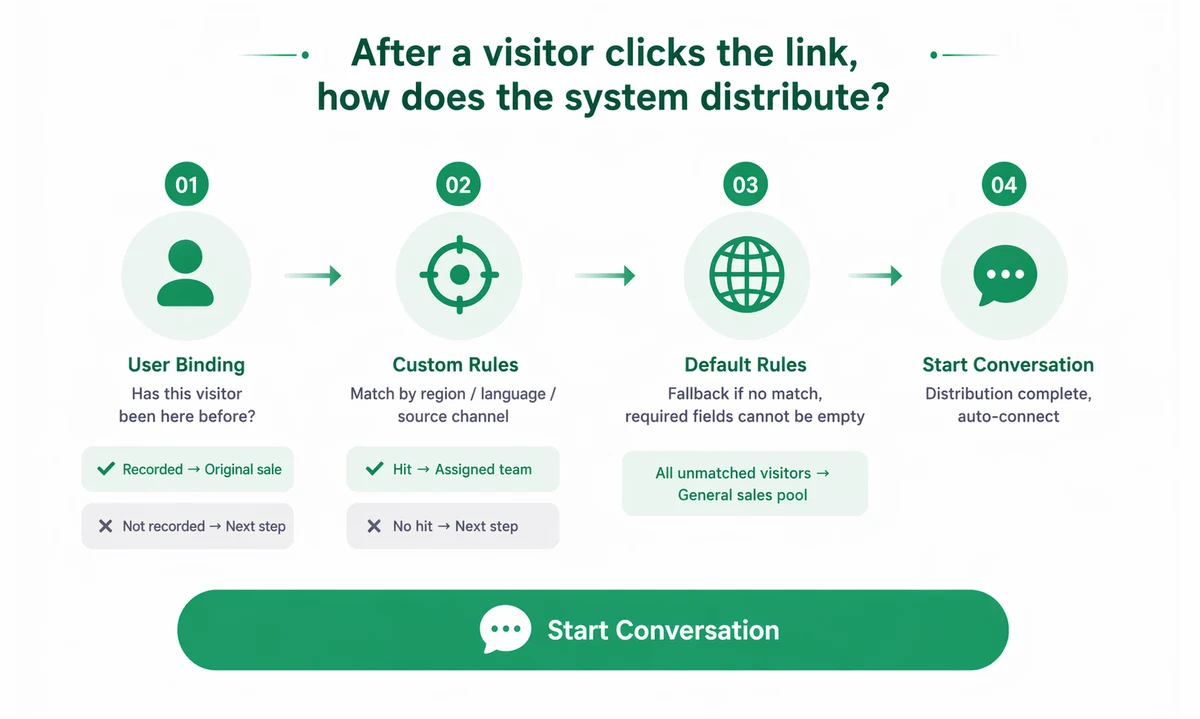
WADesk's lead pool + auto-distribution system is built around four core allocation dimensions. Leads typically arrive through split links, and each follows a structured routing pipeline before reaching a rep.
Weighted allocation: senior reps take more, rookies still get practice
Not every sales rep should receive the same number of leads. Weighted allocation lets managers set a "receive weight" for each rep — a weight-5 rep gets more leads than a weight-2 rep.
Typical configuration: top closer = weight 5, mid-level = weight 3, new hire = weight 1. Senior reps get more opportunities while new hires practice on real customers. No one gets starved or overwhelmed.
Online-first: assign to whoever is active right now
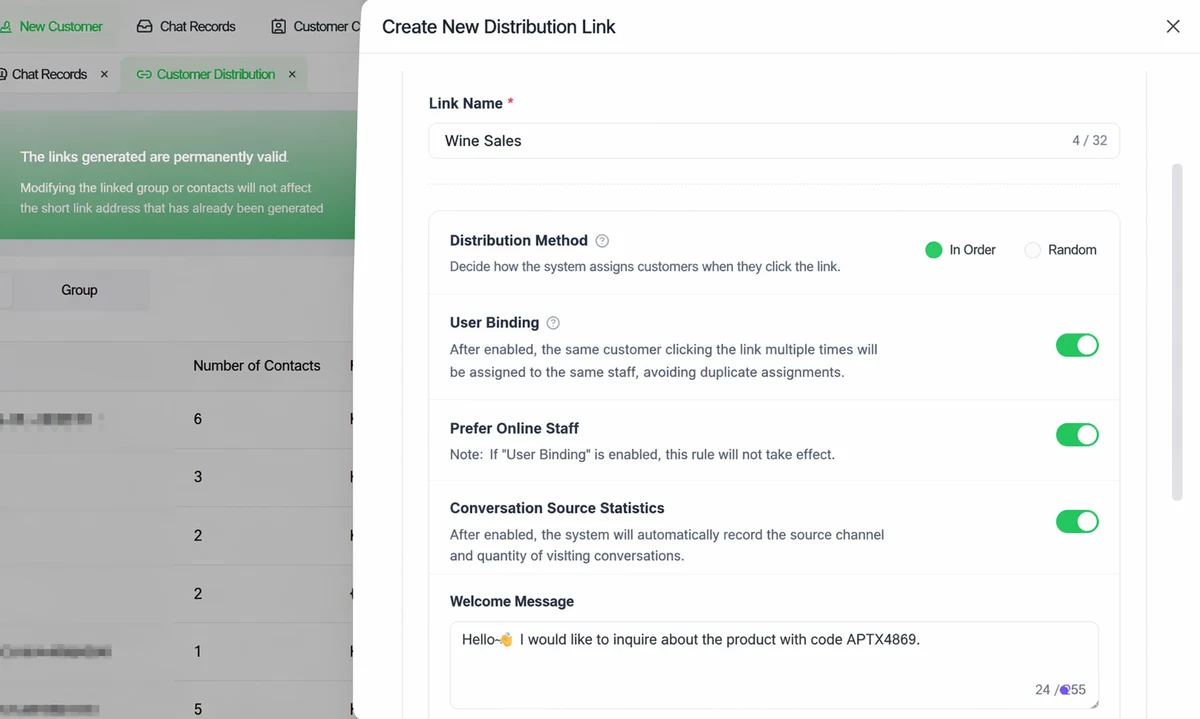
The worst thing a customer can hear is silence. With online-first enabled, the system only assigns new leads to reps who are currently online. If everyone is offline, it falls back to weighted allocation.
This is critical for teams receiving inquiries around the clock — Middle East customers messaging at 3 AM, North American buyers on weekends. As long as someone is at their desk, the lead gets an instant response.
Returning customer routing: the same rep, every time
When a returning customer sends a message, the system automatically checks whether this number has a previous assignment record. If yes, it routes directly back to the original rep. No need for the customer to re-explain their history. This mechanism improves customer experience and ensures clear ownership for commission tracking.
Custom routing rules: by region, product, and source
For teams with clear role divisions, managers configure up to 10 custom rules in the admin panel. Rules are matched top to bottom — the first match wins:
- Inquiries from the US → North America team
- Questions about a specific product → product line specialist
- Leads from Facebook ads → weight-balanced online reps
Each rule stands independently. The more clearly your team is structured, the more precisely leads are routed.
Still assigning leads through group chat? WADesk auto distribution puts every inquiry in front of the right rep in seconds.
Get started with WADesk →Distribution strategy by team size
| Team size | Recommended strategy | Why it works |
|---|---|---|
| 2-5 reps | Weighted allocation + online-first | Small teams need senior reps to carry more load and instant replies when anyone is online |
| 5-15 reps | Custom rules + returning routing | Region/product teams need leads routed to the right specialist automatically |
| 15+ reps | All strategies fully enabled | Full lead pool + auto distribution + manager override handles complexity at scale |
Results from a live deployment
A small home appliance exporter in Ningbo with 15 sales reps was receiving around 80 WhatsApp inquiries daily from Facebook ads. Before WADesk, their assignment method was "the team lead shouts in the group chat" — average time from inquiry to first response was 37 minutes.
After deployment, they configured three custom rules: by product line (rice cooker / air fryer / coffee machine) + online-first + returning customer routing.
Week one results: average response time dropped from 37 minutes to 4 minutes. Duplicate coverage complaints hit zero. Returning customer satisfaction improved noticeably. The sales lead's feedback: "The biggest change is opening the dashboard in the morning and seeing every lead already assigned. I don't have to distribute anymore."
FAQ
How many custom routing rules can I configure?
Up to 10 rules. Rules are matched top to bottom; the first match wins. Put your most specific rules first and the catch-all rule last.
What happens when the assigned rep is offline?
With online-first enabled, the system skips offline reps and assigns leads to available team members. If everyone is offline, it falls back to weighted allocation — the customer's message will be visible when they come online.
How accurate is returning customer routing? What if the customer changed their number?
Routing is based on the customer's WhatsApp number. If the customer uses a new number, they are treated as a new lead. It's good practice to remind returning customers to use their registered number for continuity.
What's the relationship between auto-distribution and the lead pool?
The lead pool is the collection of all unassigned customers. Auto-distribution pulls leads from this pool and assigns them based on your rules. Managers can also manually assign specific leads from the pool for special cases.
Are assignment records traceable?
Yes. Every assignment — automatic, manual, or returning-customer routing — is fully logged in the admin panel, including timestamp, assigned rep, and assignment method. Records can be exported as Excel for performance review.
Every WhatsApp inquiry should get a reply within 5 minutes
Start a free trial and see how many leads your team is leaving waiting
Disclaimer: Response time and conversion data cited are based on operational feedback from WADesk client deployments. Actual results vary by industry, team size, and customer profile. Lead distribution features require team admin permission configuration.