

This is one part of a complete team workflow — see the WhatsApp Operations Playbook for Export & Global Sales Teams.
Why Number Filtering Is Mandatory Before Bulk Sending
Many export teams' first reaction to a list of thousands of potential clients is "send to all immediately." But bulk sending to an unwashed list causes three problems:
- Wasted sending quota: Per Meta business policy, WhatsApp evaluates sending quality. Large volumes of messages to invalid numbers drag down the account's quality score, affecting subsequent outreach effectiveness.
- Diluted engagement rates: If 800 of 2,000 numbers are invalid, your real reachable base is 1,200. But open rates and reply rates are calculated against 2,000 — the data is severely diluted.
- Wasted team effort: Sales reps sending messages to numbers that will never respond and waiting for replies is pure time waste.
Number filtering isn't an optional optimization — it's a standard pre-send action.
Common Invalid Number Types in Lead Lists
| Type | Typical Scenario | Share (Estimated) |
|---|---|---|
| Dead / disconnected | Trade show number no longer in use | 10%–15% |
| Format errors | Missing/extra country code, spacing issues | 5%–10% |
| Non-WhatsApp registered | Number is valid but the owner hasn't installed/registered WhatsApp | 15%–25% |
| Duplicates | Same number collected from multiple sources | 5%–8% |
Combined, an unwashed list may contain 30%–50% of numbers that can't be effectively reached via WhatsApp (above ratios are industry experience estimates — actual proportions vary by lead source).
How to Use WADesk Batch Number Detection
Step 1: Upload Your List
Import your Excel or CSV lead list into WADesk. Auto-detection of international country codes is supported, along with manual column mapping.
Step 2: Batch Detection
The system checks each number individually for WhatsApp registration:
- Valid: Number is registered on WhatsApp and can send/receive messages.
- Invalid: Dead number, disconnected, or not registered on WhatsApp.
- Format anomaly: Wrong country code or incorrect digit count — system flags for manual review.
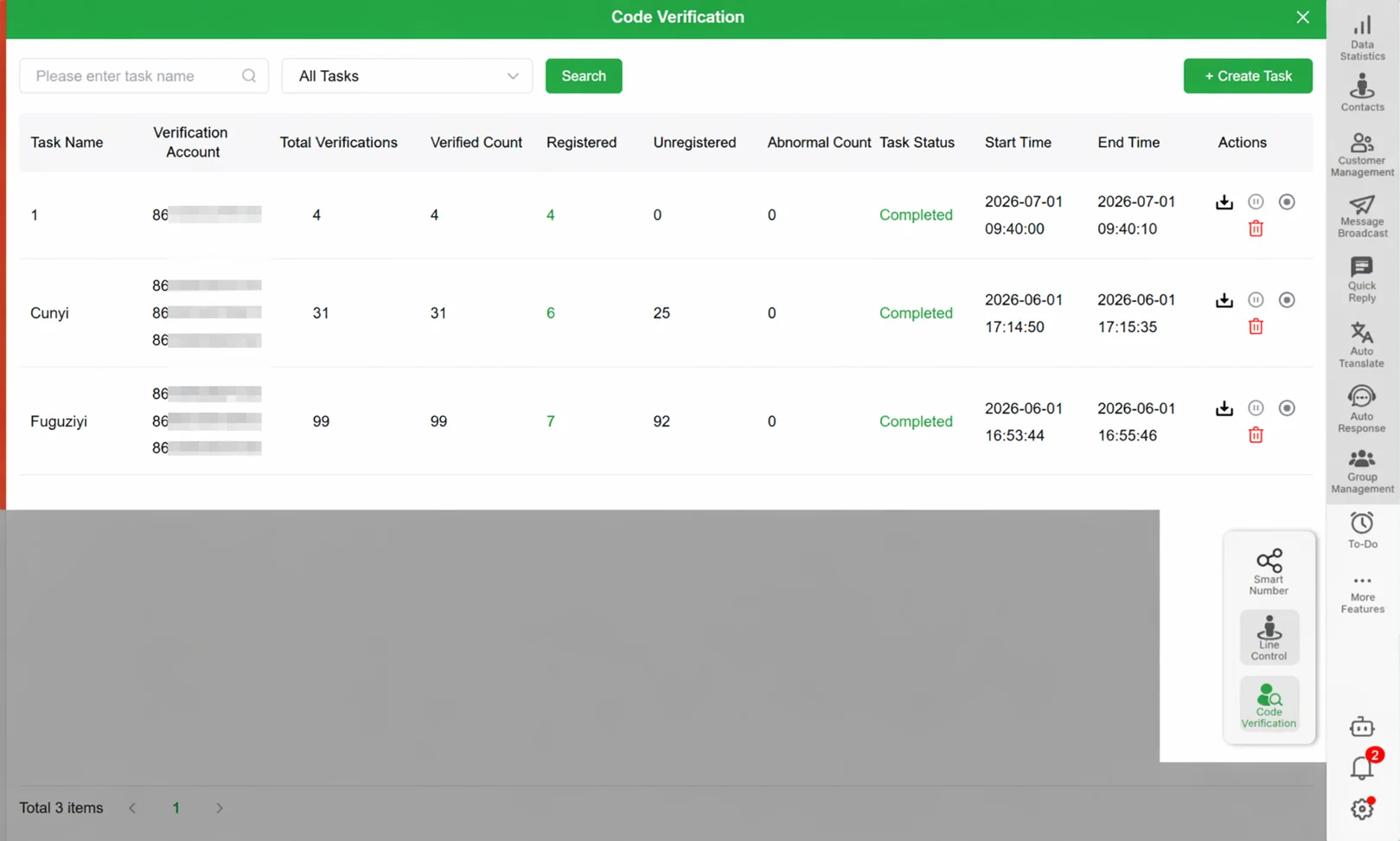 WADesk batch number detection: verifies each number's WhatsApp registration status, tagging valid / invalid.
Step 3: Export the Clean List
After detection, one-click export of "valid numbers only," or proceed directly to the next step within WADesk.
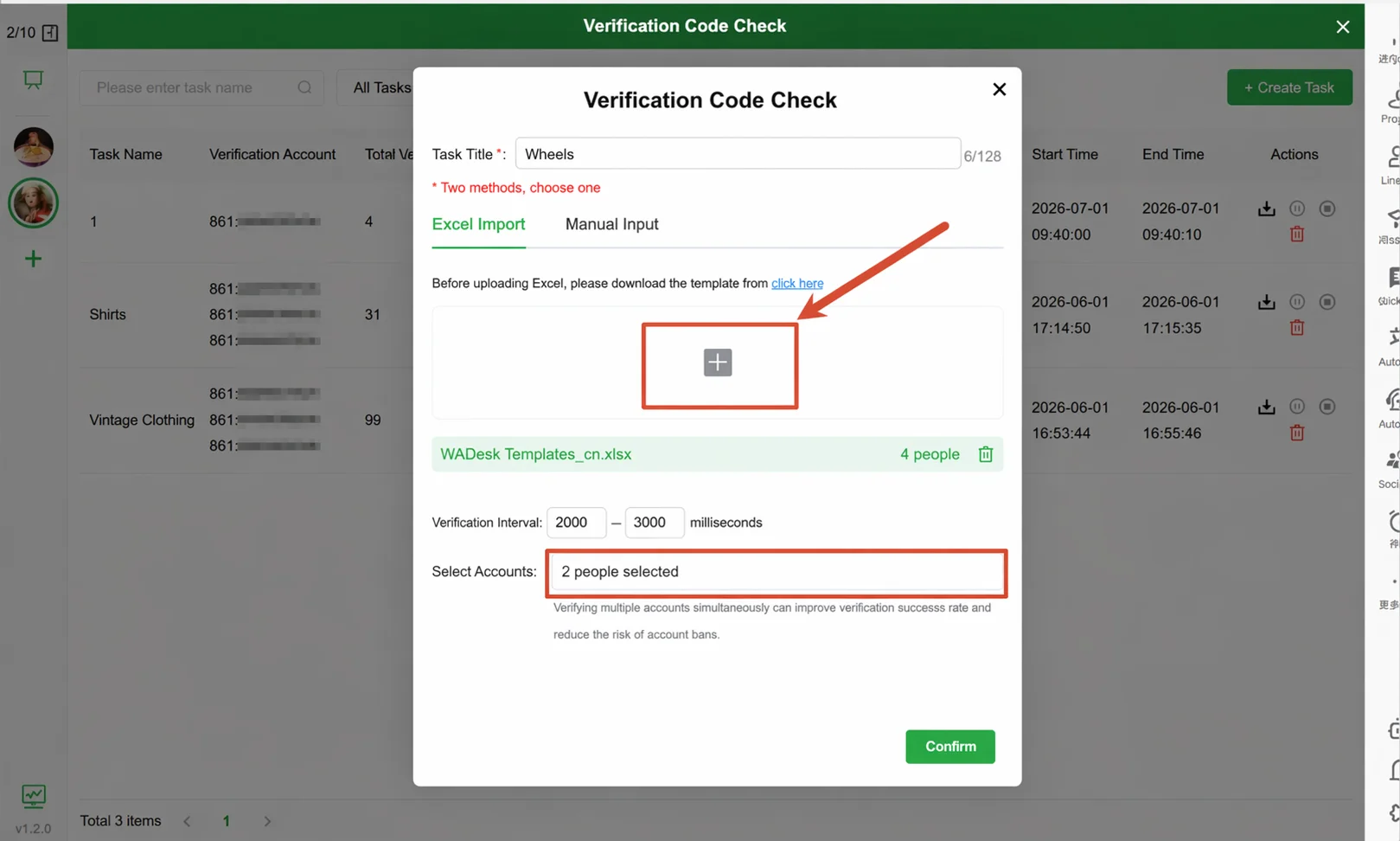 Filter results clearly mark each number's registration status — invalid numbers removed in one click.
Step 4: Launch Outreach
The filtered clean list can go straight into WADesk's broadcast or split-link tracking workflow — from filtering to outreach in one pipeline.
Spend every message quota on real clients
WADesk batch number detection — wash your list clean before sending
Closing the Lead Generation Loop with Broadcast and Split Links
Number filtering isn't an isolated step — it's the "quality check" of the entire lead generation pipeline:
- Collect: Gather potential client numbers from Google Maps or trade show business cards.
- Filter: Use WADesk batch detection to remove invalid numbers.
- Outreach: Clean list enters broadcast or split-link tracking workflow.
- Track: Split links track each channel's conversion — data flows back to the dashboard.
Without the filtering step, all downstream outreach data is "watered down." Only after filtering does each layer's data become trustworthy.
Before vs After Filtering
| Metric | Before (2,000-number list) | After (1,200 valid numbers) |
|---|---|---|
| Effective reach base | 1,200 (but calculated on 2,000) | 1,200 (true base) |
| Reply rate | Diluted (inflated denominator) | True reflection |
| Quota consumed | 2,000 messages | 1,200 messages (40% saved) |
| Sales follow-up efficiency | Waiting on 800 dead numbers | 100% targeting real clients |
Above data is illustrative — actual proportions vary by lead source and list quality.
FAQ
Does number filtering read the other party's chat content?
No. Number detection only verifies "is this number registered on WhatsApp" — it does not access any chat content, personal profiles, or message records. The detection returns a binary "valid / invalid" result.
Does it support batch deduplication?
Yes. When importing a list, the system auto-detects duplicate numbers and can remove them in one click. After merging lists from multiple sources, deduplication prevents sending to the same client twice.
Can non-WhatsApp numbers still be used?
Yes. An invalid WhatsApp number doesn't mean a dead lead — the person may simply not use WhatsApp but can be reached via email or SMS. Export the invalid list and route it to other channels.
How fast is the detection?
Based on internal testing observations, 1,000 numbers are processed within minutes (actual speed depends on network conditions). Large batch detection runs in the background with completion notifications.
Can the filtered list be used directly for bulk sending?
Yes. WADesk supports going from filter results directly into the broadcast workflow, or exporting to Excel for use in other systems. Use in conjunction with broadcast limits to control batch sizes appropriately.
Filter before you send — save your quota for real clients
Try WADesk batch number detection and see how many invalid numbers are in your lead list
Disclaimer: The WhatsApp sending quality scoring mechanism mentioned here is based on Meta business policy public content — specific rules are subject to Meta's official documentation. The number detection feature only verifies registration status and does not access chat content or personal privacy data. Please comply with local data protection regulations and WhatsApp platform policies when using this feature.