

A Goldmine Hiding in Plain Sight
Mike runs an industrial parts export company based in Shenzhen, selling to buyers across Southeast Asia and the Middle East. For two years, his lead generation relied on trade shows and referrals — each show costing thousands and delivering fewer quality contacts than expected.
Then he tried something different. He opened Google Maps, searched "industrial parts distributor Kuala Lumpur," and found dozens of businesses with phone numbers, emails, and websites listed.
He exported the data, verified which numbers had WhatsApp, and sent a single message to each. Within a week, three buyers replied asking for quotes.
This is the most direct B2B prospecting path — public Google Maps business data, combined with WhatsApp's instant reach, creates a free lead generation pipeline.
Why Google Maps Is an Underrated B2B Lead Source
Most export teams rely on these channels:
| Method | Cost | Efficiency |
|---|---|---|
| Trade shows | Thousands per event | High quality, low volume |
| B2B platforms (Alibaba, etc.) | Annual fee + bidding | Competitive |
| LinkedIn outreach | Free, low reply rate | Time-consuming |
| Google Maps prospecting | Free | High volume, good accuracy |
Google Maps isn't a social platform — it's a verified business database. Every listing is reviewed by Google, meaning:
- Phone numbers are real, not randomly generated
- Business categories are accurate (search "auto parts" and you won't get restaurants)
- Coverage is global, including non-English markets
One key fits one lock — Google Maps works best for location-specific B2B prospecting. Need electronics wholesalers in Jakarta? Search "electronics wholesale Jakarta." Need construction suppliers in Cairo? Same logic.
The 3-Step Google Maps Prospecting Workflow
WADesk turns this into a three-step process. No switching platforms, no manual copying.
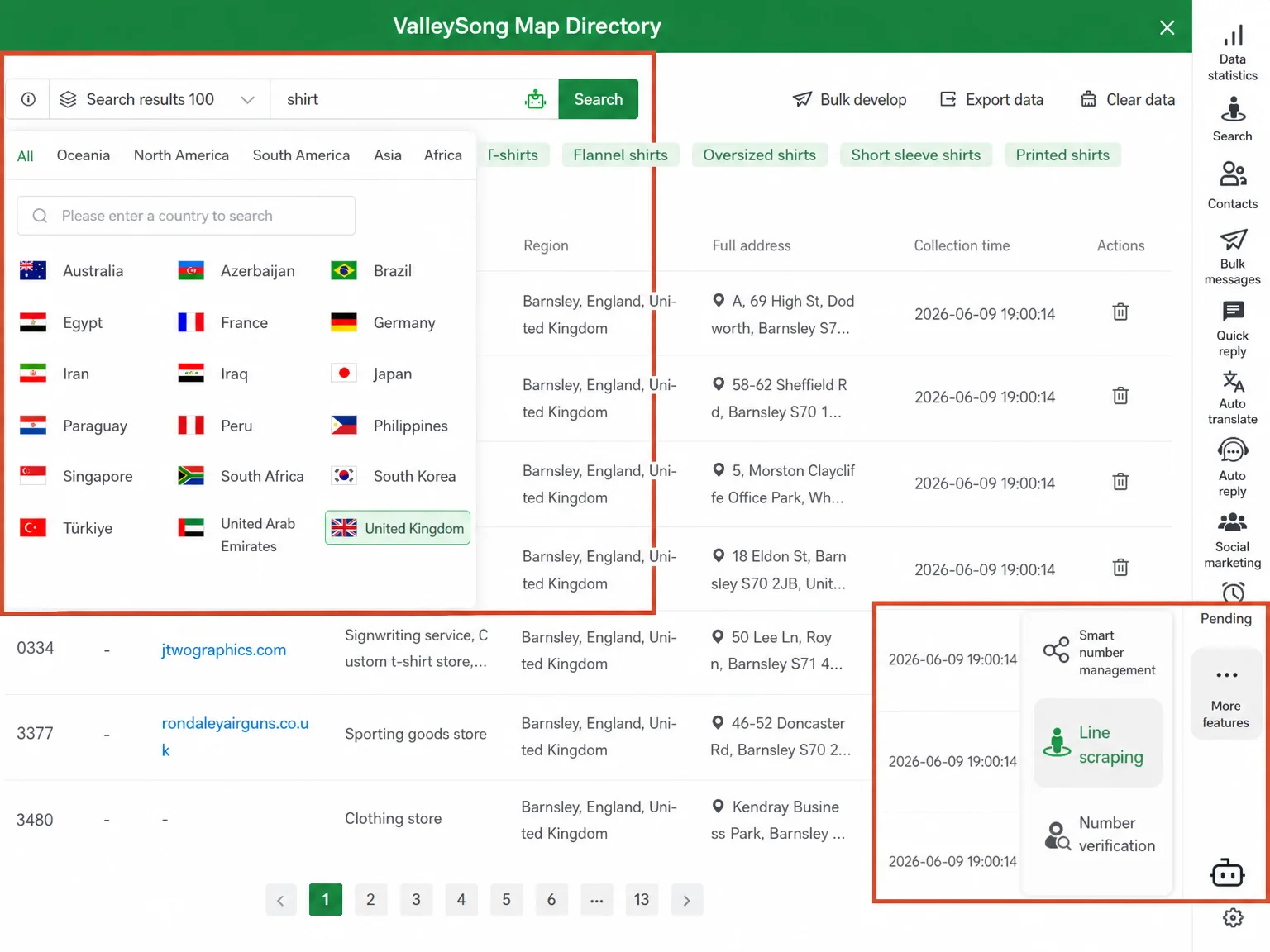
Step 1: Choose Your Target Area and Find Prospects
In WADesk's lead generation tool, select the country and region, then enter your keyword.
How to write keywords that work?
The formula is: "product term + industry context + location".
- ✅
auto parts distributor Dubai— precise target - ✅
electronics wholesale Jakarta— natural language for wholesalers - ✅
furniture manufacturer Vietnam— manufacturer angle - ❌
car parts— too broad, includes repair shops and retailers
Not sure which keywords to use? WADesk's AI expansion generates 10-20 related terms from one core keyword, covering different niches.
Each keyword can collect 100, 200, 500, 1000, or 2000 records. Start with 100 to test accuracy, then scale up.
Step 2: Verify Numbers and Filter Invalid Leads
Collected leads include phone numbers, emails, company names, industries, regions, and addresses. But not all numbers have WhatsApp.
For B2B outreach, WhatsApp is the primary channel — if half your leads don't use WhatsApp, those records are wasted.
WADesk's number verification tool batch-checks whether each number is registered on WhatsApp. It runs across multiple accounts in parallel with random intervals (2000-3000ms default) to avoid triggering detection.
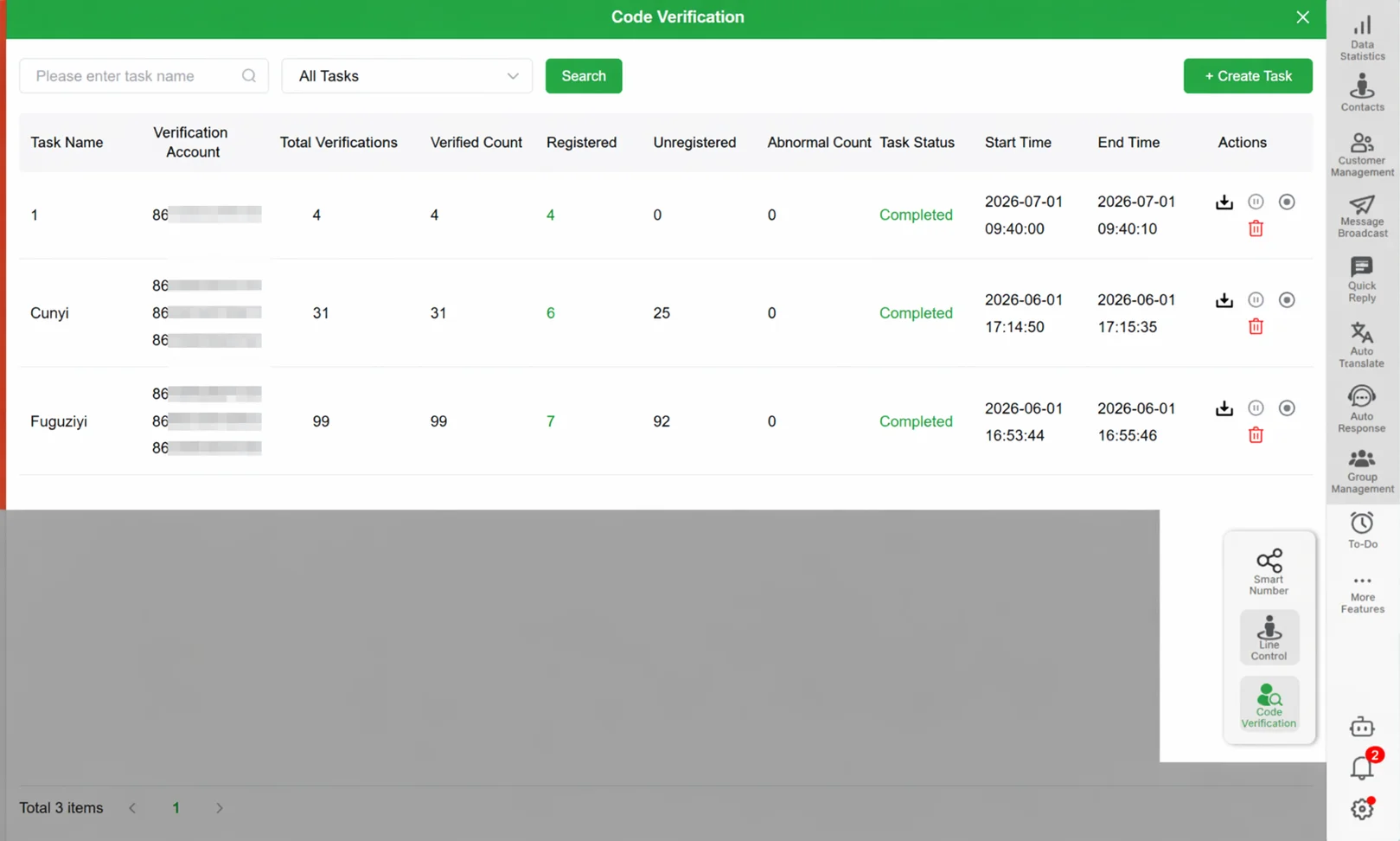
Results show four categories:
- Total verified
- Registered on WhatsApp — ready to message
- Not registered — try a different country or industry
- Errors — retry or skip
Export verified numbers directly for messaging.
Step 3: Reach Out via WhatsApp and Turn Leads into Conversations
Import verified numbers into WADesk's bulk messaging feature. Use the Excel template format — collected data already includes country codes.
Messages support 6 formats: text, image, video, voice, business card, and document. Use dynamic variables like {{name}} and {{WhatsApp nickname}} for personalization.
Recommended sending strategy: Random multi-template rotation + variable sending intervals + safety pause (pause M seconds every N messages). Set daily sending windows to avoid contacting prospects during off-hours.
💡 New to outbound? Distribute volume across multiple accounts — WADesk automatically splits the contact list across selected accounts, with each account managing its own sending pace.
What the Numbers Look Like
Based on observations from WADesk's work with export businesses, a typical Google Maps prospecting flow performs roughly as follows:
| Stage | Volume |
|---|---|
| Leads collected by keyword | ~1,000 |
| WhatsApp-verified numbers | ~600-700 |
| Message open rate | ~40-50% |
| Replies received | ~30-50 |
| Qualified inquiries | ~5-15 |
These are indicative estimates based on typical industry scenarios. Actual results vary by industry, target region, and product type.
A single qualified inquiry can cover a month's worth of prospecting costs. Five inquiries for a mid-sized export company match the output of a mid-range trade show — at near-zero cost.
3 Common Google Maps Prospecting Mistakes
Mistake 1: Getting the Keyword Wrong First Try
Many people pick a narrow keyword and get disappointed by the low result count. Instead, start broad, then narrow down. Try "electronics wholesale" first, see what types of businesses show up, then refine to "mobile phone accessories wholesale."
Mistake 2: Skipping Number Verification
Roughly 30-40% of collected numbers aren't registered on WhatsApp. Sending without verifying wastes half your sending capacity. A 5-minute verification step can double your reply rate.
Mistake 3: Sending Too Much, Too Fast
A new account sending hundreds of messages in one day significantly increases risk. Keep new accounts under 100 messages per day and distribute volume across multiple accounts. WADesk's safety pause and scheduled sending features help control the pace.
FAQ
How accurate are Google Maps leads?
Google Maps business data is submitted or verified by the businesses themselves through Google's review process. Accuracy is significantly higher than random web scraping. Use number verification to confirm WhatsApp registration before messaging.
How many leads can I collect per day?
It depends on your keywords and target region. A single keyword can return up to 2,000 records. Multiple keywords running in parallel can cover tens of thousands. Start with 100 to test keyword relevance.
Can I message collected numbers immediately?
We recommend running number verification first to filter out non-WhatsApp numbers. Then import verified numbers into the messaging tool for efficient sending with controlled pacing.
Does Google Maps lead collection have privacy concerns?
The business information displayed on Google Maps (phone numbers, addresses) is publicly listed commercial data voluntarily submitted by businesses. Use it solely for business outreach and follow local data protection regulations.
What affects collection speed?
Network conditions in the target region, keyword popularity, and account status all play a role. Running multiple accounts in parallel significantly improves efficiency.