

A Common Setup
A consumer electronics trading company in Shenzhen with a team of 15 and annual revenue of about $400K was running all client communication through WhatsApp.
In 2024, the owner decided it was time to get serious about CRM. They chose a well-known domestic CRM platform—full-featured: contact management, sales pipeline, quotes, contracts, after-sales tickets. Everything looked right on paper.
Six months later, the problem was obvious: the CRM was empty.
Well, not completely empty. They had 800+ client records entered (company name, contact person, phone number). But:
- The last 3 months of WhatsApp conversations with those clients? Not in the CRM.
- Which clients got a quote last week, who replied, who went silent? The CRM doesn't know.
- What sales rep A discussed with 5 clients on WhatsApp today? The CRM can't see it.
Why? Because a traditional CRM is a recording system, not a working system. Sales reps do their work in WhatsApp. The CRM expects them to step outside WhatsApp and log the conversation afterward. In reality, that never happens.
The result: the company was maintaining two incomplete data sources simultaneously:
- WhatsApp — held the real, real-time client conversations
- CRM — held the outdated, manually-entered, incomplete client records
Three Core Contradictions of "Traditional CRM + WhatsApp"
Contradiction 1: Data entry cost vs. data completeness
Traditional CRMs assume "sales reps will log their data." For face-to-face or phone sales, this makes sense—a rep can jot down notes after a call. For WhatsApp, it falls apart:
| Workflow step | Traditional CRM + WhatsApp | The problem |
|---|---|---|
| Client sends an inquiry | Reply on WhatsApp → switch to CRM → log the interaction | Two systems, delayed entry |
| Send a price quote | Send on WhatsApp → create a quote record in the CRM | Same data, maintained twice |
| Check conversation history | Flip between WhatsApp chat log and CRM activity log | Both are incomplete, never match |
| Assess deal stage | CRM shows "In negotiation" | But WhatsApp shows the client already rejected the offer—CRM doesn't know |
Every hour a sales rep spends synchronizing data between WhatsApp and the CRM is an hour they're not talking to clients. In practice, the sync never happens completely.
Contradiction 2: The management view is disconnected from reality
The manager opens the CRM to see the sales pipeline and deal forecasts. But this data is manually entered, outdated, and incomplete.
What the manager actually wants to know:
- How many client messages did each rep handle today? — CRM doesn't know, WhatsApp knows
- Which clients haven't been replied to in over 24 hours? — CRM doesn't know, WhatsApp knows
- Who on the team responds the fastest? — CRM doesn't know, WhatsApp knows
But WhatsApp itself has no team management features—it's a peer-to-peer chat app, not designed for oversight. The manager can't see real client engagement data anywhere.
The result: the management tool (CRM) doesn't show real business data, and the real business data (WhatsApp) has no management tool.
Contradiction 3: Client ownership is undefined
In the "traditional CRM + WhatsApp" setup, "who owns this client" is ambiguous:
- The CRM says: Client A is assigned to rep Jane
- WhatsApp says: Client A is in Jane's personal WhatsApp contact list
- Jane resigns: The CRM still has Client A's record (but with no recent chat history), and WhatsApp has Client A's contact (which disappears when Jane leaves)
Client data is split across two systems: the CRM has "client profiles" (no conversation context), and WhatsApp has "conversation history" (no company ownership).
When client data is split across two systems, neither is complete on its own. And that incompatibility ultimately falls on the most critical question—when a rep leaves, their WhatsApp history (the real client relationship record) leaves with them.
WADesk's Approach: Turn WhatsApp Into a CRM
WADesk addresses all three contradictions with a simple principle: stop asking sales reps to move data between two systems, and instead make WhatsApp itself the CRM.
Core idea: Chat is CRM
In WADesk, every WhatsApp conversation automatically becomes a CRM record. When a rep replies to a client's message in WADesk, the system automatically:
- Records the conversation timestamp and duration
- Syncs the contact's details to the backend
- Generates a timeline of communication history per client
- Logs file attachments like quotes, spec sheets, and images
The rep doesn't need to "log data." They just talk to clients normally, and the CRM data is built automatically.
Here's what the WADesk client actually looks like: multiple WhatsApp accounts running simultaneously in the left panel, conversation filters by business status (All / Unread / Awaiting Reply / Interested / Closed / In Progress) at the top, WhatsApp chat in the center, and a contact profile panel on the right.
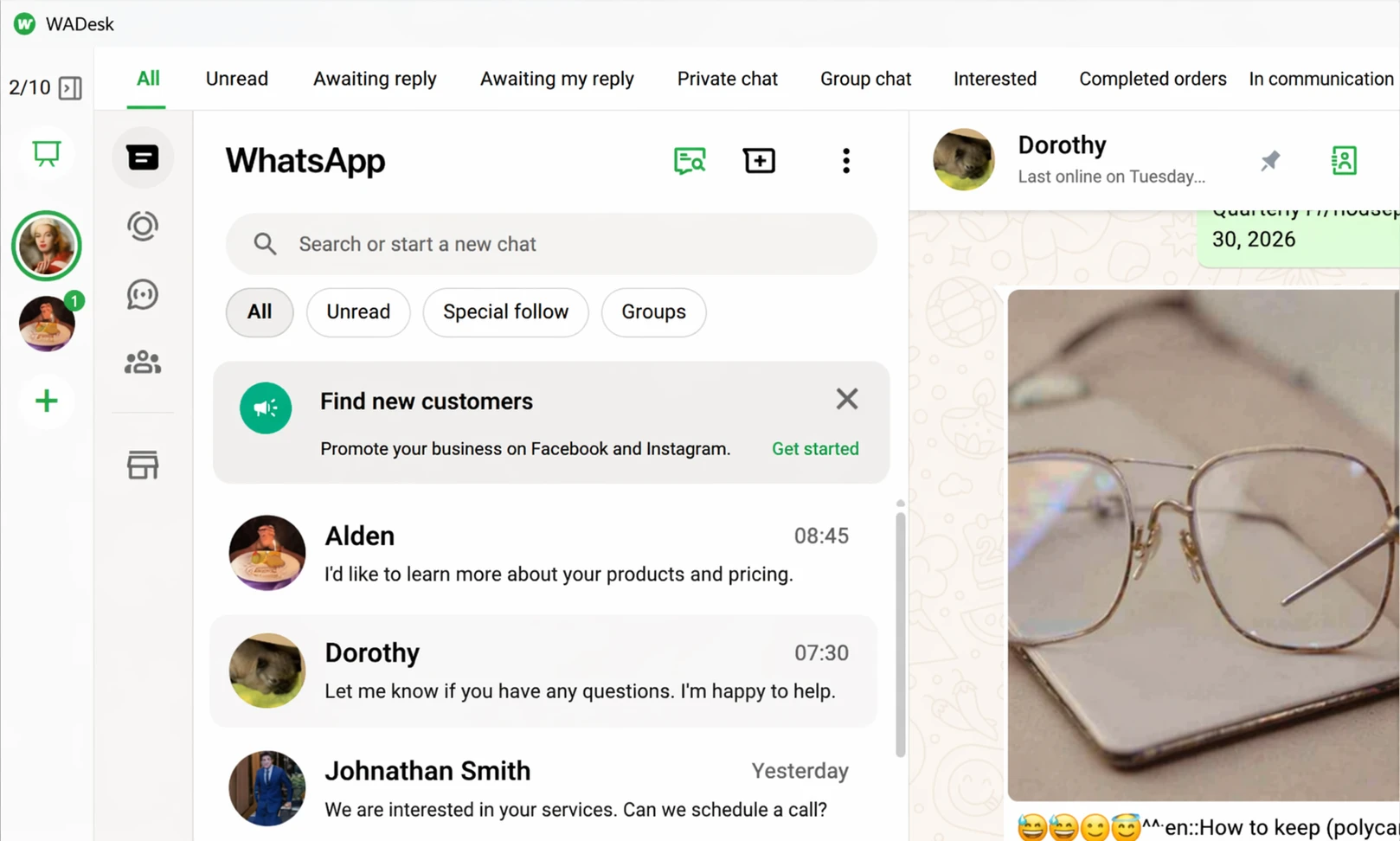
▲ The WADesk client interface: 2/10 multi-account switching + 9 business status filters + WhatsApp chat + contact details. Every UI element is designed for CRM workflows, but it feels like WhatsApp.
Side-by-Side Comparison
| Dimension | Traditional CRM + WhatsApp | WADesk WhatsApp CRM |
|---|---|---|
| Communication tool | WhatsApp (external) | Built-in WhatsApp client |
| Client management | Manually entered into CRM | Auto-synced from chat conversations |
| Chat history | Stored on the rep's personal phone | Retained in the cloud, never lost |
| Data completeness | Low—reps rarely log manually | High—every chat automatically archived |
| Manager view | Sees manually entered reports | Sees real client conversation data |
| Sales rep adoption | Low—adds extra work | High—it's their daily chat tool |
| Data entry effort | 20–30 min/rep/day | Zero additional effort |
| Client ownership | Split between CRM and WhatsApp | Consolidated in WADesk |
| Team management | Requires separate admin panel | Unified admin backend |
| Training cost | Requires CRM training | None—it's a chat interface |
Key difference 1: Data is "grown" from work, not "entered" from memory
A traditional CRM's data is "entered"—the sales rep finishes work, then finds time to log results into the system. Entered data = time the rep is willing to spend × how detail-oriented they are. Both variables are unreliable.
WADesk's data is "generated"—the rep's work is the data creation process. Every reply, every quote sent, every client note is automatically retained. Data volume = actual work volume. It's a natural, unskippable mapping.
The most direct evidence is WADesk's "Contacts" module, which automatically classifies each client into the right stage (All, New Lead, In Progress, Qualified, Closed, Lost, Inactive) and records their source channel automatically:
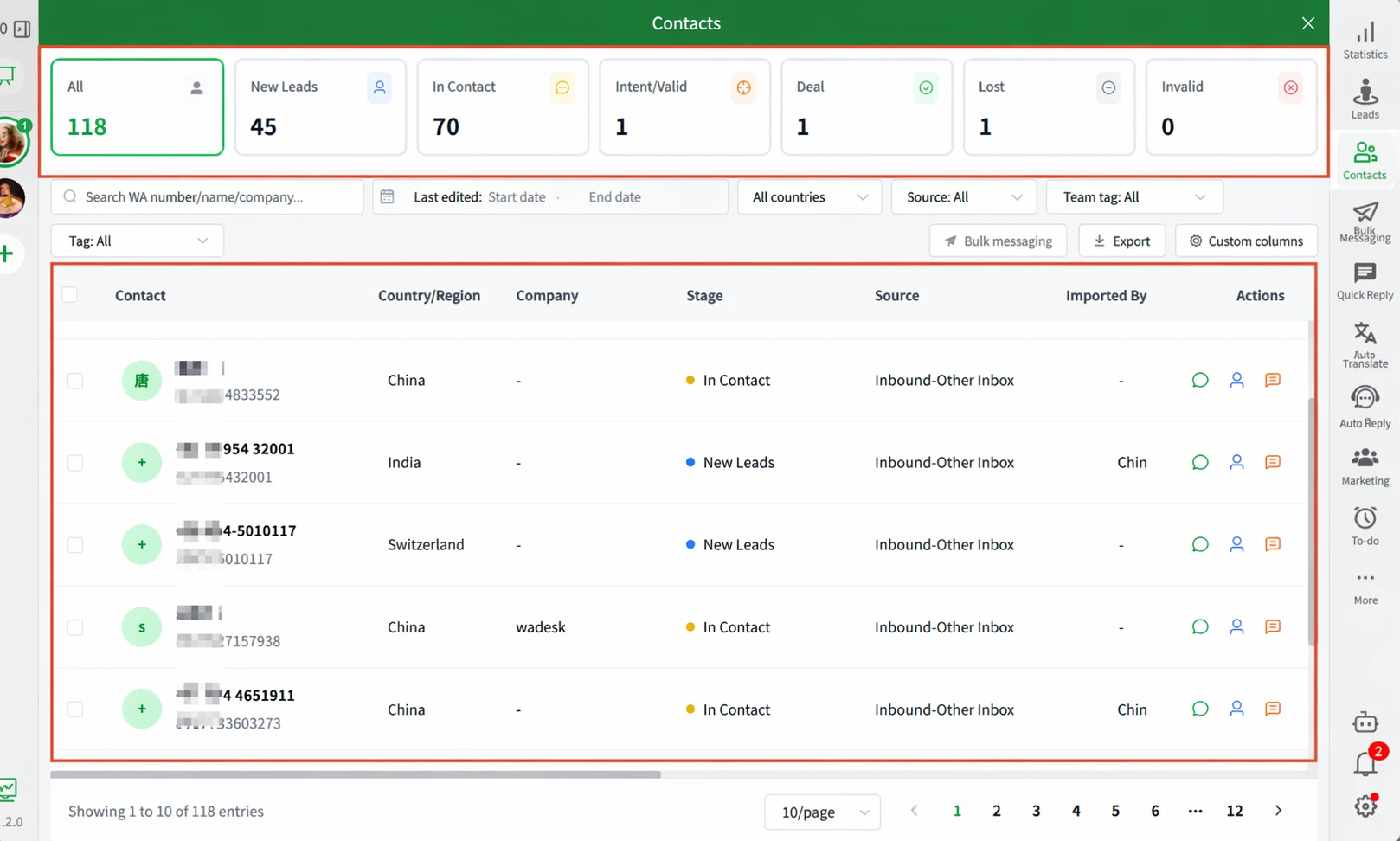
▲ Every WhatsApp conversation automatically populates the "Stage" and "Source" dimensions. 118 clients auto-classified across multiple countries (CN/IN/VE), zero manual effort.
Key difference 2: The manager sees the business, not the rep's report
A traditional CRM shows what the sales rep reported—filtered, simplified, and polished. The rep says "I contacted 20 clients today," but the manager can't verify what was actually discussed.
WADesk's admin dashboard shows a different set of dimensions:
- Team message volume: How many client messages each rep processed today
- Response time: Average time from client message to first rep reply
- Unreplied messages: Which client messages have been waiting over 24 hours
- Conversation density: Which clients are most active, which may be going cold
This data comes from real WhatsApp conversations, not self-reported numbers.
Another practical example: WADesk's "Inbound Lead Stats" module automatically categorizes every new lead by channel, account, time, and whether follow-up has occurred:
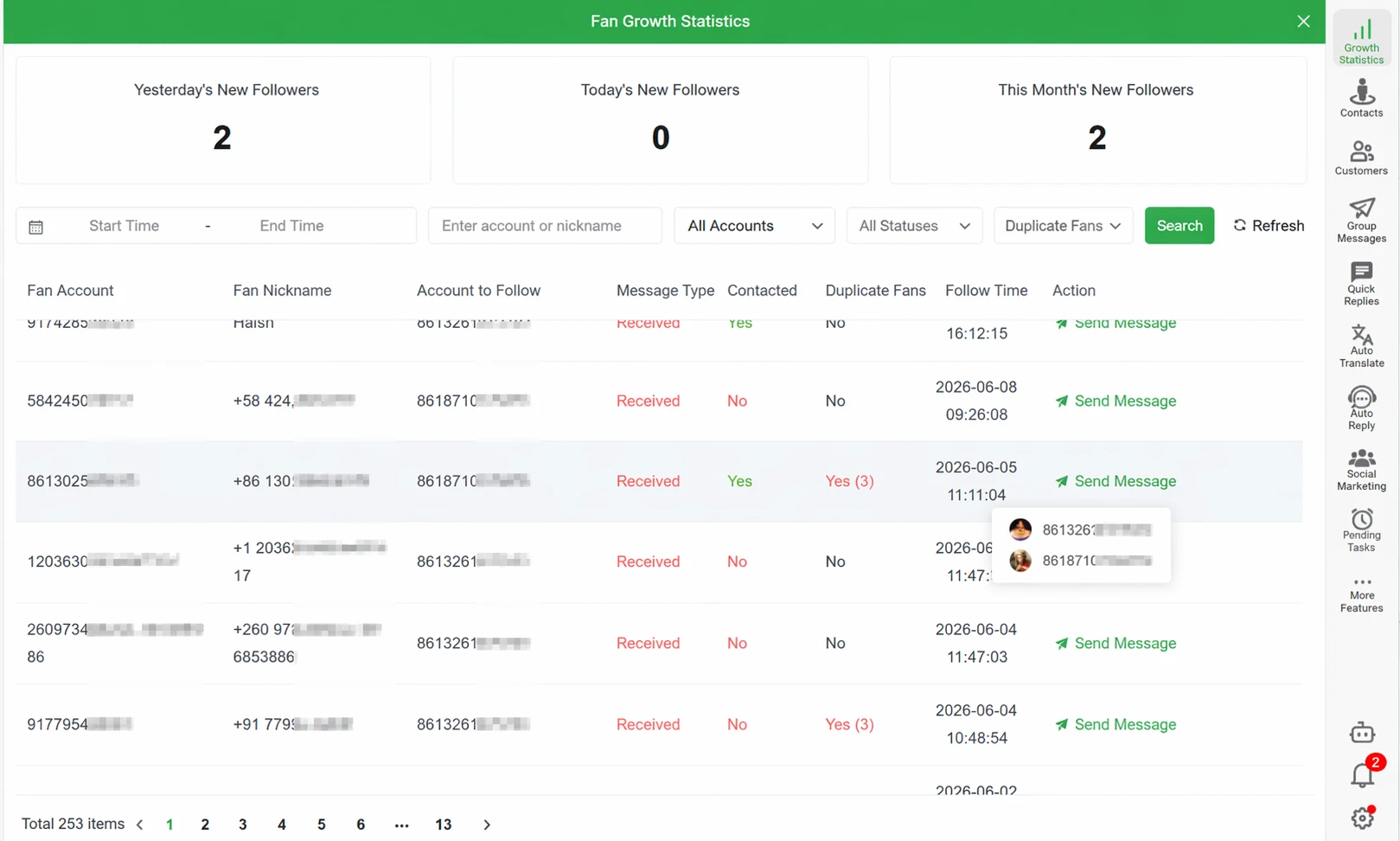
▲ **Inbound lead dashboard**: Yesterday 2 / Today 0 / This week 2, 253 records auto-attributed to specific accounts and channels. Every record can trigger a direct follow-up message—this isn't a static table, it's a live ops hub.
Key difference 3: Sales reps leave without taking client data
When client data is fully retained in WADesk, the "rep resigns" scenario stops being a negotiation:
- Chat logs, client info, and follow-up history are all stored in the cloud
- Admin disables the rep's account, and all data is preserved
- The replacement rep logs in and picks up exactly where the departing rep left off
- No client data depends on the departing rep's phone or memory
This solves the most uncomfortable question in the "CRM + WhatsApp" setup: "Do the clients belong to the company or to the sales rep?"
Which Setup Fits Your Team?
| Your Situation | Best Fit |
|---|---|
| Primary client communication through WhatsApp | WADesk WhatsApp CRM |
| WhatsApp + Email + Phone multi-channel | Traditional CRM + WADesk (complementary) |
| Alibaba.com/trade show as main lead source | Traditional CRM + WADesk for front-end lead tracking |
| Manager needs real-time WhatsApp work visibility | WADesk |
| Primary CRM need is contract/finance back-end | Traditional CRM (WADesk doesn't cover this) |
| B2B trade team, 5–50 people | WADesk |
| Deep ERP and financial system integration | Traditional CRM (with WhatsApp data gap awareness) |
For most B2B trade teams where WhatsApp is the primary client communication channel, WADesk's WhatsApp CRM approach is more practical than a traditional CRM—not because WADesk has more features, but because WADesk solves the "how does data actually get in there" problem, while traditional CRMs assume the data is already there.
Getting Started: A Practical Migration Path
If you already have a traditional CRM, you don't need to rip and replace overnight:
Step 1: Use WADesk to solve the WhatsApp data retention problem first (Week 1)
Regardless of your existing CRM, connect all team WhatsApp accounts to WADesk first. The primary goal: ensure WhatsApp conversations are no longer stored only on reps' personal phones. Now WADesk and your existing CRM run in parallel—the CRM handles back-end processes (contracts, finance, tickets), and WADesk handles WhatsApp conversation retention.
Step 2: Use WADesk's admin dashboard as a management supplement (Week 2+)
Start reviewing team WhatsApp work data in WADesk's backend—message volume, response speed, client coverage. Use this data alongside your traditional CRM. You'll likely find data here that your CRM has never been able to provide.
Step 3: Evaluate migrating client management to WADesk (Month 1–2)
Once the team is accustomed to "chatting in WADesk = using the CRM," evaluate moving client information management to WADesk fully. WADesk's tagging, grouping, and follow-up tracking capabilities cover more of the traditional CRM feature set than you might expect.
FAQ
Q1: Can WADesk work alongside Salesforce or HubSpot?
Yes, as complementary tools, not replacements. WADesk handles WhatsApp-side client communication and data retention. Your traditional CRM handles back-end processes (contracts, tickets, finance). If your core problem is WhatsApp client data not being systematically retained, start with WADesk for that layer.
Q2: Does WADesk replace all CRM functions?
WADesk is a WhatsApp CRM—it layers client management and team management on top of multi-account WhatsApp communication. It covers "client relationship" and "communication management" needs. For contract management, financial reconciliation, and ERP integration, keep your traditional CRM. WADesk is built for the scenario where WhatsApp is your primary client channel and you need chat-to-CRM automation.
Q3: Does the sales team need training to use WADesk?
Minimal. WADesk's client interface is intentionally similar to WhatsApp's native interface—reps see a familiar chat window. The key differences are: multi-account switching (if managing multiple accounts), adding tags to clients, and enabling translation. These take about 15 minutes to cover during onboarding.
Q4: How many WhatsApp accounts can one rep manage in WADesk?
WADesk's client supports multi-account management. In practice, 3–5 accounts per rep is common and switching between them is seamless. For larger account matrix requirements, contact WADesk for a custom consultation.
Q5: Can I import my existing CRM data into WADesk?
WADesk doesn't offer bulk import from third-party CRM systems—the data models are fundamentally different (traditional CRM is manually-entered data; WADesk is auto-generated chat data). The recommended approach: start fresh with WADesk from activation day, and manually add notes and tags to important historical clients as needed.
Compliance note: Salesforce, HubSpot, and other third-party CRM names are trademarks of their respective owners. Features compared are based on publicly available information and actual product usage.