

The 2 AM Inquiry You Won't See Until 10 AM
Sarah runs a home goods export team of six, selling primarily to North American buyers. The 12-hour time difference means her 2 AM is the customer's 2 PM — prime working hours.
The scenario that kept happening: a customer sends "Do you have this product in stock?" at night. Sarah sees it the next morning at 9 AM. By then, the customer has already contacted a second supplier.
One inquiry lost to slow response becomes one customer gained by a competitor.
This isn't about poor sales effort — it's about the wrong tool. Sarah set up keyword auto-reply in WADesk: whenever a message contains words like "price," "stock," "MOQ," or "quote," the system automatically responds with a product catalog link and pricing reference. After setting it up, after-hours inquiry response rates tripled.
The 3-Tier Auto-Reply System: Why Keywords Come First
WADesk's auto-reply system has three levels, in descending priority:
| Tier | Priority | Trigger | Best For |
|---|---|---|---|
| Keyword Reply | 🥇 Highest | Message contains preset keywords (multiple words separated by |) | Inquiries, FAQ, pricing questions |
| AI Reply | 🥈 Medium | AI agent takes over all conversations on assigned accounts | Complex conversations, 24/7 coverage |
| Default Reply | 🥉 Fallback | No keyword matched, no AI takeover | After-hours catch-all |
Why the keyword layer comes first?
Because it's controllable. Keyword-based replies are rule-driven — you set the word "price," a customer asks "What's your price?", and the system fires the exact response you wrote. No more, no less, no mistakes.
By comparison, AI replies are intent-driven and better suited for open-ended conversations. Default replies are the catch-all — useful, but generic.
For most export teams, keyword auto-reply covers 80% of daily inquiry scenarios.
Three Steps to Set Up Keyword Auto-Reply
Configuration takes just a few minutes in the WADesk team dashboard.
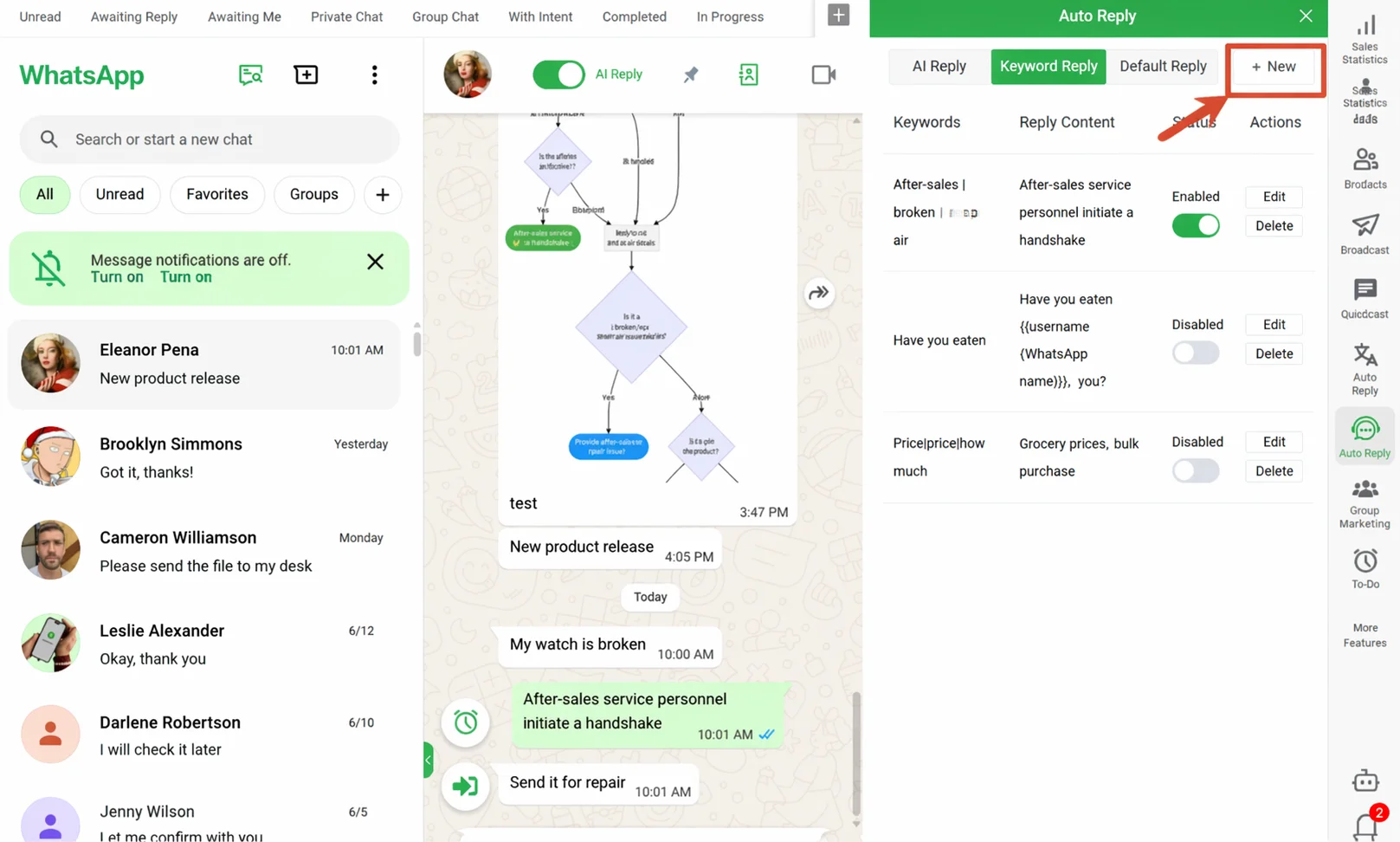
Step 1: Define Keywords and Responses
Navigate to Home → Auto Reply → Keyword Reply, then create a new rule:
- Keywords: Enter the words customers commonly use. Separate multiple words with
|. Example:price|pricing|how much|cost|quote - Response Content: Write your preset reply. Supports 6 formats: text, image, video, voice, business card, and document.
- Frequency Limit: Optional — set "max N triggers per customer per day" to prevent repeated responses.
- Response Delay: Set 0-60 seconds delay to make replies feel more natural.
Step 2: Select Accounts and Schedule
Each keyword rule can be independently configured for:
- Active accounts: Choose which WhatsApp accounts use this rule. Different accounts can have different responses.
- Effective dates: Set a validity period — useful for promotions or seasonal events.
- Active time window: Only auto-reply during specified hours. Switch to AI or fallback during off-hours.
Step 3: Test and Refine
Send a test message containing your keyword to the configured WhatsApp account. Verify the response content and delay. Best practices:
- Start with 5-10 high-frequency keywords for your first ruleset
- After a week, review trigger logs and refine keywords and responses
- Save the best-performing scripts to your team's quick-reply library
4 Best Practices for Keyword Auto-Reply
1. Cover all keyword variants, but don't go too broad
Each rule's keywords should cover common variations. For a home goods supplier:
| Good coverage | Too narrow |
|---|---|
price|pricing|how much|cost|quote|quotation|price list | Just price |
But avoid overly broad words. Hello is used in every conversation — if it triggers your auto-price response every time, the experience becomes intrusive.
2. Replies should guide conversation, not hard-sell
A good auto-reply keeps the conversation moving:
✅ "Thanks for your interest! Here's our product catalog and reference pricing. Let me know which items you'd like to discuss further, and our sales team will get back to you within 1 hour during business hours."
❌ "Our products start at $5. Order now and get 10% off!"
3. Always enable frequency limits
A customer sends 3 messages containing "price" within 5 minutes — without frequency limits, they'll receive the same auto-reply 3 times. Set: max 1 trigger per customer per day.
4. Combine keyword and AI auto-reply strategically
Use keywords for precise matches (pricing, stock, lead time, shipping) and AI for complex conversations (multi-round consultation). WADesk lets you choose the priority order — keyword-first or AI-first — based on your workflow.
A Typical Keyword Reply Configuration
Based on observations from WADesk's work with export businesses, a typical mid-sized trading company configures:
| Keyword Rule | Trigger Scenario | Response Summary | Avg Daily Triggers |
|---|---|---|---|
price|cost|how much|quote | Pricing inquiry | Product catalog link + pricing reference | ~15-25 |
stock|inventory|available|lead time | Stock/lead time | Current stock status + estimated lead time | ~8-12 |
MOQ|minimum order|sample | MOQ/samples | MOQ policy + sample process | ~5-10 |
shipping|delivery|freight|port | Shipping | Main shipping methods + freight reference | ~3-8 |
These are indicative estimates based on typical industry scenarios. Actual trigger frequency varies by industry, customer base, and communication habits.
Once configured, these rules automatically handle roughly 30-50 inquiry-type messages per day — at least half arriving outside business hours. Based on industry-standard response rate benchmarks, that's equivalent to preserving roughly 5-10 inquiry windows per day.
FAQ
What's the difference between keyword auto-reply and AI auto-reply?
Keyword reply is rule-driven — you define keywords and responses, and the system fires on exact matches. AI reply is intent-driven — an AI agent understands conversation context and generates responses autonomously. Keywords are more controllable, AI is more flexible. Both can run simultaneously with configurable priority.
What happens when multiple keywords match?
Each rule triggers independently, but frequency limits apply at the conversation level. You can set "max N triggers per customer per day" to prevent duplicate automated responses within the same conversation.
Does keyword reply support images and files?
Yes. Replies support 6 formats: text, image, video, voice, business card, and document. Great for attaching product catalogs or quotation images in pricing-related replies.
Will keyword auto-reply interfere with normal work-hour conversations?
No. Each rule has independent time windows and account settings. You can disable keyword replies during work hours and enable them outside business hours.
Is there a limit on the number of keyword rules?
No hard limit. Start with 5-10 rules covering core scenarios (pricing, stock, lead time, shipping), then expand as you refine.