


Consider a wholesale handoff: a Brazilian distributor approaching its normal replenishment window asks for the latest price list, MOQ, and delivery time. One rep sends an older price list from a personal WhatsApp account, while a product specialist later quotes a different pricing tier. Nobody records which terms are current, when the quote expires, who owns the account, or what should happen next. This guide shows how WhatsApp for wholesale can support a managed process, with a WhatsApp CRM keeping dealer context, ownership, and follow-up visible to the team.
Where Basic WhatsApp Breaks Down in Wholesale Sales
Wholesale chats rarely follow one order pattern. An importer may buy several lines, hold regional rights, and return with a revised quantity. Another dealer in the same territory may ask for a quote, creating a channel-conflict question.
In individual chats, price-list versions, tiered prices, lead times, and sample policies are easy to mix up. Managers cannot see whether a quote used current terms or whether the product specialist and account owner agreed. A handoff becomes a reconstruction exercise.
Teams that need to manage multiple WhatsApp accounts, share a dealer across sales and product specialists, or coordinate dealer coverage by territory need a shared record. Our guide to searching messages across multiple WhatsApp accounts shows why access and context retrieval belong together.
Warning signs include quotes with no expiry, dealers with two owners, and active accounts reaching replenishment without a planned contact.
A WhatsApp CRM Workflow for Wholesale Distributors
For distributor sales teams, each inquiry should enter a traceable process without implying that software completes the deal. A practical wholesale sales workflow is:
Dealer inquiry → qualification → sales assignment → quotation → follow-up → order confirmation → after-sales service → reorder
| Sales stage | What the wholesale team needs to do | How a WhatsApp CRM helps | What still requires another system or human action |
|---|---|---|---|
| Dealer inquiry | Capture product, quantity, market, destination, and timing | Keep the chat and profile together; tag the inquiry | A rep checks whether the request is complete |
| Qualification | Confirm buyer type, market, expected volume, and decision process | Record dealer type, product line, and status | Fit and credit checks need human or external review |
| Sales assignment | Select one responsible rep | Assign an owner and set permissions | A manager defines territories and escalation |
| Quotation | Verify price, MOQ, lead time, sample policy, and validity | Use approved replies and preserve quote context | Staff or ERP data must confirm changing terms |
| Follow-up | Agree a date and specific action | Create a reminder and retain negotiation history | The rep handles questions and objections |
| Order confirmation | Confirm SKU, quantity, delivery terms, and buyer details | Keep the decision trail accessible | The formal order belongs in the ERP or ordering system |
| After-sales service | Resolve delivery, quality, and usage questions | Keep customer, chat, and owner connected | Logistics and claims need their own workflow |
| Reorder | Contact dealers near a likely replenishment window | Filter by product, tier, market, and cycle | Verify demand, inventory, and current price |
A CRM can expose the next step, but it cannot decide on exclusivity, approve a margin exception, or confirm that inventory supports a promised date.
How to Organize Dealers in a WhatsApp CRM
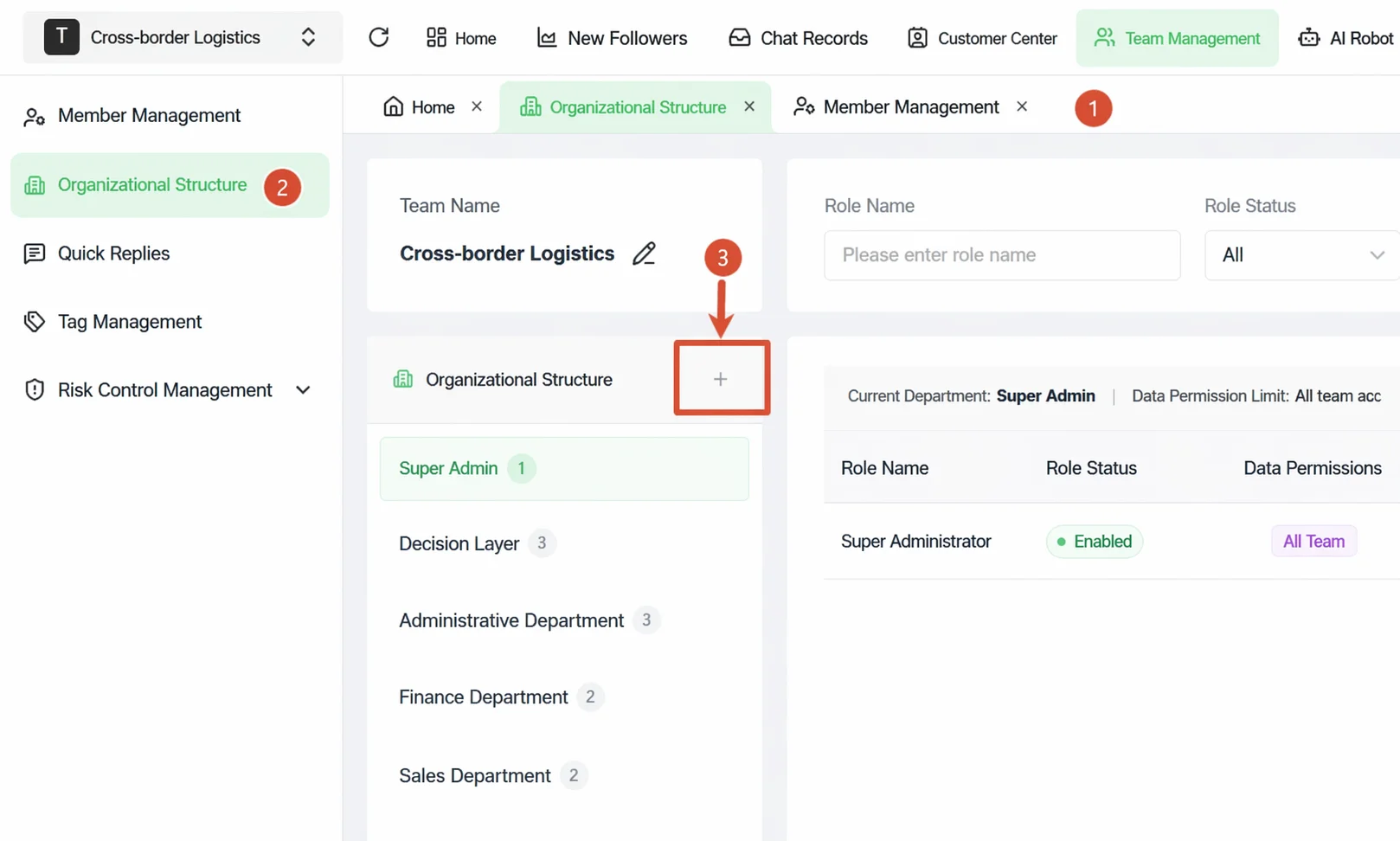
Useful distributor tags should trigger routing, pricing, service, or follow-up. The core record should also preserve the commercial conditions that a generic lead list misses.
Minimum Dealer Record for a WhatsApp CRM
| Field | What to record | Why it matters |
|---|---|---|
| Company | Dealer or importer company name | Prevents contacts becoming isolated phone numbers |
| Market | Country, region, or territory | Supports routing and local coverage |
| Dealer type | Importer, distributor, retailer, or agent | Informs pricing and qualification |
| Product line | Products currently discussed | Routes technical and commercial questions |
| Price-list version | Version and effective date | Prevents outdated quotations |
| MOQ and price tier | Current commercial level | Preserves quotation context |
| Quote validity | Expiration date | Prevents expired terms being reused |
| Owner | Primary sales representative | Avoids duplicate outreach |
| Sales stage | Inquiry, quoted, sample, negotiation, or active dealer | Shows current status |
| Open issue | Price, sample, certification, exclusivity, or delivery | Keeps the next conversation relevant |
| Next action | Specific follow-up and due date | Prevents passive waiting |
| Reorder cycle | Expected replenishment period | Supports repeat-order reminders |
For a dealer with several product lines, keep one company record plus product context. Record regional or channel authorization, exclusivity, and possible territory conflicts. This table describes the information a wholesale team should control, not a list of native WADesk fields. Use WADesk profiles, labels, ownership, chat history, and follow-up tools where they fit. Keep formal prices, quotation versions, inventory, payment, and order terms in the system of record.
How to Manage Product Inquiries and Quotations
A good first response does not quote before the request is clear. For most wholesale order inquiries, collect the SKU, quantity, destination, required date, buyer type, packaging or certification needs, and expected Incoterm. If the dealer buys more than one line, record the request against each line so the product specialist sees the same context as the account owner.
Quick replies can standardize questions, price-list introductions, MOQ explanations, lead-time ranges, and sample policies. For B2B WhatsApp sales, label the price-list version and effective date before sending. Tiered prices, stock, freight, and delivery dates still need a current check.
A transparent initial reply might read:
Thanks for contacting us. To route your inquiry and prepare the right quotation, please share the product or model, expected quantity, destination country, and required delivery date. Our sales team will confirm availability, MOQ, and current pricing before sending a formal quote.
This message acknowledges the inquiry without pretending a person is online or that stock is available. A reply can collect the basics; a human then confirms the terms.
Before quoting, assign one account owner and name any product specialist joining the deal. Lead assignment rules for WhatsApp conversations help prevent two reps from offering different terms. Record the price-list version, MOQ tier, quote validity, open issue, and next follow-up date.
How to Follow Up Without Losing Dealer Context
“Quote sent” is not a complete sales stage. Record the owner, quote-expiry date, open issue, and next action. That action might be confirming a sample address tomorrow or reviewing a revised MOQ after the buyer's purchasing meeting next Tuesday.
Set the follow-up while the quote is fresh. Save product, quantity, terms, sample status, objection, and decision timeline. Schedule messages for the buyer's business hours. WADesk supports tasks, reminders, scheduled messages, and translation; the rep remains responsible for facts and tone.
Separate high-intent dealers from long-term nurture accounts. If a product expert joins a negotiation, keep the account owner visible so the dealer does not receive parallel instructions. The previous MOQ discussion and buying cycle should shape the next message.
Our guide to WhatsApp lead follow-up for export teams covers language and time zones. A WhatsApp follow-up SOP can define overdue reminders. A team inbox for WhatsApp gives sales and product specialists a shared place to coordinate the reply.
How WhatsApp for Wholesale Supports Repeat Orders
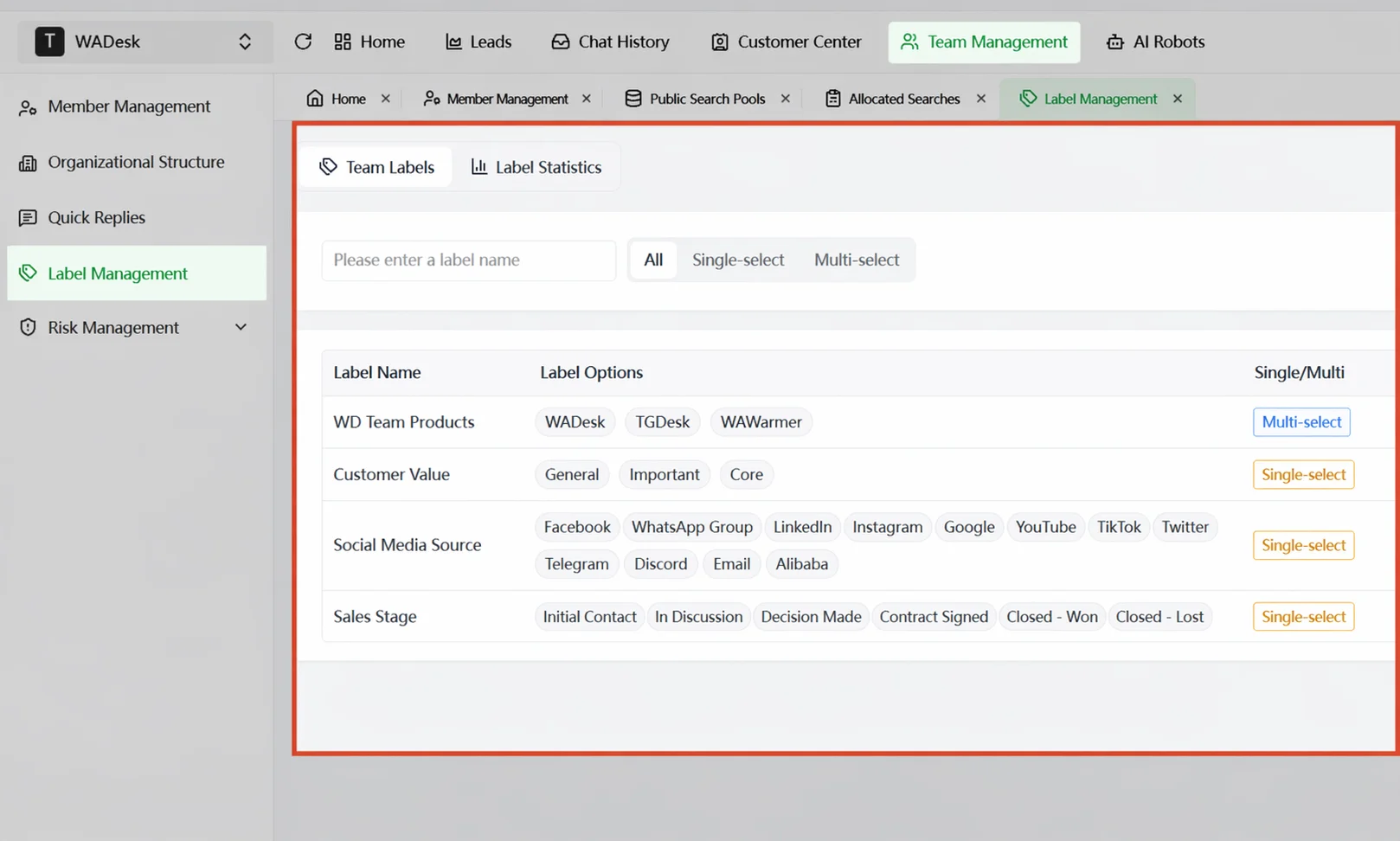
Repeat-order outreach needs buying context, not a blast to every contact. Group dealers by product, last purchase, usual cycle, tier, market, and relevant price or product updates. A 30-day consumables buyer should not receive the same reminder as a seasonal container buyer.
For example, build “Brazil + Active Dealer + Packaging + 60 Days,” review who is approaching a normal replenishment window, then assign follow-ups. Reference the last purchase and ask the dealer to confirm demand; never imply that an old price or stock position is still available.
WADesk supports tags, groups, scheduled messages, and segmented group messages. It cannot determine intent or guarantee a reorder. Reps must review recent chats, supply, and commercial changes first.
Track consent in segmentation too. WhatsApp says businesses should obtain permission for expected message categories and honor opt-outs. Keep outreach relevant, expected, and easy to stop.
WhatsApp CRM vs. ERP and B2B Order Systems
No, a WhatsApp CRM cannot replace an ERP. The systems solve different parts of the wholesale operation.
| System | Primary responsibility |
|---|---|
| Real-time conversation with dealers and buyers | |
| WhatsApp CRM | Customer profiles, chat context, ownership, tags, reminders, and sales team collaboration |
| ERP | Inventory, purchasing, formal orders, invoices, payments, and finance |
| B2B ordering portal | Structured product selection, account-specific prices, stock visibility, and order placement |
The CRM manages dealer relationships and follow-up. ERP remains the source for stock, purchase orders, invoices, and payments. A B2B portal handles structured ordering.
WADesk does not directly read ERP inventory, formal orders, payments, or invoice status. It is not an automatic Shopify, ERP, or portal synchronization layer. Customer import and export can support data handoffs, but each system still needs a clearly defined source of truth.
A small team can stay with WhatsApp Business when customer lists are distinct and follow-ups reliable. For teams using WhatsApp for wholesale, a CRM becomes useful when buyers span accounts, ownership is unclear, or handoffs lose history. For category evaluation, compare WhatsApp CRM tools.
A Seven-Day Setup Checklist
- Day 1 — Inventory every account. List the account, rep, market, and history that must remain accessible. Define business ownership before connecting it.
- Day 2 — Import active dealers and prospects. Include company, number, market, product, and owner. Flag incomplete records instead of guessing.
- Day 3 — Create core tags. Configure market, type, product, stage, tier, and reorder cycle. Define each value and its maintainer.
- Day 4 — Set permissions and ownership. Match reps to territories, products, or accounts. Test access and resolve duplicates.
- Day 5 — Build approved quick replies. Prepare questions and controlled responses for price lists, MOQ, lead time, and samples. Require confirmation of changing values.
- Day 6 — Give every quotation a next action. For “Quoted” and “Sample Sent,” add owner, due date, context, and purpose. Make overdue work visible.
- Day 7 — Create reorder segments. Group dealers by product and cycle, review the audience, and exclude contacts without relevant consent.
Once your dealer records and ownership rules are defined, see how WADesk's WhatsApp CRM brings multiple accounts, customer context, and follow-up into one team workspace.
Metrics Wholesale Teams Should Track
| Metric | What it reveals |
|---|---|
| Percentage of inquiries with an owner | Whether dealer responsibility is clear |
| Percentage of quotations followed up on time | Whether quote activity leads to a managed next step |
| Active dealers with complete tags | Whether segmentation and routing data are usable |
| Repeat inquiry or reorder rate | Whether existing dealers return over a defined period |
| Overdue follow-up tasks | Where pipeline discipline is breaking down |
Define each metric before reporting it. “Followed up on time” needs a due date, grace period, and definition of meaningful follow-up. Message volume alone does not show effective dealer management.
Common Mistakes in B2B WhatsApp Management
One audience, one price list, one assumption
Dealers differ by market, tier, consent, and cycle. Do not send one price update to everyone or treat an imported list as permission. WhatsApp advises businesses to set expectations, obtain the permissions they need, and honor opt-outs in its business broadcast guidance and opt-in guidance.
A contact name without commercial context
“Ahmed Dubai” is not a dealer record. Add company, market, buyer type, product line, price-list version, owner, stage, and next action.
A quotation with no expiry or next step
Record the price tier, validity date, open issue, and follow-up event. Otherwise, an old offer can be reused after terms change.
Parallel outreach and hidden channel conflicts
Assign one owner and make any product specialist visible. Check regional or channel authorization before two reps promise different terms to dealers in the same territory.
Confusing CRM work with transaction work
Use automation for acknowledgement, routing, reminders, and approved information. Keep negotiation, inventory, formal orders, payments, and invoices with the responsible people and systems.
FAQ
How can wholesalers use WhatsApp for sales?
WhatsApp for wholesale supports inquiries, quotations, samples, service, and reorder reminders. Each conversation needs an owner and next action.
What is the best way to manage distributors on WhatsApp?
Assign each dealer, tag market and product, record the stage, preserve quote context, and set follow-up. The process works when rules are shared.
Does a wholesale team need a WhatsApp CRM?
Not always. Basic WhatsApp may suit a small team with low quote volume. A WhatsApp CRM for wholesale helps when reps share dealers or handoffs lose context.
Can a WhatsApp CRM replace an ERP?
No. A CRM manages assignment, tags, reminders, and collaboration. ERP manages inventory, procurement, orders, invoices, payments, and finance.
How do you follow up with wholesale buyers on WhatsApp?
With the quote, save product, quantity, MOQ, sample status, and open question; set a date and next step. Ask about a decision rather than “just checking in.”
Can multiple sales reps manage different WhatsApp accounts?
Yes. WADesk manages multiple accounts in one console, supports permissions, and reassignment. Clear territory rules prevent duplicate outreach.
How should wholesale customers be segmented?
Segment by market, customer type, product, stage, tier, and reorder cycle. Each segment should influence routing, priority, or replenishment outreach.
Is WhatsApp suitable for repeat-order reminders?
Yes, when expected and tied to purchasing context. Group by product, last purchase, cycle, market, and tier; verify price and availability; honor opt-outs.
Turn Dealer Chats into a Managed Wholesale Process
A clear WhatsApp for wholesale process gives every dealer a record and next action. Price conditions, sales responsibility, and replenishment timing stay connected while ERP retains transaction control.
If quotes already disappear inside chats, start with the checklist. Then see how a team inbox supports shared WhatsApp collaboration and choose the accounts, dealers, and stages for your first rollout.