

A Scenario That Keeps Foreign Trade Owners Up at Night
Mr. Li runs a foreign trade company selling industrial parts. His team has 8 sales reps, each managing 3 to 5 WhatsApp accounts, with clients across Southeast Asia and the Middle East. Over three years — through trade shows, Google Ads, and referrals — the company accumulated nearly 2,000 valid client contacts on WhatsApp.
Last October, his top sales rep, Xiao Wang, handed in his resignation. During the handover, Mr. Li discovered a problem that kept him awake at night: Xiao Wang's phone held more than 400 client WhatsApp numbers, added one by one over two years. The chat history lived on Xiao Wang's phone, the client profiles in Xiao Wang's head, the follow-up notes in Xiao Wang's WeChat favorites.
Two months after Xiao Wang left, Mr. Li started hearing from old clients: someone had contacted them from another number, pitching the same kind of products.
This is not an isolated case. In foreign trade circles, "sales reps leaving with the clients" is a problem nearly every company has experienced or fears. And the root cause isn't the sales rep's work ethic — it's a flaw in the tool itself. WhatsApp is designed for individual users; it inherently binds client assets to a personal account, not a company account.
The Root Cause: WhatsApp Is a Personal Tool, Not a Business Tool
With over 3 billion monthly active users, WhatsApp is one of the most direct channels for foreign trade teams to reach overseas clients. But its design logic has always served individuals, which means:
No team permission system. Every WhatsApp account is independent. The boss cannot see what a sales rep is discussing with clients, nor can he take over the account's clients after the rep leaves.
No chat history backup. WhatsApp chat history is stored locally on the phone. Changing phones, reinstalling the system, or a banned account can make the data disappear permanently. Even with Google Drive or iCloud backup, that data belongs only to the account holder — the company cannot access it.
No client asset ownership mechanism. Client contacts accumulated during employment are, legally and technically, stored on the sales rep's personal device. The company cannot count how many clients it has, nor complete a client handover when staff changes.
In one sentence: WhatsApp is an excellent communication tool, but it was never an enterprise-grade client asset management system.
When your team runs business on WhatsApp without a management layer on top of it, you are essentially entrusting your company's most core asset — client relationships — to every employee's personal phone.
Three Layers of Risk: Where Is Your Client Asset Leaking?
Before diving into the solution, it's worth being clear about the risks. Client asset leakage in foreign trade teams usually happens at three levels:
Layer 1: Active removal. Before leaving, a sales rep manually saves client WhatsApp numbers to a personal address book or notes, then continues contacting those clients from a personal account after departure. This is the most common and hardest-to-prevent case — as long as a rep can see the number, there is a chance of taking it.
Layer 2: Passive disappearance. After a sales rep leaves, their WhatsApp account goes unused; the chat history and client info inside fall dormant. The new rep cannot access the predecessor's follow-up history and must rebuild the relationship from zero. Many clients in "communicating" or "intent" stages are lost.
Layer 3: Account ban. Even without departure, a WhatsApp account can be banned for high broadcast frequency, abnormal IP, etc. Once banned, if not backed up in advance, all chat history and client info under that account disappear permanently.
These three layers stack up: a foreign trade team without a systematic protection mechanism keeps its client assets in a highly fragile state.
WADesk's Solution: A Three-Layer Client Asset Protection System
WADesk designed a complete client asset protection system against these three risks. The core logic: turn client assets from "the employee's personal asset" into "the company's asset", acting across three dimensions — data, account, and behavior.
Layer 1: Data — Real-Time Cloud Backup, Data Never Disappears
While the WADesk client runs, it syncs all WhatsApp accounts' chat history to cloud servers in real time. This means that no matter what happens — employee departure, account ban, device damage — managers can view complete historical conversations in the team backend's "Chat History" module, filtered by employee account.
The backup mechanism has two tiers: local backup stored on the computer running WADesk as the first line of defense; cloud backup uploaded to WADesk servers, so data stays intact even if the local device fails. The "Message Sync" data card on the home dashboard shows local backup count and cloud backup count in real time; the gap is the "pending upload" volume, so managers can always check sync status and ensure data is current.
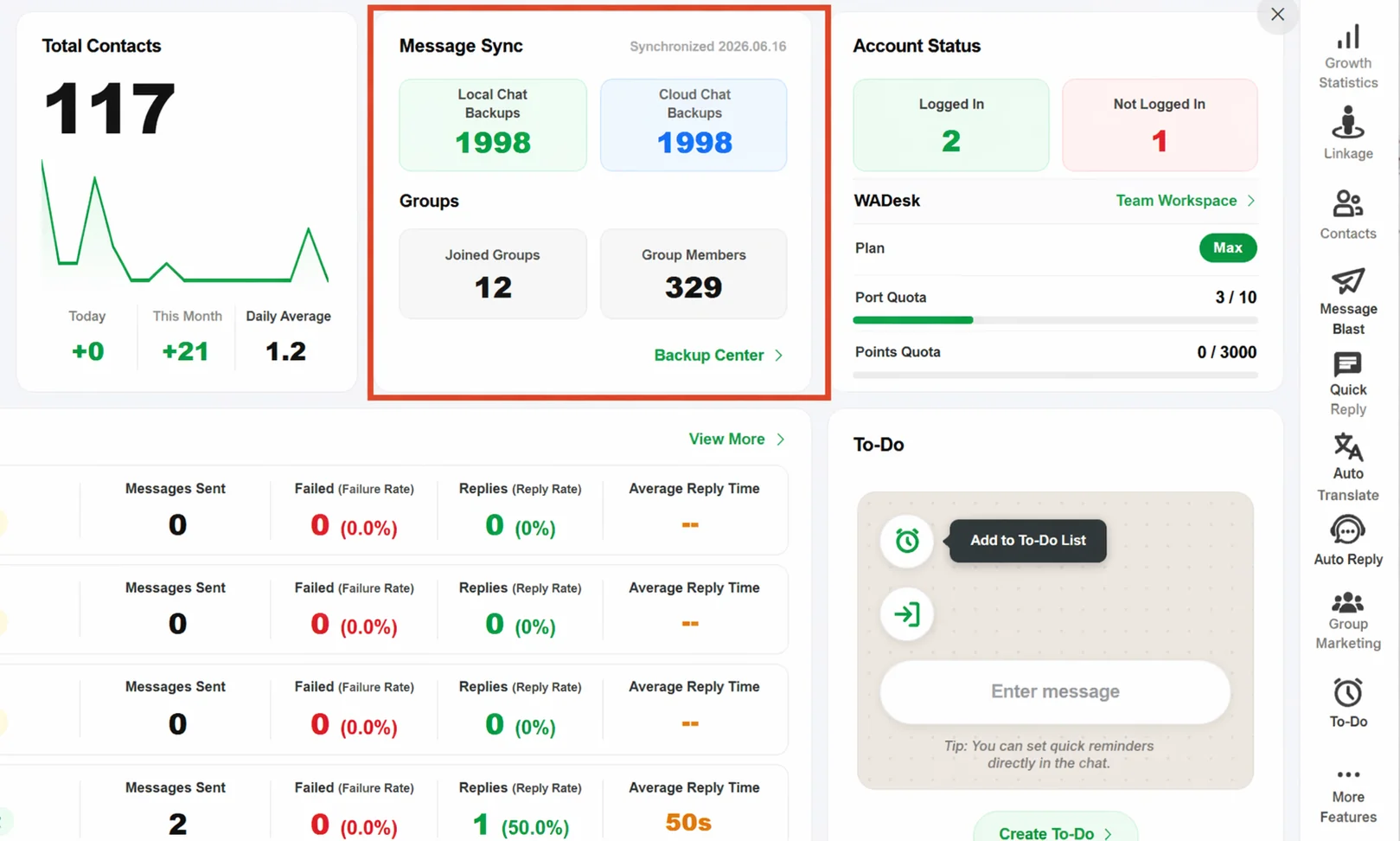
Worth emphasizing: a banned account does not cause loss of already-backed-up data. Chat history already synced to the cloud is completely unaffected by the ban status; the owner can keep accessing it in the backend, filtered by employee and account.
Layer 2: Account — Unified Control, One-Click Disable and Handover
Under WADesk's architecture, all WhatsApp accounts sales reps use log into the company-managed WADesk client, not scattered across each rep's personal phone. This design fundamentally changes account ownership.
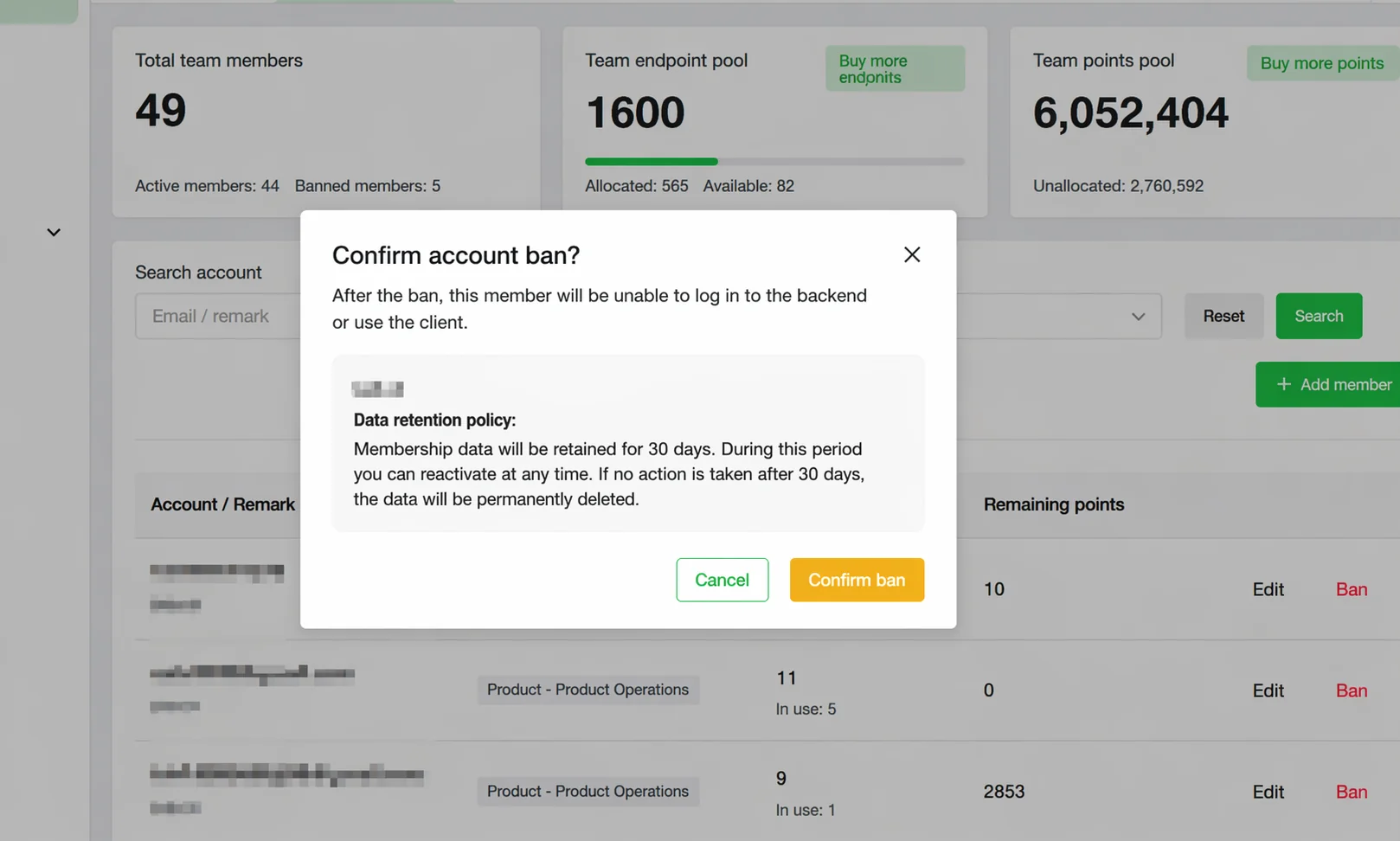
When a sales rep resigns, the admin only needs to go to the team backend's "Member Management" page, find the member, and click "Disable." The employee instantly loses all access to the WADesk client and team backend. But all client contacts, chat history, and follow-up info inside the account remain intact in the system; the admin can directly reassign those clients to other sales reps to continue follow-up.
More importantly, the contact detail page's dynamic timeline records each client's complete follow-up history — including notes, to-do reminders, and import info. When a client is transferred to a new rep, the new rep opens the timeline and quickly understands the predecessor's follow-up thread: where the last conversation left off, the client's core concerns, the next follow-up node. This greatly reduces handover friction and avoids the awkward "new rep, client has to reintroduce themselves" situation.
Layer 3: Behavior — Number Masking, Cutting Off the Removal Path at the Source
The first two layers solve "after departure" problems; number masking solves "during employment" — cutting off the possibility of a rep manually recording client numbers at the source.
After enabling number masking, all client numbers a sales rep sees in the client are encrypted, e.g. +86 138****8888, with the full number hidden. At the same time, the system closes all number-related permissions: the lead-gen list cannot show new client numbers, the lead pool cannot export, the contact list cannot copy numbers.
In short: with number masking on, sales reps can only communicate with clients inside WADesk, but cannot take the numbers out of the system. This feature is especially suited to teams with fly-out (poaching) risk — particularly in high-ticket B2B foreign trade, where one client can be worth hundreds of thousands or even millions, making the protection value of number masking self-evident.
Three-Layer Protection Comparison
| Protection Layer | Core Problem Solved | WADesk Feature | When Effective |
|---|---|---|---|
| Data | Chat history lost on ban/departure | Real-time cloud + local backup | Continuous, real-time |
| Account | Client asset lost on departure | Member disable + reassign + dynamic timeline | Triggered on departure |
| Behavior | Rep manually records numbers during employment | Number masking + permission closure | Effective immediately on enable |
Ready to stop the leak? Let WADesk lock your client assets into the system.
A three-layer protection system, configurable in as little as 30 minutes — from today, your clients belong to the company, not to any individual.
Hands-On: How Admins Configure This Protection System in WADesk
After understanding the mechanism, here are the concrete configuration steps for admins in the WADesk team backend:
Step 1: Enable message sync to ensure real-time backup. Go to "Team Management → Member Management," find each sales rep in the list, and confirm the "Message Sync" switch is on. Once enabled, all chat messages under that member's account sync to the backend database in real time. It's recommended to periodically check "Cloud Chat Backup Count" on the home dashboard to confirm sync status.
Step 2: Enable number masking for high-risk members. On the same member management page, find the member to protect and turn on the "Number Masking" switch. The system will warn that related permissions will close; confirm to apply immediately. It's recommended to complete this configuration at onboarding, not after a problem appears.
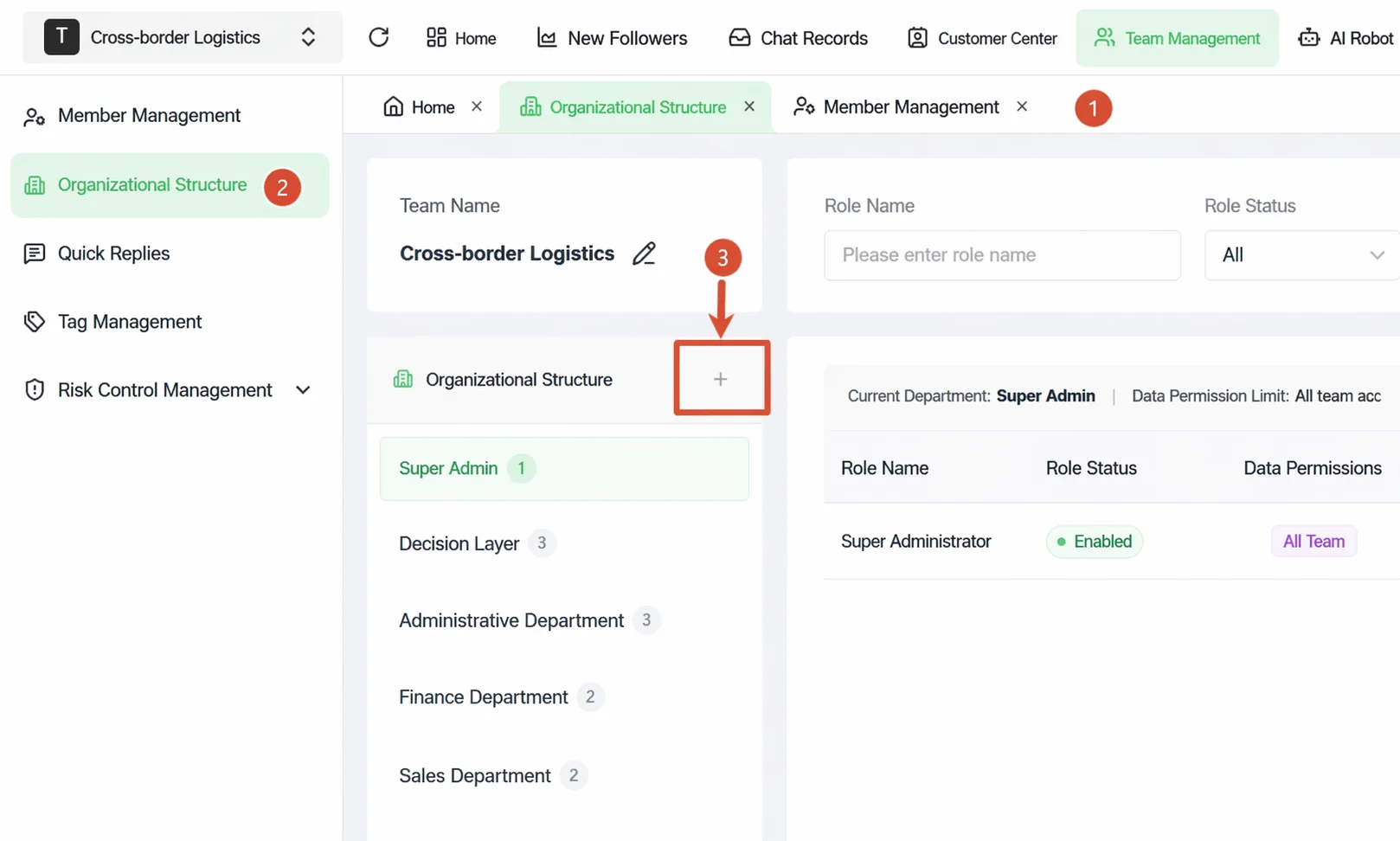
Step 3: Configure a sensible permission system. In "Team Management → Organization Structure," configure function and data permissions per role (super admin, department head, regular sales rep). Core principle: regular sales reps see only their own client data, department heads see their department's data, super admins have a global view. This ensures data security while avoiding the management risk of over-centralized permissions.
Step 4: Build a departure handover SOP. When an employee resigns, the manager should follow this flow: export the employee's client list in the backend (the Contacts module supports filtering by member then exporting Excel); reassign key clients to the replacement; after the new rep takes over, disable the departing employee's account. The whole flow takes under 30 minutes with zero client data loss.
A Question Worth Thinking About
Many foreign trade owners worry about one thing when introducing this mechanism: will enabling number masking and chat monitoring make sales reps feel distrusted, hurting team morale?
This concern is real, but consider another angle: this mechanism protects not just the company's interests, but the sales rep's own. A client with complete follow-up records can be seamlessly handed to a colleague when the rep is on leave or leaves — no forced overtime handling work just because "only he knows the client." Systematic client asset management makes everyone's work more secure, not just beneficial to the company.
When explaining this mechanism to the team, the recommended core message: "We use the system to protect the company's client assets, and also to protect every sales rep's labor." Once reps understand the logic, acceptance is usually much higher.
Conclusion: Client Asset Security Is the First Threshold of Foreign Trade Team Digitalization
In foreign trade, client relationships are the core competitive moat. A client network built over three years can shrink dramatically from one employee departure or one account ban. This is not alarmist — it's real loss happening every day.
WhatsApp, as the most direct channel to overseas clients, is unquestionably valuable. But to make this channel a company asset rather than a personal one, an enterprise-grade management layer is needed on top. WADesk's three-layer client asset protection system — data-layer backup, account-layer control, behavior-layer masking — is designed exactly for this.
Client asset security is the first threshold of a foreign trade team's WhatsApp digitalization, and the foundation for all subsequent operational efficiency gains. Before this foundation is laid, no matter how much marketing investment, you're building on sand.
Protect Your WhatsApp Client Assets Now
If your team still manages clients with native WhatsApp, or already uses WADesk but hasn't configured a complete asset protection mechanism, now is the best time to revisit this.
Don't let client assets walk out the door with your staff.
Build your company's client moat today.
The demo is customized by a WADesk product consultant for your team — covering client asset protection, team permission configuration, and data backup, about 30 minutes.