

Yes, multiple people can use WhatsApp Business through its supported linked-device options. For teams that need a more structured workflow, WADesk WhatsApp CRM brings multi-account management and customer follow-up into one workspace.
The problem changes once WhatsApp becomes part of an actual sales process. A few reps are working different markets. One handles distributors in Brazil, another follows buyers in Mexico, while someone else is working through leads collected at a trade show or from Google Maps. Customers are asking about MOQ, catalogues, samples, freight and quotations, and many of those conversations stay open for days or weeks.
At that point, getting another salesperson into WhatsApp is usually the easy part. The harder part is knowing what is happening across all those conversations.
WhatsApp is built around recent activity. Someone sends a message and the chat moves to the top. That makes perfect sense for messaging, but sales teams do not prioritize customers simply by who spoke last. A distributor who has been silent for four days after receiving a $20,000 quotation may matter far more than a new contact who asked about a product ten minutes ago.
This is the real operational problem behind WhatsApp Business multiple users. As more people and accounts become involved, the team needs a way to keep track of ownership, deal stage and what should happen next.
When Linked Devices Are Enough
There is no reason to turn a simple WhatsApp workflow into a CRM project.
If two people share one number, both know the customers and the number of active conversations is manageable, WhatsApp Business may work perfectly well. The same is true for teams handling short, transactional conversations where most questions are resolved in one sitting.
The limitation becomes visible when conversations start stretching across several days.
A buyer asks:
“What is the MOQ for 1,000 pieces?”
The salesperson replies:
“I'll confirm and get back to you.”
During the next two days, 30 new conversations arrive. The salesperson checks internally, deals with several other quotations and forgets to return to the original buyer. On Friday, the chat is still there, but nothing in the WhatsApp inbox tells the salesperson that this particular conversation has an unfinished action attached to it.
The message was not lost. The sales state was.
That is why team size is not a particularly useful threshold for deciding when you need more structure. Three export salespeople handling hundreds of distributor conversations may have a much harder problem than ten service agents answering simple availability questions. Sales-cycle length, follow-up volume and how often customers move between employees are much better signals.
WhatsApp Sorts by Conversation. Sales Teams Need to Sort by Opportunity.
This difference becomes obvious when you compare two chats.
The first arrived ten minutes ago:
“Do you have this in blue?”
The second has been quiet since Monday:
“The quotation looks good. Let me check with my boss.”
WhatsApp naturally places the first conversation higher because it is newer. A sales manager may care much more about the second one.
The second buyer has already moved through several commercial steps. Perhaps they asked for a catalogue, confirmed the MOQ, discussed freight and received pricing. Their silence does not mean the opportunity is dead. They may simply be waiting for internal approval.
A sales team therefore needs information that does not come from the timestamp of the latest message: who owns this buyer, how far the conversation has progressed and when somebody should contact them again.
This is where the difference between linked devices, a shared inbox and a WhatsApp CRM becomes useful.
Linked devices mainly solve access. A shared inbox helps several people coordinate incoming conversations and avoid situations where two agents reply to the same person. A CRM adds structure around the customer or opportunity itself.
Take a distributor inquiry:
Maria — Brazil distributor
Owner: Lucas
Stage: Quotation Sent
Interest: Product A
Next action: Follow up Thursday
In WhatsApp, Maria may simply look like an inactive conversation. In the sales pipeline, she is still an active opportunity.
| Capability | Linked Devices | Shared Inbox | WhatsApp CRM |
|---|---|---|---|
| Several people can handle chats | Yes | Yes | Yes |
| Common conversation view | Limited | Yes | Yes |
| Assign conversations or leads | Limited | Usually | Yes |
| Track customer ownership | Limited | Varies | Yes |
| Track sales stage | No | Limited | Yes |
| Track follow-up | Manual | Varies | Yes |
| Manage several WhatsApp accounts | Limited | Depends on platform | Yes |
| Manager-level sales visibility | Limited | Moderate | Stronger |
The right choice depends on how much structure the team actually needs. If another employee simply needs to help answer messages, native WhatsApp may be enough. Once WhatsApp is being used to qualify, quote and repeatedly follow up leads, access alone stops solving the harder part of the job.
Multiple WhatsApp Accounts Turn Into Information Silos
Multiple-account setups are common in international sales. A company may use separate WhatsApp numbers for Brazil, Mexico and the Middle East, give each salesperson their own account, or split accounts by product line.
Operationally, this is convenient. Each rep has their market and knows the customers inside their own account.
For the manager, however, the sales pipeline becomes fragmented.
Imagine a company with 15 WhatsApp accounts. All 15 are online, all conversations still exist and every salesperson can explain what is happening in their own account. The manager still cannot easily answer basic questions such as:
Which accounts contain active quotations? Which distributor leads have received samples but not replied? Which buyers have had no follow-up for a week? Are two salespeople talking to the same company?
Nothing has technically disappeared. The information is simply scattered across separate account histories and individual employees' memory.
This is why the request “we need to manage more WhatsApp accounts” often points to a larger workflow problem. Centralizing account access saves switching time, but the bigger benefit comes when customer responsibility and follow-up can also be seen across the team.
WADesk brings multiple WhatsApp accounts into one desktop workspace and provides team-level account and customer-management tools. Its team dashboard also gives managers visibility into members, accounts and communication activity.
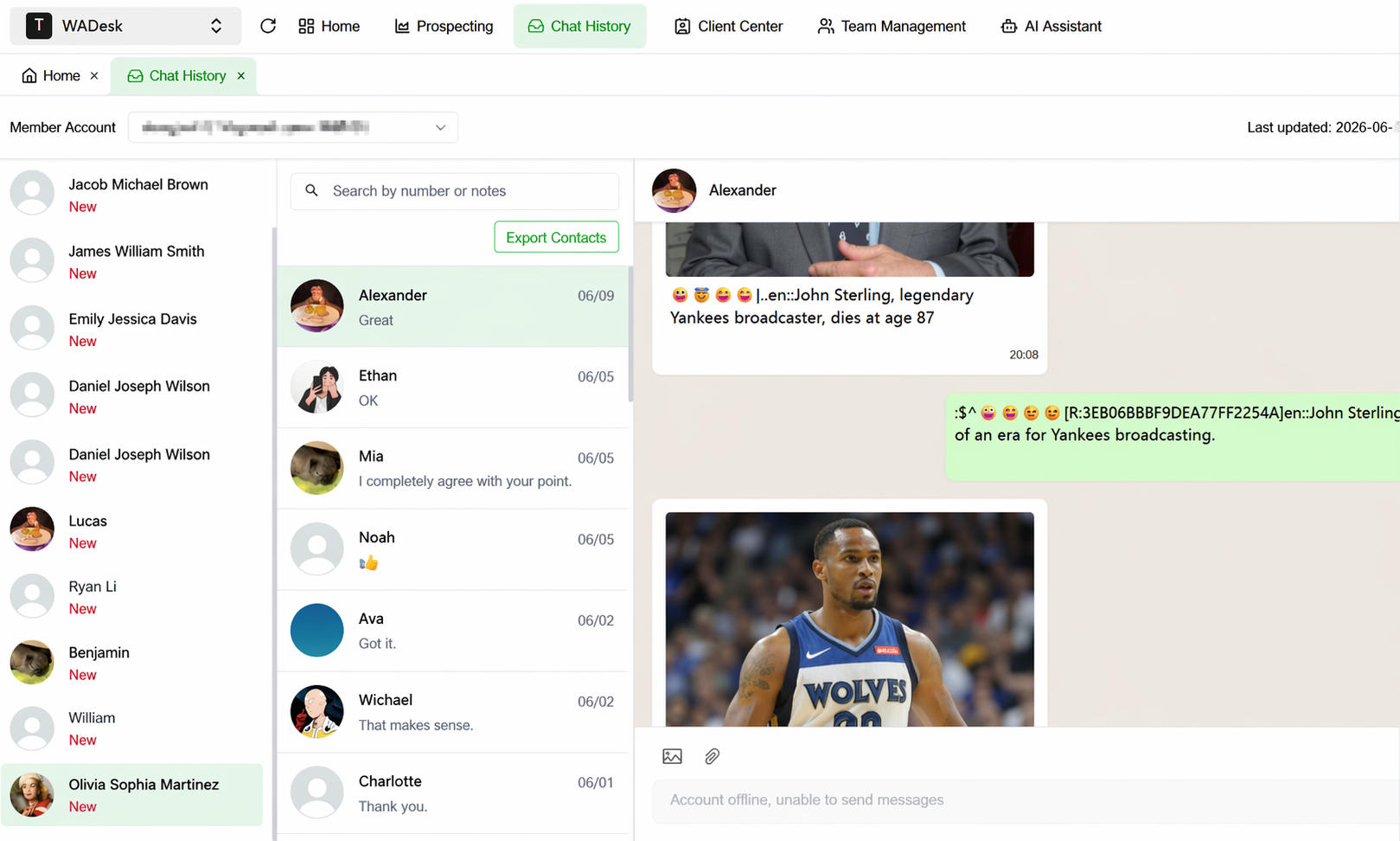
Bring multiple WhatsApp accounts into one workspace instead of managing each market or salesperson in isolation.
Centralization does not automatically create a sales process, though. If everyone can see 80 new leads and nobody knows which ones belong to them, the team has simply built a larger inbox.
Ownership Matters More as Lead Volume Grows
Suppose a trade show produces 80 new WhatsApp contacts over two days. By Monday, the team has a mixture of fresh inquiries, buyers who received catalogues, companies waiting for samples and distributors who already have quotations.
Giving everyone access to those conversations does not tell the team who is responsible for each opportunity.
This is where explicit ownership becomes important. For an active lead, the team should at least know three things: who owns it, where it stands and what happens next.
That does not require a complicated enterprise pipeline. Something as simple as:
New Lead → Contacted → Interested → Quotation Sent → Follow-Up → Won / Lost
is often enough.
WADesk's current lead workflow is more specific than simply “assign any chat.” Administrators can import leads into a public lead pool, assign selected leads to sales reps and transfer them between members. Assigned leads then appear in the salesperson's desktop client, while lead status updates can be reflected in the team dashboard.
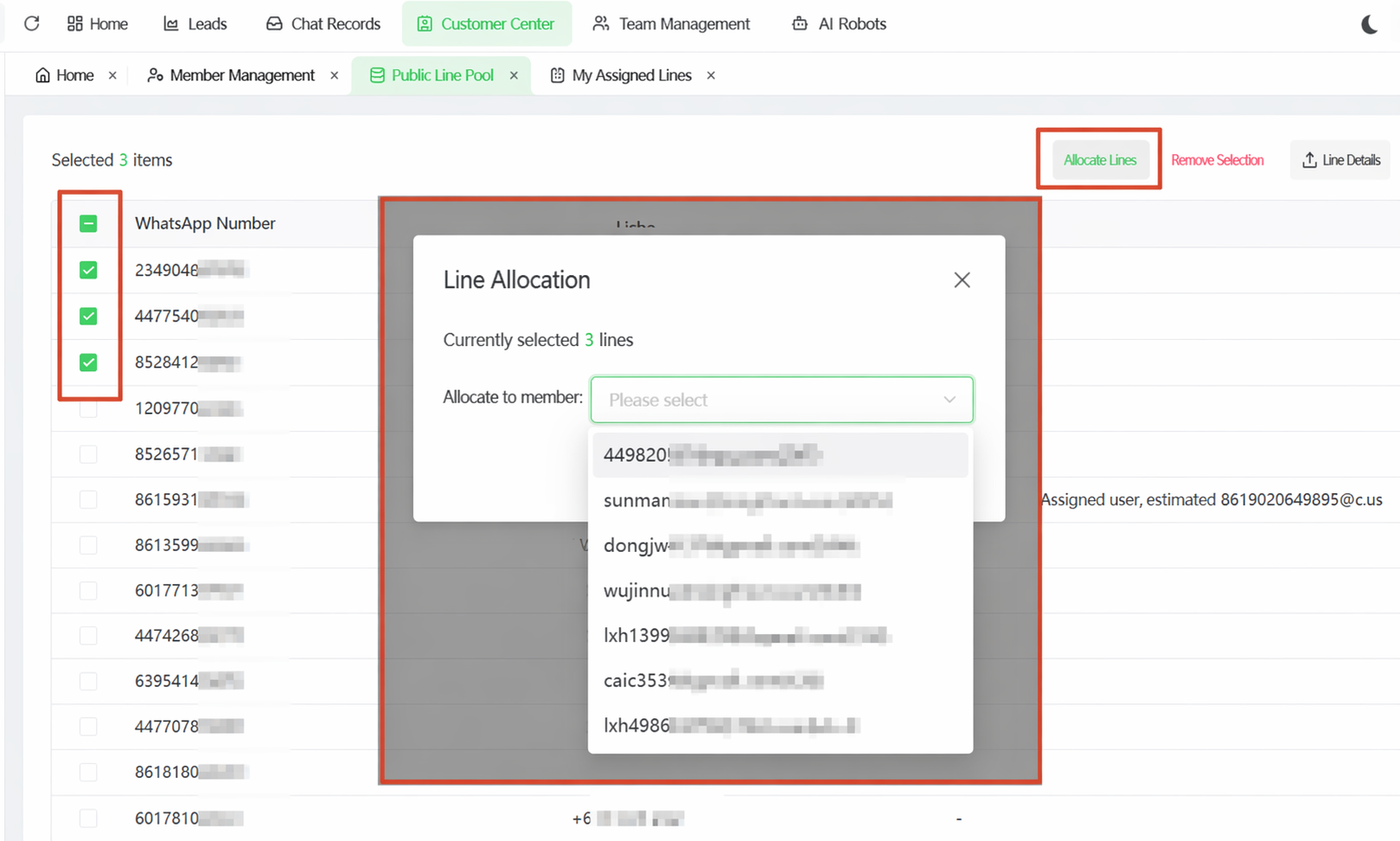
Assign leads to specific sales reps and transfer them when responsibilities change.
This distinction is important because ownership should be visible in the workflow, rather than inferred from whoever happened to send the latest message.
The Follow-Up Problem: WhatsApp Loses Sales State
Follow-up is where a chronological inbox becomes particularly weak for sales.
Consider a normal export conversation:
Buyer: “Please send me your catalogue.”
The catalogue is sent.
The next day:
Buyer: “What's your price for 1,000 pieces?”
The salesperson sends a quotation.
Then:
Buyer: “Looks okay. Let me check with my boss.”
From WhatsApp's perspective, the conversation is now inactive. As new messages arrive, it moves further down the list.
From a sales perspective, it may have just become more valuable.
The buyer has gone from a general inquiry to discussing quantity and pricing. They may now be comparing suppliers, checking the budget with a manager or waiting for purchasing approval. None of that work happens inside the WhatsApp conversation, so the chat can remain silent while the opportunity is still alive.
This is why a basic “follow-up reminder” does not fully describe the problem. What the team needs to preserve is the meaning of the customer's last position.
“Not interested” and “let me check with my boss” can both produce five days of silence. They should not be treated the same way.
The same applies to:
“Please send a sample.”
“We need to calculate freight first.”
“Can you revise the quotation for 5,000 units?”
Each one implies a different next action.
Once a salesperson is managing dozens of conversations like these, relying on the chat list and memory becomes fragile. The useful CRM layer is the one that makes that context visible before the rep has to reread an entire conversation.
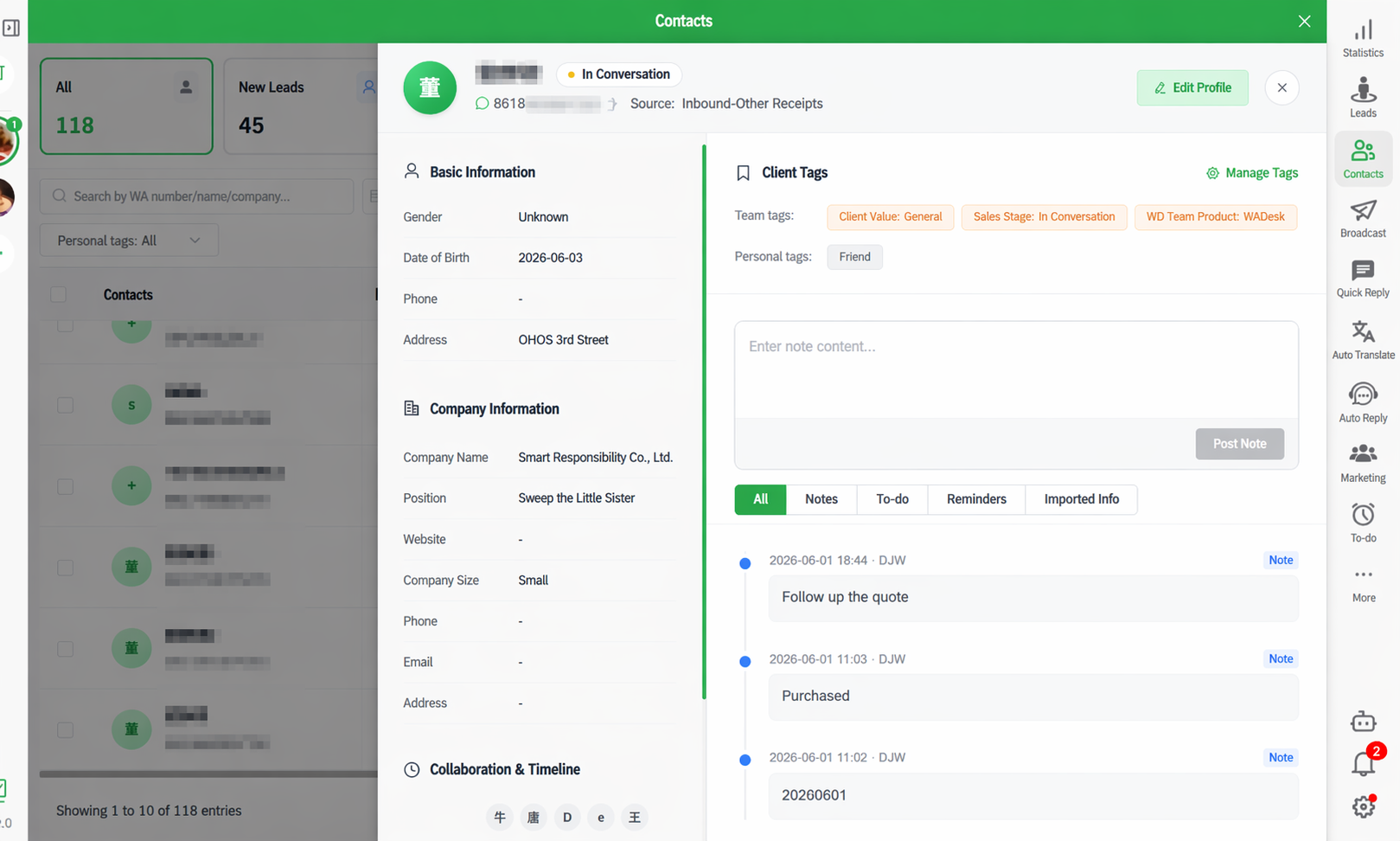
Keep customer context beside the conversation so reps can understand where the opportunity stands before replying.
Handover Is a Better CRM Test Than Headcount
Another useful test is to ask what happens when the salesperson who knows the customer disappears for a week — or leaves the company entirely.
Suppose one rep has managed a market for 18 months. They know which distributor placed a trial order, who received samples last month, which buyer constantly negotiates on MOQ and which customer was close to placing a larger order.
A replacement may have access to the WhatsApp conversations, but reading the history is not the same as understanding the account.
If every handover requires the new salesperson to scroll through months of chat or ask customers to explain what happened with the previous rep, the workflow depends too heavily on individual memory.
This is one reason a three-person team can need CRM structure sooner than a much larger team. Long sales cycles, frequent handovers and high follow-up volume create more operational complexity than headcount by itself.
WADesk supports team-level customer and lead reassignment, while its cloud chat-history retention depends on plan. The current public pricing page lists 7-day, 30-day and 90-day cloud history retention across different plans, so teams that rely heavily on historical conversations should choose their retention level accordingly.
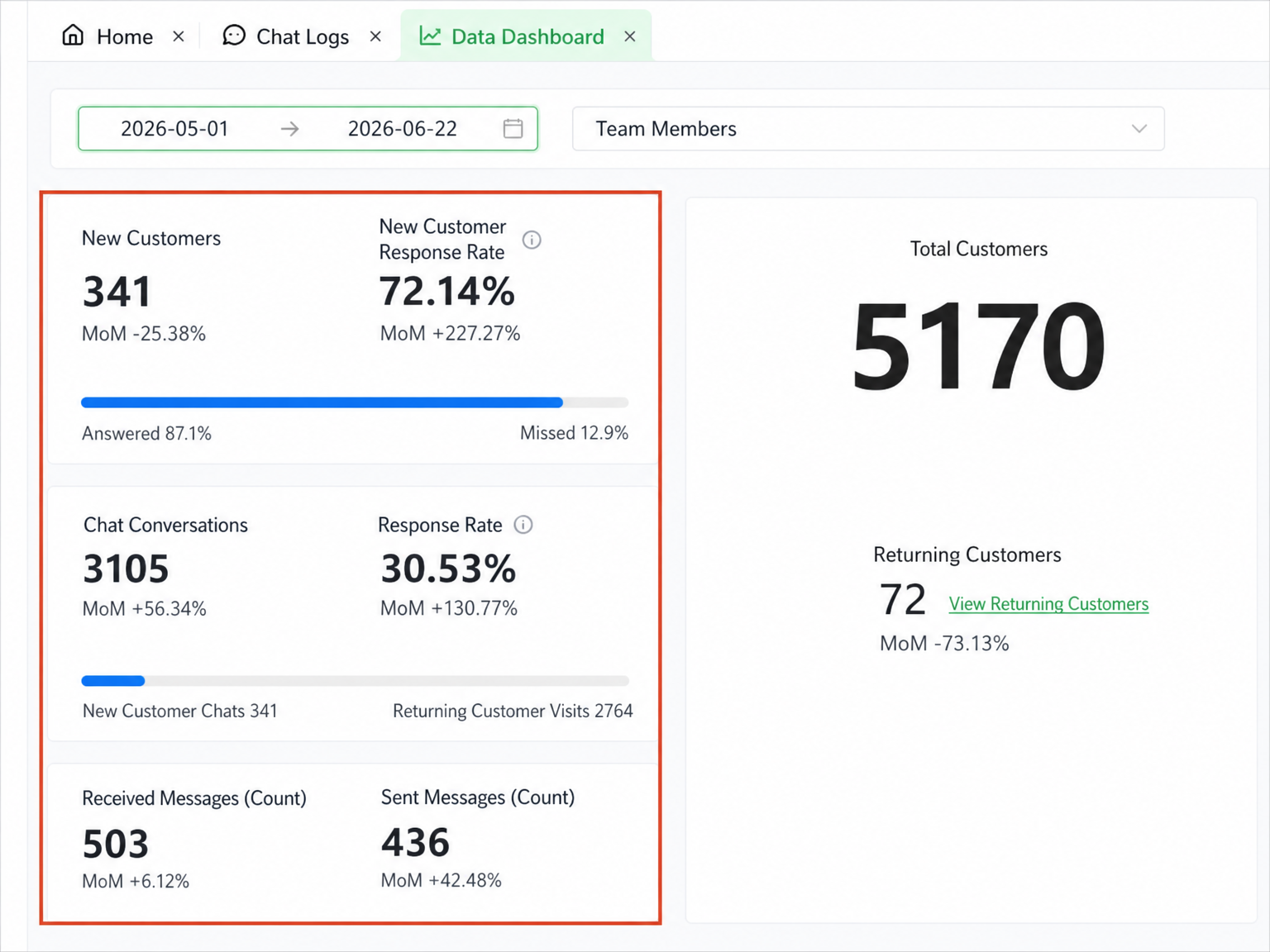
Give managers a team-level view of WhatsApp activity instead of relying on individual account owners for every update.
How to Know When WhatsApp Business Is No Longer Enough
There is no useful rule such as “five salespeople means you need a CRM.”
A better test is whether the team can still answer a few operational questions without opening multiple accounts or asking individual salespeople:
- Who owns each active opportunity?
- Which buyers have received quotations and are waiting for follow-up?
- Which sample or freight discussions are still open?
- Can another rep take over a customer without starting from zero?
- Can a manager see what is happening across several WhatsApp accounts?
If those answers are already obvious, keep the workflow simple.
If the team regularly hears “I thought someone else followed up,” “that customer is on David's account” or “I know we sent a quote but I'm not sure what happened after that,” then the problem is no longer the number of devices connected to WhatsApp.
The business has started to depend on sales information that a chronological chat list does not represent very well.
The sensible response is not necessarily to build a complicated CRM. In many teams, a clear owner, a small number of meaningful stages and one visible next action are enough to restore control. Automation, AI replies and advanced reporting can be added later; they do not fix unclear responsibility.
So, What's the Best Way to Use WhatsApp Business With Multiple Users?
For a small team that mainly needs several people to answer the same account, start with WhatsApp's native linked-device options.
When several agents need to coordinate incoming conversations, a shared inbox adds useful structure.
A WhatsApp CRM becomes relevant when the team is managing more than conversations: multiple accounts, long-running opportunities, quotations, follow-up, customer handovers and manager visibility.
The most useful question is therefore not simply:
“How many people need access to WhatsApp?”
It is:
“After a customer stops messaging, can our team still tell who owns the opportunity and what needs to happen next?”
If the answer is becoming difficult, adding more access will not solve much.
WADesk is built for sales teams at that stage, combining multi-account WhatsApp management with lead assignment, customer management, team visibility and follow-up workflows in one workspace.
Frequently Asked Questions
Can multiple people use WhatsApp Business?
Yes. WhatsApp supports linked-device functionality for accessing an account from additional supported devices. Because WhatsApp changes its business products and device options over time, check its current official documentation before relying on a specific device limit.
Is WhatsApp Business enough for a small sales team?
Often, yes. If conversations are simple, customer responsibility is obvious and follow-up volume is low, native WhatsApp may be all the team needs.
What is the difference between a WhatsApp shared inbox and a WhatsApp CRM?
A shared inbox mainly helps several agents coordinate conversations. A WhatsApp CRM also keeps sales context around those conversations, such as customer ownership, lead status and follow-up.
Why can a lead get lost even when the WhatsApp messages are still there?
Because new activity pushes older conversations down the inbox. A buyer can stop messaging after receiving a quotation while remaining an active opportunity, but WhatsApp itself does not automatically preserve that sales stage or next action.
Can WADesk manage multiple WhatsApp accounts?
Yes. WADesk supports multiple WhatsApp accounts in one workspace and provides team-management features around those accounts.
Can WADesk assign leads to salespeople?
Yes. Administrators can import leads into the public lead pool, assign them to members and transfer assigned leads between salespeople.
What happens to chat history when an employee leaves?
WADesk supports team workflows and reassignment, but cloud chat-history retention depends on the plan. The current public pricing page lists retention periods of 7, 30 or 90 days depending on tier.