

This is one part of a complete team workflow — see the WhatsApp Operations Playbook for Export & Global Sales Teams.
The Hidden Cost of Overnight Inquiries
A Shenzhen consumer electronics export company — team signs off at 6 PM. North American clients send inquiries in their afternoon (Beijing time 2-6 AM). Nobody replies until 9 AM the next day.
They tracked one month of data. The pattern was uncomfortable:
- Overnight inquiries (Beijing time 0:00-8:00) made up 28% of total daily volume
- Average first reply time was 8.5 hours — far beyond the 30-minute golden window
- Drop-off rate was 3x higher for overnight vs daytime inquiries
- But the quality of overnight leads was not lower — many North American buyers batch-send inquiries during their local working hours
"We want to reply faster," the sales manager admitted, "but we can't keep the team online 24/7."
This is not just "late replies." When a client sends an inquiry at night and waits 8+ hours for a response, they have probably contacted multiple suppliers and completed the first round of screening. What you see in the morning is an "expired lead" that already missed its golden window.
The end result: cross-timezone teams naturally lose about one-third of their inquiries to delayed responses.
Three-Layer AI Auto-Reply Strategy
WADesk auto-reply uses a three-tier progressive strategy, automatically matching the most appropriate response method based on message intent and complexity:
Layer 1: Keyword Auto-Reply (Triggered)
For simple inquiries containing clear keywords — "price," "price list," "catalog," "MOQ" — the system sends a preset standard reply. This is the most basic but effective layer: customer asks "how much," AI sends the price sheet — no need for complex AI understanding.
Best for:
- Pricing inquiries (price / quote / quotation / cost)
- Documentation requests (catalog / brochure / specification)
- Contact details (email / website / address)
Setup: In the WADesk auto-reply settings panel, create keyword-reply mapping rules with trigger keywords and corresponding response content.
Layer 2: AI Smart Reply (Context-Aware)
When a client message doesn't contain clear trigger keywords, or requires understanding before replying, the AI model takes over. It analyzes the client's message history, known product information, and your team's preset reply style to generate natural language responses.
The advantage of AI smart reply is that it's not just "template filling" — it can understand complete sentences like "Can you send me the specs for the IP68 waterproof LED strip?" and identify the intent as "customer wants the IP68 waterproof LED strip specification sheet."
In this mode, when your sales team arrives in the morning, they only need to review rather than compose — AI has already drafted the response.
Layer 3: Seamless Human Handoff (Overnight Safety Net)
When neither layer can handle the message — custom requirements, complaints, or meeting requests — the system:
- Sends a polite notice: "Thank you for reaching out. Our team will respond during business hours."
- Marks the message as "pending follow-up," pinned at the top of the sales queue
- Calculates the wait time to help prioritize responses
This safety net ensures one thing: no message slips through the cracks. Even when AI cannot resolve it, the message won't disappear into the noise.
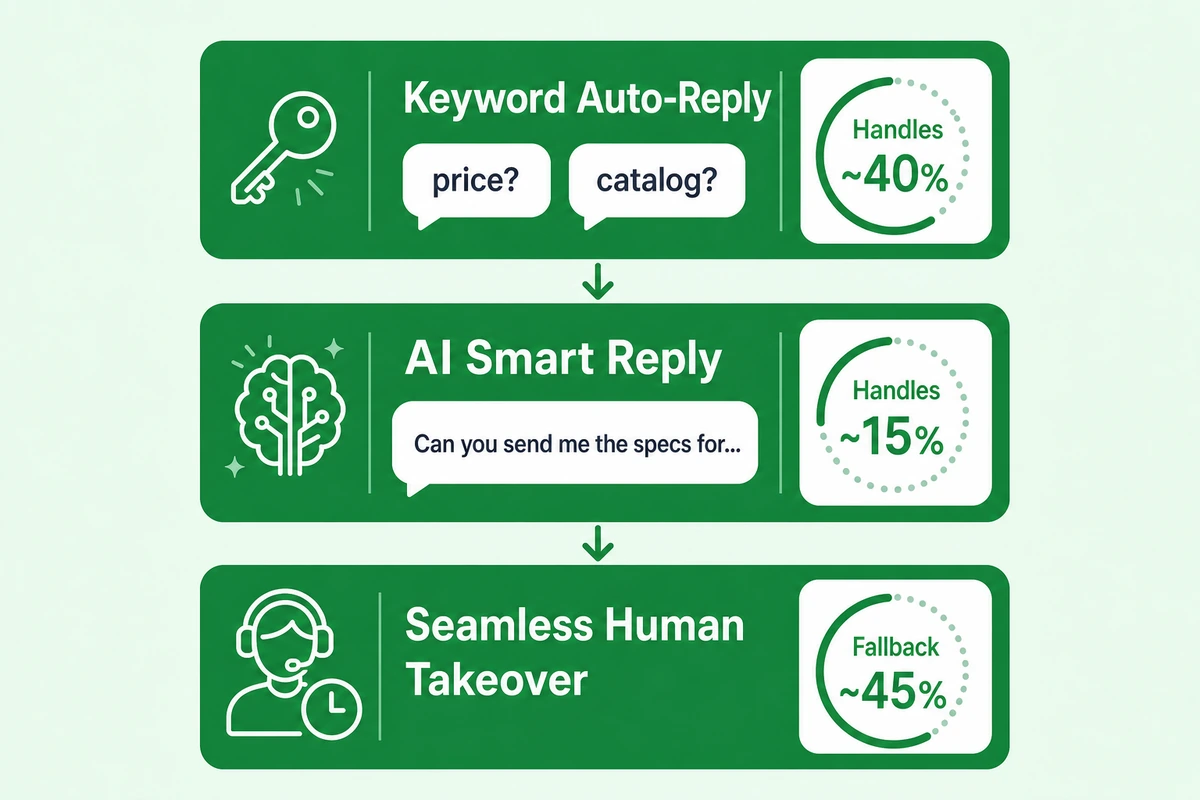
▲ Progressive logic: Layer 1 intercepts simple inquiries (keyword match), Layer 2 handles complex conversations (AI understanding), Layer 3 catches unhandled messages (brochure + flag). Messages always flow down, never back up.
The Numbers: What Overnight Auto-Reply Delivers
The following data is based on operational scenarios from multiple trade teams using WADesk AI auto-reply. Figures are illustrative.
| Metric | Without Auto-Reply | With Auto-Reply (3 Layers) | Change |
|---|---|---|---|
| Overnight inquiry reply time | 8.5 hours (next morning) | < 1 minute | ↓ 99% |
| Overnight inquiry drop-off rate | ~40% | ~15% | ↓ 62% |
| Morning catch-up time for sales | 1-2 hours (reply one by one) | 15-30 min (review + confirm) | ↓ 75% |
| Messages handled by AI (no human needed) | 0% | ~55% | ↑ |
Note: Approximately 55% of overnight messages are fully handled by AI (keyword reply or AI reply), with the client receiving a meaningful response. The remaining 45% are preserved through the handoff layer — no single message is lost.
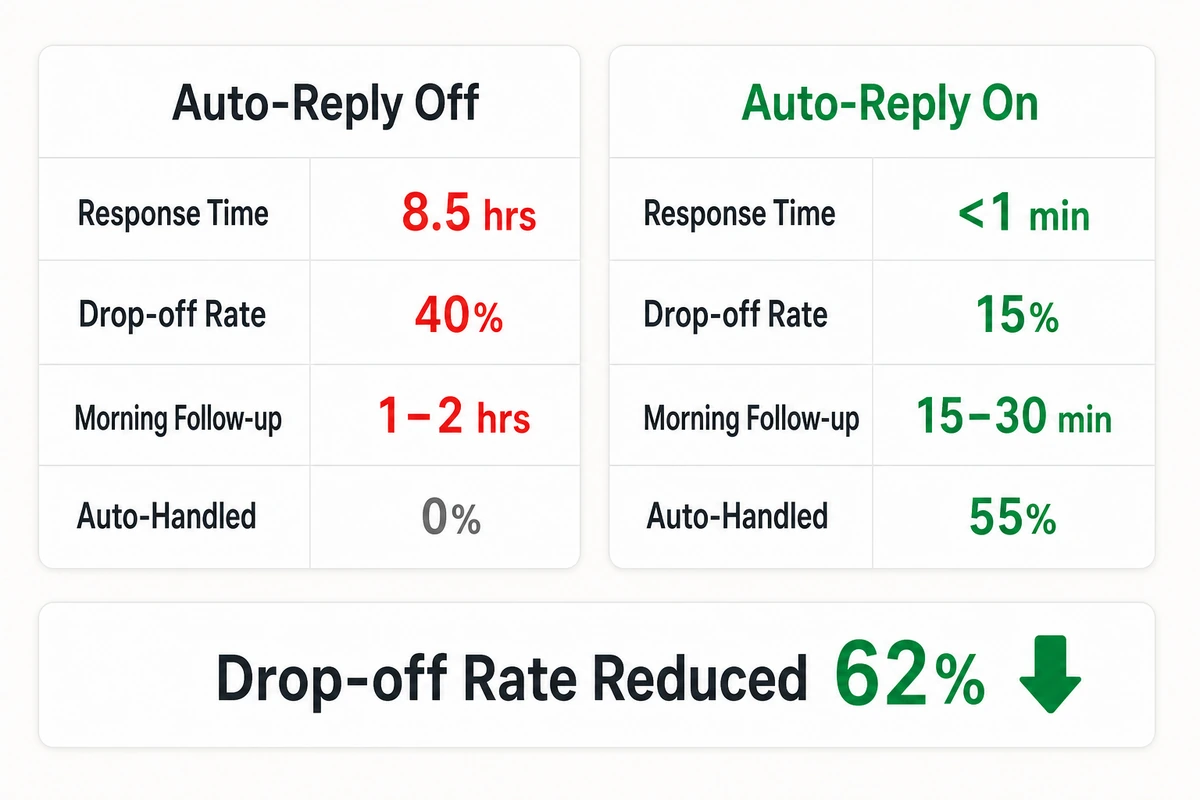
▲ Key metrics comparison: Reply time dropped from 8.5 hours to <1 minute. Drop-off rate from 40% to 15%. The hidden value: each sales rep saves ~1 hour of overnight message catch-up each morning.
Getting Started: Three Steps to Overnight Auto-Reply
Step 1: Set Up Keyword Reply Rules (Day 1)
Open the WADesk auto-reply settings panel and create 5-8 keyword rules. Start with the most common inquiry keywords: price / quote / catalog / delivery / MOQ. Write a clear reply for each, with links to product catalogs or contact information.
Step 2: Enable AI Smart Reply (Week 1)
After keyword rules are running, enable AI reply mode. We recommend starting in "draft mode" (requires review before sending) to observe AI response quality for 3-5 days. Once quality is confirmed stable, switch to "auto-send" mode.
Step 3: Configure Handoff Messages and Workflow (Week 2+)
Edit the overnight handoff message to clearly inform clients: "Message received + expected reply time." Set up the morning follow-up queue — all AI-unhandled messages automatically enter the sales task list, sorted by priority.
FAQ
Q1: Can AI auto-reply send inaccurate information to clients?
Layer 1 (keyword reply) is 100% controlled by you — everything you preset. Layer 2 (AI reply) quality depends on the information scope you provide. We recommend starting in "draft mode" to review AI quality. Additionally, WADesk AI learns your team's reply style over time — the more you use it, the more natural the responses. Combining WhatsApp AI auto-reply with human review is the safest approach.
Q2: Will auto replies make clients feel like they're talking to a bot?
Yes — which is why reply tone matters. Keyword and AI responses should sound like a real salesperson's natural tone, not robotic "Thank you for your inquiry, we will respond within 1-2 business days." Good messaging makes clients feel "someone is online" — even though they're actually asleep. WADesk supports custom templates; we recommend writing 2-3 "sounds-like-a-human" reply scripts for rotation.
Q3: What languages does AI auto-reply support? Can it work with AI real-time translation?
Supports the same 200+ languages as AI real-time translation. When WhatsApp auto-reply and real-time translation are both enabled, responses are translated before sending — a client messages in Arabic, AI auto-replies in Arabic, all without human intervention.
Q4: What's the difference between keyword reply and AI reply?
Keyword reply is rule-based ("keyword → response"), best for repetitive simple inquiries (pricing, specs). It's fast and predictable. AI reply uses natural language understanding for complex questions. Keep all three layers active simultaneously: keywords catch high-frequency simple questions in Layer 1, AI handles comprehension-level questions in Layer 2, human handoff catches the rest in Layer 3. The combination of WhatsApp keyword auto-reply and AI reply covers everything from simple to complex message types.
Compliance note: Auto-reply handling rate figures are illustrative estimates. Actual results vary by industry, language, and message complexity. WhatsApp is a registered trademark of Meta Platforms, Inc. All third-party trademarks are the property of their respective owners.